October 28, 2026
Google Business Profile for Local SEO: 9 Tips That Work
A Google Business Profile for local SEO works when you do three things well: pick the right primary category, keep your name, address, and phone number identical everywhere, and collect reviews on a s...
Written by Frankwin Hooglander
A Google Business Profile for local SEO works when you do three things well: pick the right primary category, keep your name, address, and phone number identical everywhere, and collect reviews on a steady schedule. The nine tips below follow the order you would work through them. If your profile is new, start with tips 1 to 4. If it already exists, you will probably gain the most from the reviews, photos, and tracking in tips 5 to 9.
Most trades owners know they need a profile, yet many fill it out once and never touch it again. Meanwhile a competitor with a complete profile, fresh photos, and 80 reviews takes the map spots you wanted. Google ranks local results on relevance, distance, and prominence. You cannot change how far a customer is from your shop, but you control how relevant and how prominent your listing looks.
HSP Automation works with home service companies on local search, including Google Business Profile optimization and restoring suspended listings. These tips reflect the problems we see most often. The profile itself is free, so you can do every step yourself.
1. Claim and verify your profile
Claim and verify your profile first, because an unverified profile cannot show its full details to customers. It costs nothing. You sign in at business.google.com and either claim an existing listing or add a new one, and Google often already has a listing built from public data.

Verification is the line between having a profile and having a listing customers can find.
What to do
Work through these steps in order:
- Search your business name and address in Google Maps. If a listing exists, claim it instead of creating a second one.
- Sign in with a Google account the business owns, such as a shared owner mailbox, not an employee's personal address.
- Enter your exact name, primary category, address or service area, and phone number.
- Complete the verification method Google offers you. Depending on the business, that can be a phone call or text, an email, a video recording, or a postcard.
- Add a second owner or manager so one lost password never locks you out.
Why it moves rankings
Verification is how Google confirms that the business is real and that you control the data. Without it you cannot manage reviews, edit details with authority, or see performance numbers, which rules out every other tip in this article. Your login and dashboard afterward are simple: search your business name while signed in, or go back to business.google.com.
The most common mistake is a duplicate listing. Two profiles for one location split your reviews and can trigger a suspension. Another trap is the address. A PO box or a virtual office does not qualify as a business location, so if you work from home and drive to customers, hide the address and use a service area instead.
2. Pick the right primary category
Your primary category is the most important setting you control, so choose the one that describes your core job, not your broadest one. Google uses categories to decide which searches your profile is eligible to appear for, and the primary one carries the most weight.
Your primary category decides which searches you can win, so choose it like a keyword, not a label.
What to do
Do not guess. Use this process:
- Search the main phrase you want to rank for, such as "furnace repair," and expand the map results.
- Note the primary category shown on the top competitors' profiles.
- Repeat with four or five related phrases and track the pattern in a spreadsheet.
- Pick one primary category that matches your highest-value service.
- Add secondary categories only for services you genuinely sell. Google allows up to nine.
Category names vary slightly, so confirm the exact wording in the picker. These are typical examples:
| Business | Primary category | Possible secondary categories |
|---|---|---|
| HVAC company | HVAC contractor | Air conditioning contractor, Heating contractor |
| Plumber | Plumber | Water heater installer, Drainage service |
| Electrician | Electrician | Electrical installation service |
Why it moves rankings
Moving the right category into the primary slot is one of the quickest changes you can make. A plumber who lists "Plumber" first matches far more searches than one who leads with a narrow service. Relevance is the first of Google's three local ranking factors, and categories are its clearest signal.
Do not stuff the list with stretch categories. A plumber who adds "Home inspector" to look broader makes the profile less focused, and Google may show it for fewer of the searches that matter. Review your categories once a year, because Google adds and retires options.
3. Make your name, address, and phone exact
Enter your business name, address, and phone number exactly as they appear on your truck, sign, invoices, and website. Consistency of this name, address, and phone number data is how Google confirms that all the listings it finds belong to one real business.
One business, one name, one address, one phone number, everywhere you appear online.
What to do
Check each field against your real-world branding:
- Use your legal or signed name only. Do not add services or cities to it.
- If customers visit you, enter the street address. If you travel to them, hide the address and list your service areas. Google allows up to 20.
- Use a local phone number with an area code that matches your website.
- If you use a call-tracking number, make it the primary number and add your real local number as an additional one.
- Set regular hours and add special hours for every holiday.
- Link to your website and, if you take bookings online, add the appointment link.
Why it moves rankings
Matching details across the web reduce doubt about which business is which. Inconsistent data, such as an old phone number on a directory, can weaken your prominence and send customers to a dead line. Accurate hours matter too. A customer who arrives at a closed shop that your profile said was open will leave a bad review.
The costliest error is keyword stuffing in the name. "Best Plumber Cheap 24 Hour" breaks Google's guidelines and is a common reason for suspensions. Google's rules say your name should reflect your real-world business name, so keep it clean and earn your keywords elsewhere.
4. Write a clear description and list your services
Use the description field and the services section to tell customers exactly what you do and where you work. The description is mainly written for people, while a precise services list gives Google and customers a clear picture of your offer.
Say what you do, where you do it, and who you do it for in the first two sentences.
What to do
Follow this checklist:
- Put your most important information in the first 250 characters or so, because that is what people see before expanding the text.
- Mention your core services and the areas you serve in natural language.
- Add every service you offer, each with a one-line description and, where you can, a price or price range.
- Leave out links, phone numbers, promotions, and all-caps text. Google restricts them.
- Update the services list when you add a new offering.
You can adapt this template for your own trade:
[Business name] is a [family-owned / licensed] [trade] company serving [city] and nearby areas. We handle [service 1], [service 2], and [service 3], with [same-day / emergency / scheduled] appointments. Our technicians are [licensed and insured / background-checked]. Call or book online to get started.
Why it moves rankings
A precise profile matches more specific searches. Someone typing "tankless water heater install" is more likely to see a plumber who lists that exact service than one who just says "plumbing." Better still, the profile helps the customer decide, which turns views into calls.
Do not claim things you cannot back up, such as "number one in the state." Also avoid the opposite mistake of leaving the services section empty. An empty section is a missed chance to show Google and customers what you actually sell, and it makes the profile look unfinished.
5. Upload real photos and videos
Upload real photos of your team, vehicles, storefront, and finished jobs, and keep adding them. Customers compare profiles quickly, and a profile full of authentic images looks more trustworthy than one with a logo and nothing else.

Photos of real work and real people beat any sentence you can write about being reliable.
What to do
Build a simple shot list:
- Add a logo and a cover photo that shows your brand or a signature job.
- Photograph your trucks with the company name visible.
- Take team photos in uniform, and show your office or shop if customers visit.
- Add before-and-after shots of jobs, with the customer's permission.
- Upload short videos of a job in progress or a quick walkthrough.
- Set a habit: have each technician send three to five job photos a week.
Why it moves rankings
Photos are a trust signal for customers and an engagement signal for the profile. When more people click, call, and ask for directions, the profile performs better in the data Google sees. A recent job photo also proves the business is active, which a static listing cannot do.
Avoid stock images. Customers recognize them, and they undercut the point of showing real work. Also skip heavily edited photos or ones with promotional text overlays. Google wants images that accurately represent the business, and customers can upload their own too, so a thin gallery lets others define how you look.
6. Build a steady stream of reviews and answer them
Ask every happy customer for a review right after the job, and reply to every review you receive. Reviews feed prominence, and recency, rating, and volume all affect how your profile compares with competitors.
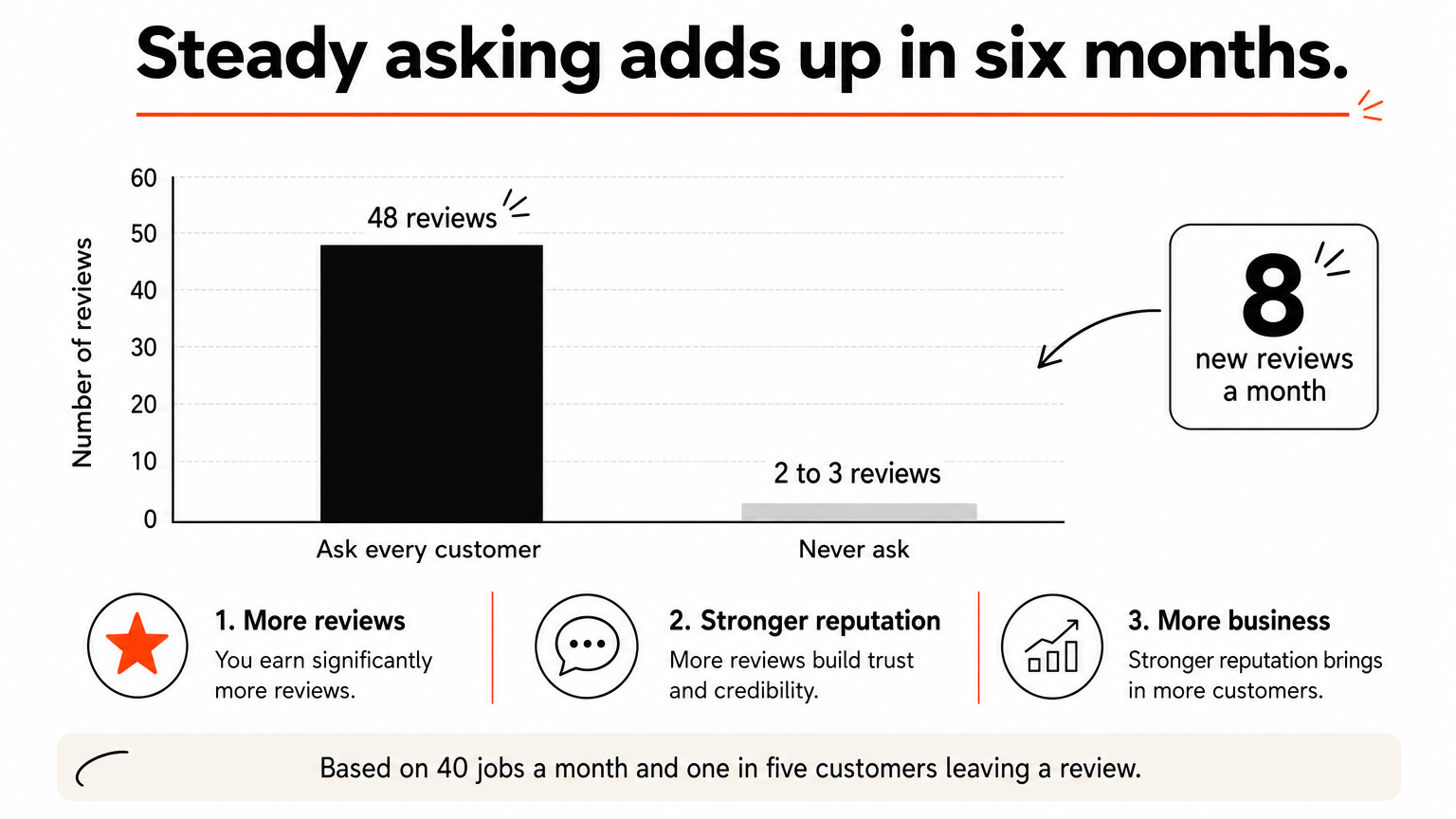
Reviews are the one ranking factor you earn one customer at a time, so make asking part of every job.
What to do
Set up a repeatable routine:
- Copy your review link from the profile so customers open the form in one tap.
- Have the technician mention it at the end of the job, then text the link the same day.
- Set up your field service software to send a request when a job closes. Housecall Pro, ServiceTitan, and Jobber can all be configured to do this.
- Reply to every review within a couple of days. Thank positive reviewers by name and mention the job.
- Answer negative reviews calmly, acknowledge the problem, and offer to fix it offline.
Why it moves rankings
Here is a worked example. Say you complete 40 jobs a month and ask every customer, and about one in five leaves a review. That is 8 new reviews a month, or about 48 in six months. A competitor who never asks might add two or three in the same period. Reviews that describe the work in detail also help customers pick you.
Never offer a discount or gift in exchange for a review, and never filter who you ask based on how happy they seem. Google prohibits both, and violations can lead to removed reviews or a suspension. Fake reviews are even worse. Customers spot them, and Google removes them.
7. Post updates and keep the profile fresh
Post to your profile at least weekly and keep hours, services, and offers current. Posts are best treated as a way to convert people who already found you, not as a guaranteed ranking boost, but an active profile does look more credible than an abandoned one.
A profile that looks alive earns more calls than one that looks forgotten.
What to do
Keep the routine light:
- Use updates for recent jobs, offers for seasonal specials, and events for open houses or promotions with a date.
- Add a photo and a short sentence, then choose a button such as call, book, or learn more.
- Tie posts to the season: furnace tune-ups in fall, AC checks in spring, gutter cleaning before storms.
- Update holiday hours before each holiday, not after.
- Remove expired offers so customers do not show up expecting a discount that has ended.
Why it moves rankings
Fresh activity gives customers a reason to trust the details they see. It also gives you a place to show the services you want more of, such as the high-margin work you want to sell this month. Treat any ranking benefit as a bonus, and judge posts by calls and bookings.
The biggest mistake is posting four times in January and then going quiet. A stale last post from a year ago hurts credibility more than having no posts. Pick a cadence you can keep, such as one post a week, and assign it to a person. Otherwise it will not happen.
8. Match your website and citations to your profile
Make sure your website and your listings on other sites tell the same story as your profile. Google says prominence draws on information from across the web, such as links, articles, and directory listings, so a clean footprint supports your ranking.
Your profile ranks better when the rest of the web agrees with it.
What to do
Audit these items:
- Link your profile to the most relevant page. For a single location, that is usually the home page or a local landing page.
- Put your name, address, and phone number in text in the website footer, not just in an image.
- Embed a Google map on your contact page.
- Build service pages for the main cities or areas you serve.
- Claim your listings on Bing Places, Apple Business Connect, Yelp, and trade directories, and check that each matches your profile.
- Fix old numbers and addresses from previous moves or rebrands.
- Test the site on your phone, because many local searchers use one.
You can check how your site performs with our Website Grader for Contractors. It scans in about 60 seconds, needs no credit card, and scores speed, SEO, mobile usability, security, and trust signals.
Why it moves rankings
When Google finds the same name and number on your site, your profile, and major directories, it can trust the data and connect the signals to a single business. When it finds three versions, it has to guess. A site with service pages for each area also gives your profile a strong destination, which improves the odds that a click turns into a call.
Watch for forgotten listings. Businesses that moved or changed phone numbers often leave old data on directories for years, and it keeps surfacing. Cleaning those up is dull work, but it removes the conflicts that quietly hold listings back.
9. Track performance and protect the profile
Check the performance data in your profile every month, and keep the profile within Google's rules so it never gets suspended. Tracking tells you which changes worked, and protection keeps the work you did from vanishing overnight.
What you do not measure, you cannot improve, and what gets suspended, you cannot rank.
What to do
Open your profile dashboard once a month and compare against the previous month:
| Metric | What it tells you | If it is low |
|---|---|---|
| Search appearances | How often your profile showed in Search and Maps | Recheck categories, services, and review count |
| Search terms | The queries that surfaced your profile | Add matching services and website pages |
| Calls | How many customers phoned from the profile | Confirm the number, hours, and call button |
| Direction requests | Visits planned to your location | Check your map pin and hours |
| Website clicks | Traffic sent to your site | Improve the landing page you link to |
Change one thing at a time, so you can see what caused a shift.
Why it moves rankings
Local results change slowly. In our experience with local search work, expect 3 to 6 months before meaningful movement and 6 to 12 months for significant results. Monthly tracking keeps you from abandoning a good strategy too early or repeating a bad one.
Protection matters just as much. The usual causes of suspension are a name that breaks the rules, duplicate listings, an ineligible address, and prohibited content. Google does not always spell out the reason, so you have to audit the profile, fix the problem, and submit a reinstatement request. If you would rather not do this yourself, HSP Automation's Google Business Profile service covers optimization and suspension restoration. Our broader SEO and local search service, which includes profile optimization, typically runs $750 to $1,500 a month for local home service businesses.
Where to start this week
A strong Google Business Profile for local SEO comes down to a few habits: verify it, choose the right categories, keep your details exact, show real photos, earn reviews steadily, and check the numbers monthly. None of it is complicated, but all of it has to be done consistently, and consistency is where most trades businesses fall behind.
Start with your primary category and your name, address, and phone number, since they take under an hour and affect everything else. Then set up a review request routine, and put a monthly reminder on your calendar to check performance. If you would rather hand the work to a team that handles it for home service companies every day, talk to HSP Automation about your Google Business Profile.