November 8, 2026
How to Do Home Service SEO and Get More Local Calls
The fastest way to do home service SEO is to work in a fixed order. Fix your Google Business Profile, build one page for each service and city you cover, collect reviews after every job, and track cal...
Written by Frankwin Hooglander
The fastest way to do home service SEO is to work in a fixed order. Fix your Google Business Profile, build one page for each service and city you cover, collect reviews after every job, and track calls instead of clicks. Do those four things well and your business shows up in the map results and organic listings when people nearby search for a plumber, electrician, or HVAC tech.
The problem is that most contractors pick up SEO advice written for online stores or blogs. Homeowners search with urgency and tight geography. The map pack shows only three businesses at first, and you compete for those slots with companies that have more reviews, older websites, and sometimes an agency behind them. Spreading effort across keywords, directories, and blog posts without a plan leaves you busy and invisible.
This guide covers local SEO for home services in four steps, with templates you can copy. At HSP Automation we build websites and run local search for trades companies, so the steps reflect how these campaigns work in practice. You can do them yourself or hand them off.
Why home service SEO is mostly a local game
Home service SEO is mostly local SEO because customers search for a nearby provider, and Google answers with a map pack before anything else. Your work splits into two tracks: ranking in the map listings and ranking your website in the organic results below them.
How Google picks local results
Google says local results rely mainly on relevance, distance, and prominence. You cannot move closer to the searcher, but you can influence the other two factors.
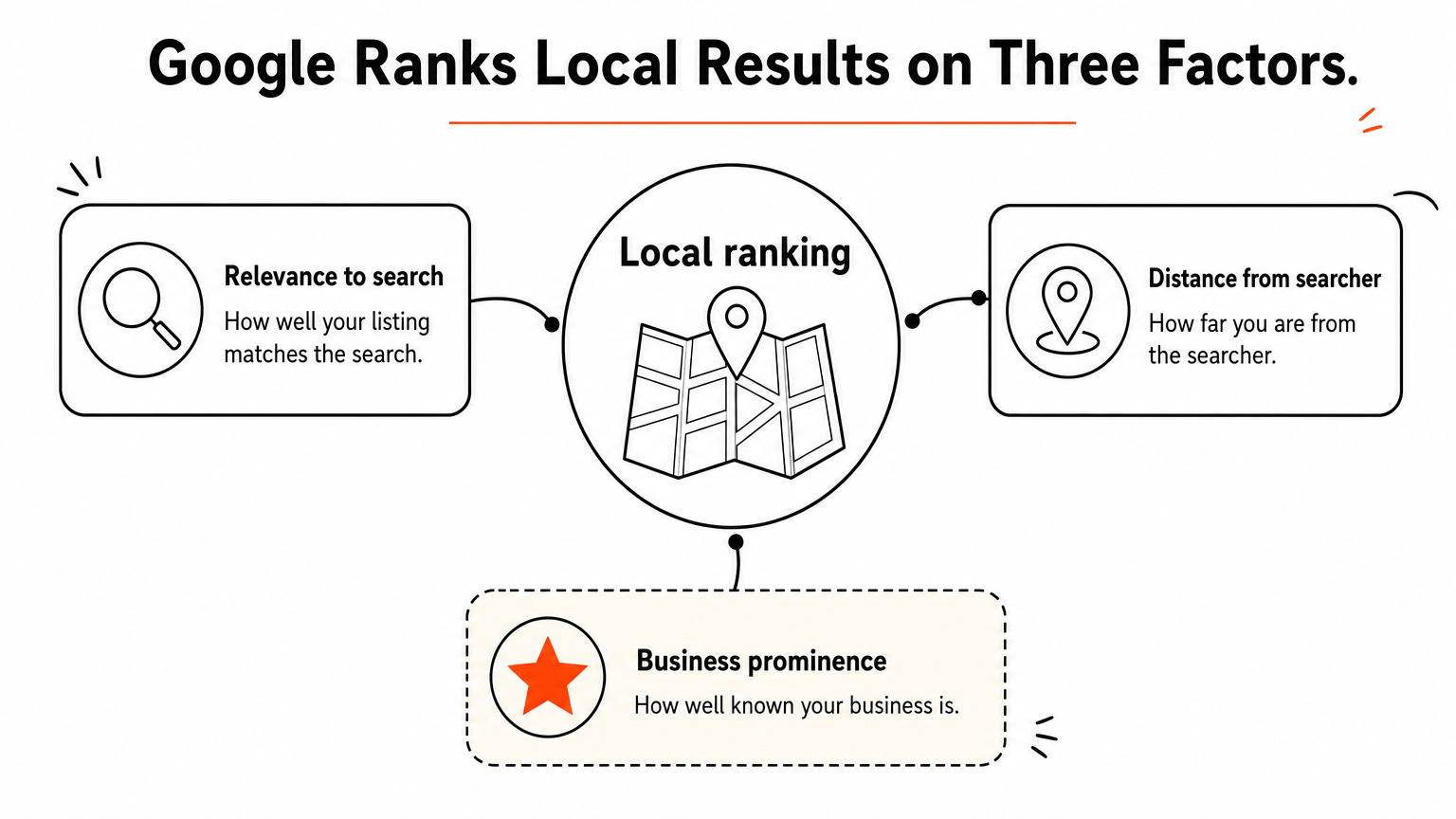
| Factor | What it means | What you control |
|---|---|---|
| Relevance | How well your listing matches the search | Categories, services list, service pages |
| Distance | How far you are from the searcher | Accurate address or service area |
| Prominence | How well known your business is | Reviews, citations, links, mentions |
Distance is fixed, so relevance and prominence are where you win.
What to gather before you start
Collect your exact business name, main phone number, list of services, list of cities you serve, and ten photos of real jobs. You also need a website you can edit. If you want an 80/20 view, the profile, the service pages, and reviews do most of the work in the steps below.
Set expectations early. For a competitive trade, first movement usually takes 3 to 6 months, and significant results often take 6 to 12 months. Anyone promising page one in two weeks is selling something.
Step 1. Fix your Google Business Profile
Your Google Business Profile is the single biggest lever for map rankings, so complete every field before you touch your website. Treat it as your most important landing page.
Fill in every field that matters
Start with the primary category, because it tells Google what you are. Choose "Plumber," not "Home improvement contractor." Then work through the rest:
- Add secondary categories only for services you actually sell, such as "Water heater installation service."
- Use your real business name. Adding keywords or city names to it breaks Google's rules and risks suspension.
- If you travel to customers, set a service area and hide your address.
- List every service with a short description.
- Add hours, including emergency availability if it is true.
If your profile is already suspended, the fix is a documented reinstatement request, not a new listing. Our Google Business Profile service covers suspension analysis, documentation, and reinstatement for this case.
Keep the profile active
Upload new photos of finished jobs every few weeks, post short updates, and answer questions in the Q&A. Real photos of your trucks, crew, and work outperform stock images because they prove you operate locally.

A complete, active profile beats a perfect website that Google cannot connect to a real business.
Step 2. Build pages for each service and city
Create one page per core service and one page per city you truly serve, because Google ranks pages, not businesses. A single "Services" page cannot rank for water heater repair, drain cleaning, and repiping at the same time.
Structure each page to win the search
Give every page a title tag that names the service, the place, and your brand:
Water Heater Repair in [City], [State] | [Business Name]
Then write content a homeowner wants: what the job involves, how you work, how long it takes, what affects the price, and a few photos from jobs in that city. Add a phone number and booking button near the top. Skip city pages for areas you do not serve, and never clone one page with the city name swapped. Google treats near-duplicates as thin content.
AI tools can draft an outline, but they cannot know your pricing, your crew, or the neighborhoods you work in. Add your own details before publishing anything.
Make the site work on a phone
Most emergency searches happen on a phone, so check the basics: a tap-to-call button, fast loading, readable text, and a booking form with few fields. Add LocalBusiness structured data so Google reads your name, phone, and hours correctly. To see where you stand, our free Website Grader scans your site in about 60 seconds across speed, SEO, mobile usability, security, and trust signals.
One focused page per service and city gives Google a clear reason to show you for each search.
Step 3. Earn reviews, citations, and links
Reviews, consistent listings, and local links build prominence, and prominence decides close races between similar businesses. Start with reviews because they take the least effort.
Ask for a review after every job
Send the request within an hour of finishing, while the customer is still happy. Make it a text with a direct link to your review form:

Hi [Name], thanks for choosing [Business Name] today. If [Technician] did a good job, would you leave a quick review? It takes 30 seconds and helps neighbors find us: [review link]
Reply to every review, good or bad, in a calm and specific way. Never offer discounts for reviews or screen out unhappy customers first, since Google prohibits both. If you use Housecall Pro, ServiceTitan, or Jobber, automate the review request to fire when a job closes.
Keep listings consistent and earn local links
Your name, address, and phone number should match everywhere: Bing Places, Apple Business Connect, Yelp, the Better Business Bureau, and your trade's directories. Then earn links from sources that know you: your chamber of commerce, suppliers who list installers, local sponsorships, and community news features.
Ten honest recent reviews beat fifty old ones when customers and Google compare you.
Step 4. Track calls and set a budget
Measure phone calls and booked jobs, not rankings alone, because rankings do not pay your techs. Then decide how much to invest based on what a booked job is worth.
Measure what matters
Your Google Business Profile performance data shows calls, direction requests, and website clicks. Google Search Console shows which searches bring visitors to your site. If you add call tracking, keep your real number as the primary on your profile and add the tracking number as secondary. Ask every new customer "How did you find us?" and record the answer in your booking system.
Decide what to spend
Professional local SEO usually costs $500 to $2,000 per month depending on competition, and most local home service businesses land between $750 and $1,500. Our SEO and local search service starts with an audit, then monthly optimization and reporting. One-time optimization projects start at $1,500.
Here is a worked example. Say you invest $1,000 per month and an average job brings $450 in revenue. You need about 3 extra booked jobs a month to cover the cost ($1,000 ÷ $450 ≈ 2.2). Over six months, that is $6,000 spent, so the break-even point is 14 extra jobs in total. Run the same math with your own job value before you commit.
Judge SEO by booked jobs per month against its monthly cost, not by ranking screenshots.
Start with your profile
Home service SEO works when you fix the basics in order: a complete Google Business Profile, a focused page for each service and city, a steady flow of real reviews, and tracking that ties effort to booked jobs. Skip the tricks. Consistency over several months is what moves you into the map pack.
If you would rather hand the work to a team that knows trades businesses and field service software, talk to HSP Automation about local search for your company. The first consultation is free and carries no obligation.