November 2, 2026
Small Business Automation: 5 Tasks to Automate First
For automation small business owners can trust, start with tasks that repeat every day, follow clear rules, and cost you money when they slip. Five tasks pass that test: replying to new leads, sending...
Written by Frankwin Hooglander
For automation small business owners can trust, start with tasks that repeat every day, follow clear rules, and cost you money when they slip. Five tasks pass that test: replying to new leads, sending quotes and contracts, following up with customers, moving data between your apps, and onboarding your team. Instant lead replies suit owners who miss calls while working. Contract automation suits anyone who chases signatures. Syncing apps suits owners who retype data, and written procedures suit teams that are starting to grow.
Most owners already know they should automate. The hard part is choosing. Every tool promises hours back, and a long list of ideas does not tell you which one pays off first. A common mistake is starting with a complex build that sits half finished while the admin pile grows.
This list ranks the five tasks by how quickly they pay back. For each one you get how it works, who it fits, and what it costs. At HSP Automation we build these workflows for home service companies on Housecall Pro, ServiceTitan and Jobber, so the examples lean toward the trades. The logic works for any small business.
1. Lead response and follow-up
Automating lead response means every new inquiry gets a text and email reply within seconds, and the lead lands in your CRM without anyone typing it in. This is the first task to automate because a missed lead is lost revenue, not just lost time.
How it works
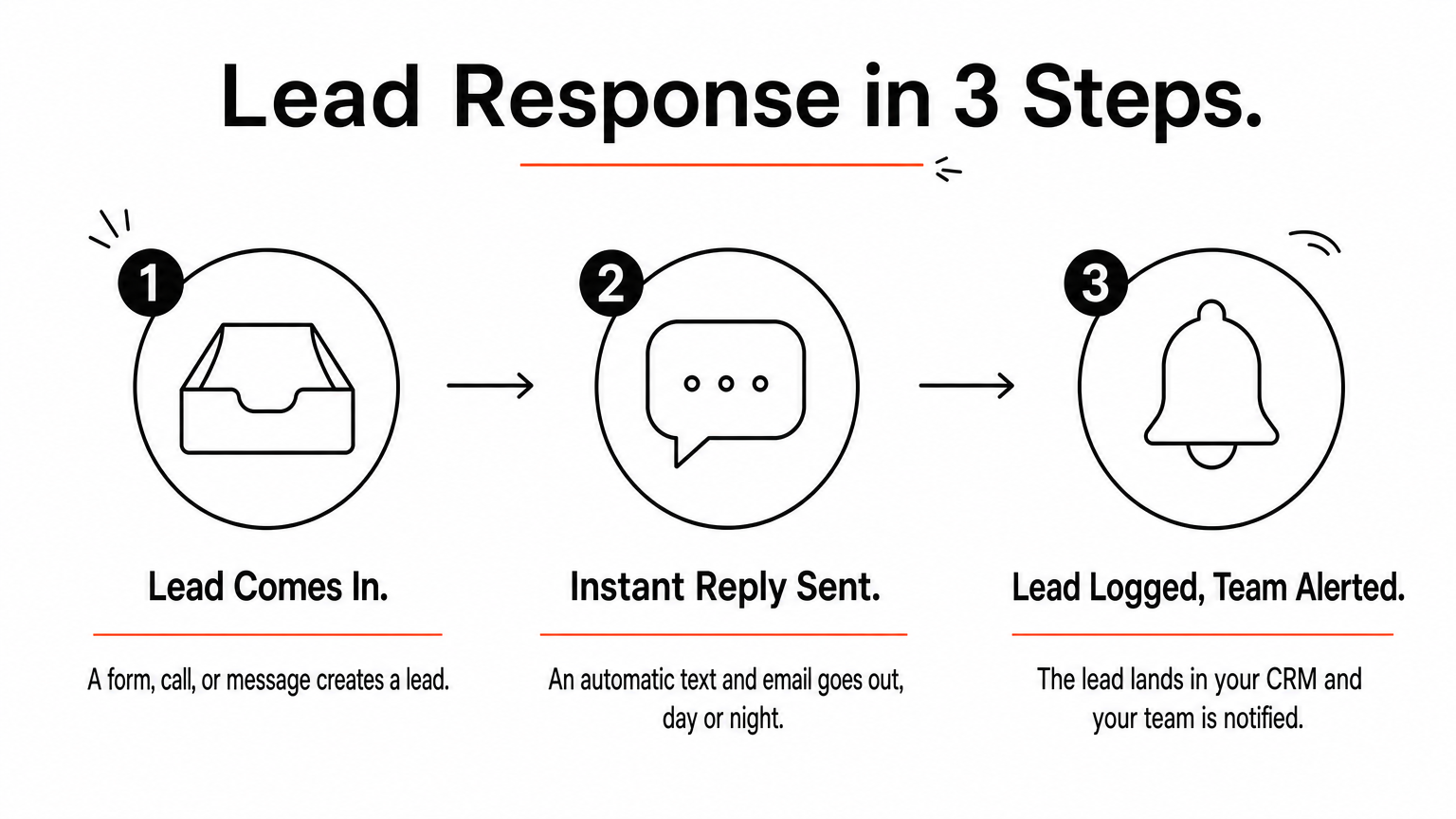
Many small businesses lose jobs because the owner is on a roof or under a sink when the inquiry arrives, and the customer moves on to the next company. A lead response system closes that gap in three steps:
- A form, call, or message creates a lead.
- An automatic text and email goes out, day or night.
- The lead is logged in your CRM and your team is notified.
Who it suits and what it costs
This fits any business where the first reply tends to win the job: trades, cleaning, pest control, and similar services. It also suits owners who spend their day away from the phone.
HSP Automation's Lead Response Systems run $97 to $297 per month, depending on volume and complexity. The price includes setup, ongoing monitoring, and adjustments. As an example, if your average job is $400 and the system saves two a month that would have gone elsewhere, that is $800 against a plan of $97 to $297. Check whether your CRM already has basic auto-replies before you pay for anything.
The fastest reply usually wins the job, so automate the first response before anything else.
2. Quotes, contracts, and invoices
You can automate the paperwork that follows a "yes": the contract, the signature request, and the invoice. Each one is a rule-based step that people forget when the day gets busy, and each delay slows your cash flow.
How it works
The pattern is trigger and action. A customer approves an estimate or you create a job, and a contract goes out for signature on its own. When the job closes, an invoice follows. Many accounting and field service tools can also send payment reminders automatically, so turn those on.
HSP Automation's Housecall Pro and DocuSign integration sends contracts automatically when an estimate is approved or a job is created. Signed agreements can also help reduce your chargeback risk.
Who it suits and what it costs
This suits owners who send the same few contract types again and again and lose hours chasing signatures. It is a poor fit if every job needs a fully custom contract.
The DocuSign integration starts at $97 per month for one contract type, plus a $97 one-time setup fee. Plans cover 1, 3, or 5 contract types, and setup fees vary by plan. Most setups finish within 2 to 3 business days, and you need an active DocuSign account.
Automate the step right after a customer says yes, because that is where money sits waiting.
3. Scheduling, reminders, and customer follow-up
Automated reminders and follow-ups send the right message at the right moment without anyone remembering to do it. They cut no-shows, keep customers informed, and help you collect reviews and revisit unanswered quotes.
How it works
These workflows run on triggers such as a job being booked, a technician heading out, a job closing, or a quote sitting unanswered. Common messages are:
- A booking confirmation right after scheduling
- A reminder before the appointment
- A review request after completion
- A nudge on quotes with no reply
Who it suits and what it costs
Repeat-service and appointment-based businesses gain the most. Start with the reminders built into your booking or field service software, which are usually free.
If you use Housecall Pro, the standard Zapier app limits what you can trigger. HSP Automation's custom integration adds 13 exclusive triggers and 49 actions across customers, jobs, leads, estimates, and tags. It supports technician routing, Slack or Teams alerts, and email follow-ups. It costs $147 per month plus a $147 one-time setup fee, with a 14-day free trial. You need an active Zapier account, and you can cancel anytime.
Reminders cost almost nothing to run, so use the ones already built into your software first.
4. Data entry between your apps
Connecting your apps so data moves on its own removes the retyping that eats administrative hours. When a job closes in your field service tool, the invoice and payment can appear in your accounting software without anyone touching them.
How it works
Zapier links thousands of apps, so it can move customer, job, and payment data between your CRM, calendar, accounting, and chat tools. HSP Automation connects QuickBooks to a client's field service CRM so job data, invoices, and payments sync automatically. Build simple Zaps yourself if you have the time. Hire small business automation services when a workflow touches money or customers, because a silent failure costs more than the fee.
Who it suits and what it costs
This suits owners whose CRM, accounting, and scheduling tools do not talk to each other. HSP Automation says clients may save 10 to 20 hours a week on admin work, depending on volume and configuration.
For Housecall Pro accounts, the done-for-you Zap service creates and maintains the automations, and maintenance is included. You need your own Zapier account.
| Plan | Monthly | One-time setup |
|---|---|---|
| 1-5 Zaps or paths | $97 | $97 |
| 6-10 | $147 | $147 |
| 11-20 | $297 | $297 |
| 21-50 | $497 | $497 |
| 51+ | $997 | $997 |
A shop with eight automations pays $147 per month plus $147 to start, or $1,911 in the first year. Initial setup takes 3 to 5 business days after the kickoff call, and complex automations take 1 to 2 weeks.
If two of your tools hold the same data, one of them should be filling it in for you.
5. Team onboarding and standard procedures
Standard operating procedures let you automate onboarding, training, and quality checks, so new hires learn your way of working without you standing next to them. Automation also fails on messy processes, so write the procedure before you build the workflow.

How it works
A good procedure system follows four steps:
- Write each process once, in plain steps.
- Assign it to the people who need it.
- Track who has read it.
- Update it in one place when the process changes.
Who it suits and what it costs
This suits owners who are hiring, or who answer the same how-do-I questions every week. If you only have a few procedures, shared documents work fine at first.
Once the library grows, SOP Manager from HSP Automation adds version control, team access management, process flow visualization, read receipts, comments, search, training modules, and compliance tracking. Check the SOP Manager site for current plans, since pricing is not listed here.
Document the process first, because automating a messy one only makes the mess faster.
Where to start this week
Pick one task from this list, not all five. If you miss leads, start with instant replies. If you chase paperwork, start with contracts. If you retype data, connect your apps.
Automation for a small business works best when each project is small, measurable, and finished before the next begins. Setting up even one of these usually takes days, not months.
If you want help choosing and building, book a free consultation with HSP Automation. We look at your current workflow and tell you what it will cost before any work starts.