November 7, 2026
Field Service Dispatching Software: 5 Picks by Team Size
The best field service dispatching software is the one that fits your crew size and how complicated your schedule really is. Jobber suits small crews that need a clean calendar. Housecall Pro suits gr...
Written by Frankwin Hooglander
The best field service dispatching software is the one that fits your crew size and how complicated your schedule really is. Jobber suits small crews that need a clean calendar. Housecall Pro suits growing home service teams that want a drag-and-drop board and customer notifications. FieldPulse fits mid-sized shops that want jobs, estimates and invoices in one system. ServiceTitan suits larger trades companies with several dispatchers. Salesforce Field Service suits enterprises with complex scheduling rules.
Dispatch is where a service business loses money quietly. A tech sits idle, a job runs late, a customer calls asking where the truck is, and your dispatcher is juggling texts and a whiteboard. Good field service dispatch software replaces that with one board that shows who is free, who is closest, and what each job needs.
Below you get five picks, each judged the same way: how it handles dispatching, who it suits, and what it costs. Vendors change plans often, so confirm current pricing on each vendor's site before you buy. HSP Automation sets up Housecall Pro, ServiceTitan and Jobber for home service companies, so the setup notes below reflect that hands-on work.
1. Jobber
How the dispatching works
Jobber handles dispatch through a drag-and-drop calendar where you assign each job to a technician and see the whole day at a glance. Techs get their jobs, client notes and checklists in the mobile app, and customers receive automated appointment reminders without anyone typing a text.
Route planning and team location tracking are the features to verify, because features like these tend to sit on higher-priced plans. Jobber is built around a dispatcher making the call, not around automatic assignment rules.
A small crew needs a clear calendar more than it needs dispatch automation.
Who it suits and what it costs
Jobber fits owner-operators and small crews in lawn care, landscaping, cleaning and similar trades, where one person schedules everything. It gets cramped once you have several dispatchers or need rules for matching skills and certifications to jobs.
Pricing comes as tiered monthly plans with a free trial, and extra users cost more on top of the plan. Price it for your actual headcount, not the headline number. HSP Automation configures Jobber workflows and scheduling if you want it built around how your team works.
2. Housecall Pro
How the dispatching works
Housecall Pro gives you a dispatch board where you drag jobs onto technicians, plus a field app and customer notifications when a tech is on the way. Advanced tools such as GPS tracking sit on higher tiers, so match the plan to the features you need.
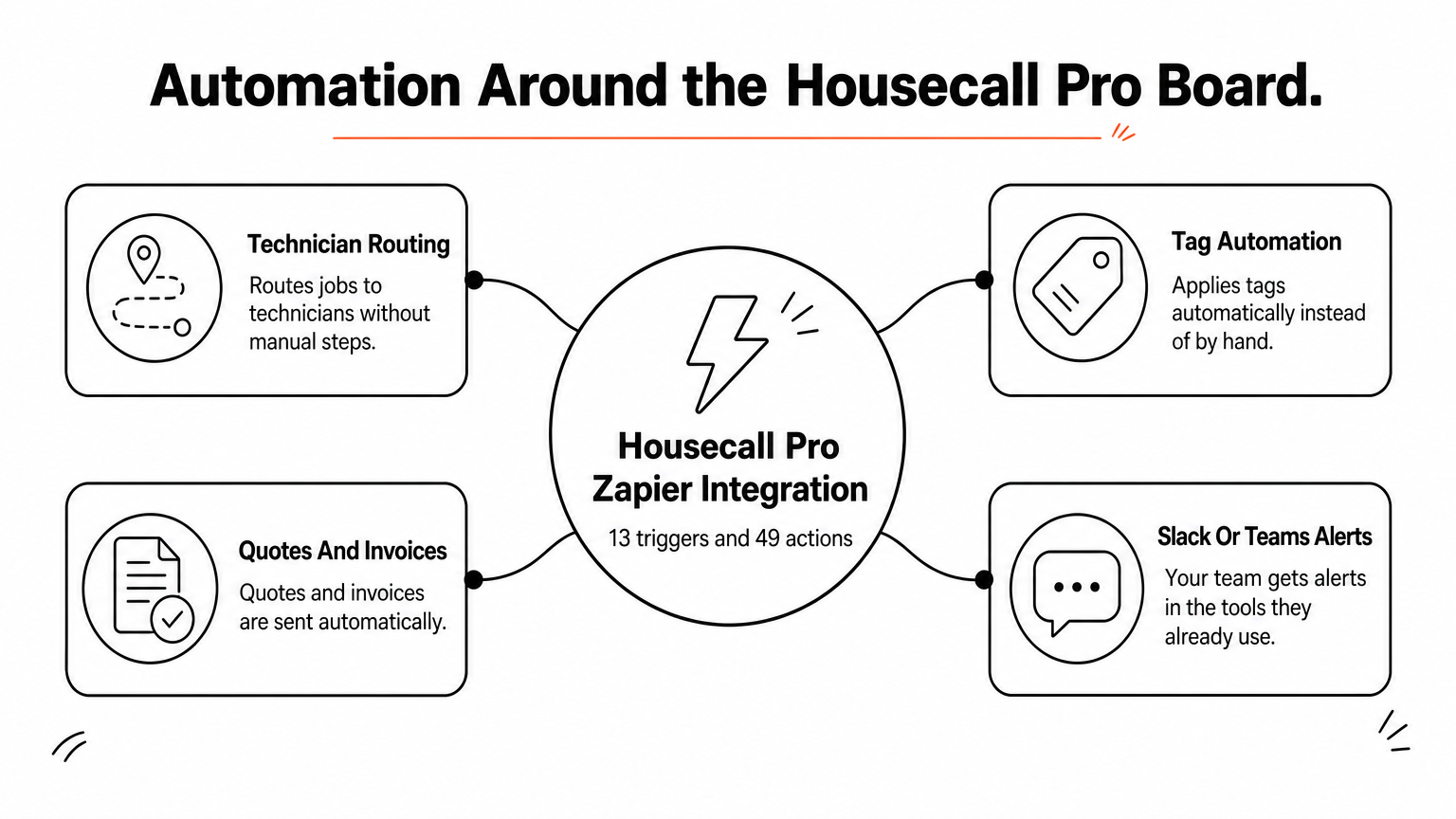
The board gets stronger with automation around it. HSP Automation's Housecall Pro Custom Zapier Integration adds 13 triggers and 49 actions that the standard Zapier app lacks, covering technician routing, tag automation, auto-sent quotes and invoices, and Slack or Teams alerts.
Housecall Pro dispatches well on its own, and automation removes the manual steps around the board.
Who it suits and what it costs
Housecall Pro suits small to mid-sized home service companies, such as HVAC, plumbing and electrical shops with a handful to a few dozen techs. A multi-branch operation with dedicated dispatch staff may outgrow it.
Housecall Pro publishes tiered monthly pricing and offers a free trial. The HSP Zapier integration is priced separately. It has a 14-day free trial, then $147/month plus a one-time $147 setup fee, and you need an active Zapier account.
3. FieldPulse
How the dispatching works
FieldPulse puts scheduling and dispatching inside an all-in-one platform alongside estimates, invoicing and job tracking. You assign jobs to technicians from a schedule view, and the office and field work from the same job record.
The appeal is fewer moving parts. You avoid stitching a scheduler to a separate invoicing tool, which cuts the double entry that causes dispatch errors in the first place.
An all-in-one tool saves integration work only if its dispatch board is good enough for your dispatcher.
Who it suits and what it costs
FieldPulse fits small to mid-sized trades companies that want one system instead of several and do not need enterprise-level customization. Ask for a live demo and have your dispatcher run a real day of jobs through it.
Request a current quote and ask which dispatching features come at each tier. Check specifically whether GPS tracking and customer notifications are included or priced as add-ons.
4. ServiceTitan
How the dispatching works
ServiceTitan is built for trades and ties dispatch to call booking, job types and capacity so dispatchers see who can take what before they commit. Reporting is deep, which helps you spot idle time and slow jobs.
That depth needs configuration. HSP Automation handles advanced ServiceTitan setup, including dispatch optimization and KPI dashboards, because a default install rarely reflects how your dispatchers actually work.
ServiceTitan rewards companies that invest in configuring it and training every dispatcher.
Who it suits and what it costs
ServiceTitan suits mid-sized to large trades companies with several dispatchers, call-center staff and multiple service lines. For a five-truck shop it is usually more system than you will use.
Pricing is quote-based, so expect a sales process rather than a price list. Budget for a proper rollout with role-based training, since a half-adopted ServiceTitan costs more than a fully used simpler tool.
5. Salesforce Field Service
How the dispatching works
Salesforce Field Service is cloud-based field service management software that sits on top of Salesforce Service Cloud. It adds work orders, skill-based matching, scheduling optimization rules and a mobile app for technicians.
Its strength is rule-driven scheduling. You define service territories, skills, working hours and priorities, and the system proposes assignments. That flexibility comes with build work.
Salesforce Field Service is a platform you build on, not an app you switch on.
Who it suits and what it costs
It fits large organizations with complex territories, regulated work or an existing Salesforce investment. It is not designed for a small home service company that wants to be live in days.
Licensing is per user and sits on top of Service Cloud, so get a written quote. Plan for a Salesforce administrator or implementation partner, because configuring the optimization rules is real project work.
Picking the right dispatch tool
Match the tool to your team. Jobber and Housecall Pro cover small and growing crews, FieldPulse suits shops that want one system, ServiceTitan serves larger trades operations, and Salesforce Field Service serves enterprises. Trial your top two with a real week of jobs, and let your dispatcher make the call.
Whichever you choose, the software only works as well as its setup. If you want your board, notifications and automations configured around your workflow, book a free strategy call with HSP Automation and we will map out the right setup before any work starts.