November 6, 2026
10 Best Business Process Automation Software in 2026
The best business process automation softwares connect the apps you already use, run without constant babysitting, and cost less than the hours they save. Zapier fits most small and mid-sized teams, M...
Written by Frankwin Hooglander
The best business process automation softwares connect the apps you already use, run without constant babysitting, and cost less than the hours they save. Zapier fits most small and mid-sized teams, Make fits people who want visual control, and Microsoft Power Automate fits companies that live in Microsoft 365. UiPath and Automation Anywhere handle legacy systems, n8n suits technical teams, ServiceNow, Workato and HubSpot serve larger or more specialized setups, and HSP Automation fits home service companies that want someone else to build the workflows.
Most owners and managers do not struggle to find a tool. They struggle to compare ten of them when every vendor says "contact sales," when the real cost is buried, and when half the options are built for enterprise IT departments. Meanwhile your team keeps retyping job data, chasing quotes, and answering leads late.
This guide ranks ten options and explains how each one works, who it suits, and what it costs. We build automations for home service businesses at HSP Automation, so we list ourselves first, but we are a done-for-you service, not a platform. The other nine are tools you run yourself. Prices are the entry prices vendors list, so confirm them before you buy.
Business process automation software at a glance
Ten tools compared
This table puts the ten picks side by side so you can cut the list to two or three before reading the details. The starting price is the lowest listed plan, and the type column tells you whether you are buying a tool, a platform, or a service.
| Tool | Best for | Type | Starting price |
|---|---|---|---|
| HSP Automation | Home service and trades businesses | Done-for-you service, mostly on Zapier | From $97/month plus $97 setup |
| Zapier | Connecting cloud apps fast | No-code cloud platform | Free plan; Pro from $19.99/month |
| Make | Visual, multi-branch workflows | Visual cloud platform | Free plan available |
| Microsoft Power Automate | Microsoft 365 companies | Cloud flows plus RPA | From $15/month |
| UiPath | Legacy screens with no API | RPA platform | From $25/month |
| n8n | Technical teams, self-hosting | Self-hostable workflow tool | Free Community edition; paid from $24/month |
| ServiceNow | Enterprise IT workflows | Enterprise platform | By request |
| Workato | Enterprise system integration | iPaaS | Contact for pricing |
| Automation Anywhere | AI agents and RPA at scale | Agentic process automation | Contact for pricing |
| HubSpot | Sales, marketing and service teams | CRM-based workflows | From $890/month (Marketing Hub Professional) |
Treat the price column as an entry point. Per-user licenses, task or operation volume, and implementation work move the real cost, and the enterprise names in the table usually cost far more once someone sets them up.
Picks by situation
Your situation narrows the field faster than any feature list. Use these matches as a starting point, then read the matching sections below.
- Home service company on Housecall Pro, ServiceTitan, Jobber or FieldEdge, with no technical staff: HSP Automation
- Small team connecting cloud apps quickly: Zapier
- Operations person who wants branches, loops and data mapping on screen: Make
- Company standardized on Microsoft 365: Power Automate
- Old software with a screen and no API: UiPath or Automation Anywhere
- Developers who want control over hosting and data: n8n
- Large IT department: ServiceNow
- Enterprise integrating ERP, CRM and HR systems: Workato
- Team already paying for HubSpot: HubSpot workflows
Pick the tool that fits the first process you want to automate, not the one with the longest feature list.
How to choose business process automation software
Software, platform, or automation partner
Business process automation means using software to run repeatable, multi-step work, such as lead intake, approvals, invoicing and follow-ups, without manual handoffs. You can buy it three ways. Automation software is a tool you build in yourself. A platform adds integration, RPA and AI agents for larger organizations. An automation company designs and maintains the workflows for you.
The right choice depends on who will own the work. If someone on your team likes building workflows and has time to fix them when an app changes, a tool wins on cost. If nobody does, a partner is cheaper than an automation that quietly stops running.
Features that decide the choice
Five checks separate a tool that lasts from one you abandon within six months.
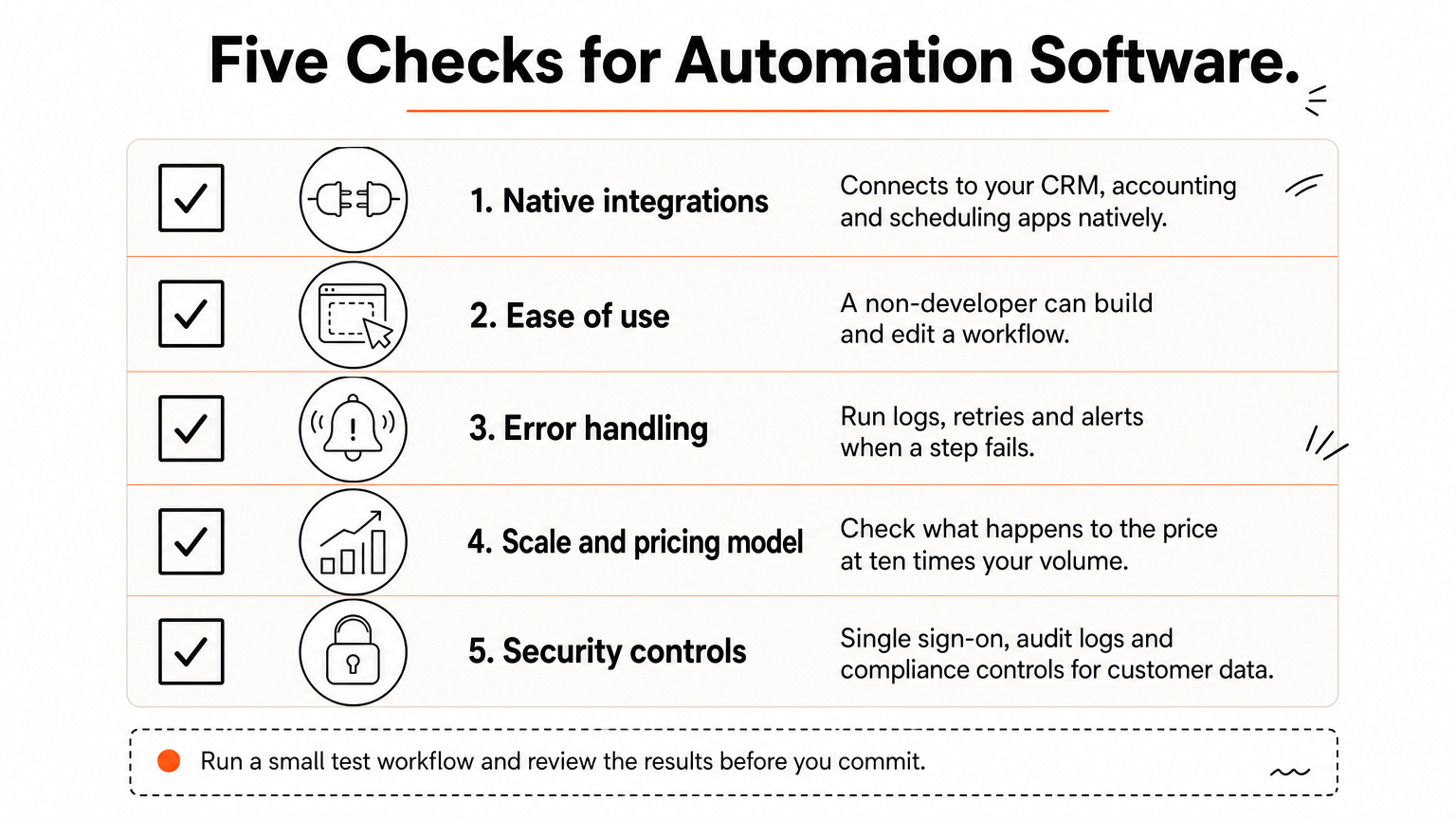
- Integrations: Does it connect natively to your CRM, accounting and scheduling apps, and does it offer webhooks or an API step for the rest?
- Ease of use: Can a non-developer build and edit a workflow without a training course?
- Error handling: Look for run logs, retries and alerts when a step fails.
- Scale and pricing model: Is it priced per user, per task, per operation or per contract, and what happens at ten times your volume?
- Security: Check for single sign-on, audit logs and compliance controls if you handle customer data.
Test with your messiest real workflow, not a demo. A tool that handles a form-to-spreadsheet automation tells you little about how it handles a quote that needs approval, a price lookup and a text to the customer.
Where RPA still fits
RPA is still worth using for one job: automating software that has a screen and no API. A robot clicks through the interface the way a person would. If the app offers an API or a native integration, API-based tools are faster to build and break less often when a screen changes.
Three tools in this list include RPA: UiPath, Automation Anywhere and Power Automate. Most teams should try API automation first and add RPA only for the gap that is left.
What the total cost includes
The subscription is rarely the whole bill. Add the build time, the usage tier you will actually need, any partner or implementation fee, and the hours someone spends maintaining workflows when apps change.
Free plans and trials are the cheapest way to learn. Run one real workflow for 30 days and compare the hours it saved with the hours you spent on it.
The cheapest tool is the one someone keeps maintained, not the one with the lowest sticker price.
1. HSP Automation for home service businesses
How it works

HSP Automation is a done-for-you automation partner, not a software platform. We design, build, test and maintain your workflows, mostly as Zapier automations plus custom API work, for trades companies on Housecall Pro, ServiceTitan, Jobber or FieldEdge. We also connect those tools to QuickBooks, Google Workspace, Slack and other apps.
Typical builds include instant text and email replies to new leads, auto-sent quotes and invoices, technician routing, tag automation and customer follow-ups. For Housecall Pro users, our custom Zapier integration adds 13 triggers and 49 actions that the standard Zapier app does not offer. Simple automations go live in 1-2 days, complex workflows in 1-2 weeks, and training for your team is included.
Who it suits
Owners and office managers who are busy in the field and do not want to learn Zapier are the core fit. You describe the process, we build it, and your team gets trained on how it runs.
- Good fit: HVAC, plumbing, electrical, landscaping, roofing, pest control, cleaning and other trades companies on a field service CRM.
- Look elsewhere if: your business is outside home services, or you want to build and edit every workflow yourself. Zapier or Make directly are better then.
Pricing
Our done-for-you Zap service starts at $97 per month plus a $97 setup fee and scales with the number of Zaps or paths. Maintenance is included, you can cancel anytime, and annual billing saves 17%. You also need your own Zapier account.
| Zaps or paths | Monthly | One-time setup |
|---|---|---|
| 1-5 | $97 | $97 |
| 6-10 | $147 | $147 |
| 11-20 | $297 | $297 |
| 21-50 | $497 | $497 |
| 51+ | $997 | $997 |
Take a plumbing company running eight Zaps. It lands in the 6-10 tier, so the first 12 months cost $1,911 (12 × $147 = $1,764, plus the $147 setup fee). On annual billing the subscription drops to about $1,464, roughly $1,611 with setup. If those automations save 10 hours a week, the low end of the 10 to 20 hours we quote, and you value an office hour at $20, that is about $10,400 a year in time. Your own numbers will differ.
A done-for-you build makes sense when nobody on your team wants to own the automation.
The Housecall Pro Custom Zapier Integration alone costs $147 per month plus a one-time $147 setup fee, with a 14-day free trial. Lead response systems run $97 to $297 per month depending on volume and complexity.
2. Zapier for connecting thousands of apps
How it works
Zapier connects apps with Zaps, where one trigger starts a chain of actions. You build them in a no-code editor, usually from a template, and Zapier lists more than 9,000 app connections, far more than most rivals by its own count. An AI copilot helps draft workflows, and Zapier MCP lets AI assistants such as ChatGPT or Claude act inside your apps.
Governance is stronger than the price suggests. Zapier reports SOC 2 Type II certification, GDPR compliance, SAML single sign-on and connection logging. The main limit sits on the free plan, which allows only two-step workflows, so anything with more steps needs a paid plan.
Who it suits
Small and mid-sized teams that need results this week, without a developer, get the most from Zapier. It is the safest default when your stack is mostly cloud apps.
- Strong fit: lead capture to CRM, form to spreadsheet, invoice and Slack alerts, AI-assisted steps in a workflow.
- Weaker fit: legacy desktop software with no API, or very high volumes where per-task pricing climbs.
Pricing
Zapier has a free plan, and paid plans start with Pro at $19.99 per month. Usage is metered in tasks, so a workflow that runs hundreds of times a day moves you up the tiers faster than a few daily runs.
- Free: two-step workflows
- Pro: from $19.99 per month
- Enterprise: custom quote
Zapier is the default pick when your apps live in the cloud and nobody on staff writes code.
3. Make for visual, multi-branch workflows
How it works
Make, formerly Integromat, builds automations on a visual canvas where every step is a module you can see and map. Routers split a workflow into branches, iterators loop through lists, and built-in functions reshape data between steps.
That visibility is why we use Make at HSP Automation for advanced workflows with conditional logic and data transformation that go beyond a standard Zap. The trade-off is a steeper learning curve and an app catalog smaller than Zapier's, although an HTTP module lets you call an API that has no native module.
Who it suits
People who think in flowcharts get the most from Make, such as operations managers, analysts and technically curious owners.
- Strong fit: multi-branch approvals, data cleanup between systems, workflows with many conditions.
- Weaker fit: teams that want a template and a one-click result.
Pricing
Make offers a free plan, and paid plans scale with the number of operations you run. Each module that executes counts as an operation, so estimate your monthly volume before choosing a tier, and check Make's pricing page for current plan prices.
- Count the modules in your busiest scenario.
- Multiply by the number of runs per month. A six-module scenario that runs 500 times uses 3,000 operations.
- Compare that figure with each plan's operation limit.
Choose Make when your workflow needs branches, loops and data cleanup that a straight trigger-and-action tool handles poorly.
4. Microsoft Power Automate for Microsoft shops
How it works
Microsoft Power Automate builds cloud flows across Outlook, SharePoint, Teams and Excel files in OneDrive, plus desktop flows that use RPA for apps without an API. It offers more than 1,400 pre-built connectors, and Copilot can draft a flow from a plain-language description.
Everything works best inside the Microsoft family. Connecting outside apps is possible through connectors, APIs or RPA, but it is less smooth than in tools built to be neutral. Microsoft has also added AI features such as document processing.
Who it suits
Companies already standardized on Microsoft 365 and SharePoint will get the fastest return, because the apps already share one sign-in and one admin console.
- Strong fit: approvals inside Teams, SharePoint document flows, logging emails into Excel.
- Weaker fit: mixed stacks that lean on Google Workspace and niche SaaS tools.
Pricing
Pricing starts at $15 per month for the Premium plan. Microsoft licenses by user and by flow, so the real figure depends on how many people build and run flows.
Basic flows that only touch Microsoft 365 apps may already be covered by your existing license. Check Microsoft's licensing page before you budget for a paid plan.
Power Automate pays off in proportion to how much of your work already happens in Microsoft software.
5. UiPath for legacy systems and RPA
How it works

UiPath is an RPA platform. Software robots simulate a person's clicks and keystrokes on an app's screen, so you can automate software that has no API. It also supports API-based workflows and AI agents that make context-based decisions about what a robot does.
Expect more technical work than with Zapier. UiPath ships 100+ pre-built connectors, a fraction of what no-code tools offer, and getting the most from it usually takes someone with coding experience. The upside is a large community and plenty of training material.
Who it suits
Organizations with older desktop or web applications that have no API, and a technical person to own the bots, fit UiPath best.
- Strong fit: copying data between legacy systems, keying invoices from screens, report pulls from old software.
- Weaker fit: cloud-only stacks and small teams without technical help.
Pricing
Pricing starts at $25 per month for the Basic plan. Costs rise with the number of robots, attended or unattended use, and enterprise features, so request a quote before you plan a production rollout.
Start with one bot for one painful, stable, screen-based process and measure the hours saved before you buy more.
UiPath earns its place when the only way into a system is its screen.
6. n8n for self-hosted automation
How it works
n8n is a workflow builder with a node canvas, an HTTP request node for any API, and room to write JavaScript inside workflows. It lists about 1,800 integrations, although not all of them are complete app integrations. Its Community edition can be self-hosted for free.
Self-hosting means you install it with Docker or npm, run it on a virtual private server, or deploy it to Google Cloud Run. You then own maintenance, security patching and troubleshooting. n8n is also not fully open source, because commercial use of the Community edition is limited, so read the license before you build a business on it.
Who it suits
Developers and technical operators who need control over where data lives, and who are happy to write code, are n8n's audience.
- Strong fit: custom logic, data that must stay on your own servers, teams with an engineer on staff.
- Weaker fit: non-technical owners who want something that simply works.
Pricing
The Community edition is free, and n8n-hosted plans start at $24 per month with the Starter plan. Free does not mean zero cost, because server fees, maintenance time and security work all count.
If nobody on your team will maintain a server, pay for a hosted plan or choose a cloud tool instead.
Free self-hosting trades license cost for engineering time.
7. ServiceNow for IT-heavy enterprises
How it works
ServiceNow is an enterprise platform that began as an IT service management tool more than 20 years ago. It now also covers HR, risk and cybersecurity workflows, with AI that triages incidents and suggests fixes from historical data.
A typical flow shows the depth. An employee requests software, and ServiceNow checks license compliance, routes the approval, provisions the software and updates the asset record without anyone touching it. With thousands of devices and users, that chain matters.
Who it suits
Large organizations with big IT estates and the staff to administer a heavy platform fit ServiceNow. For a ten-person company it is far too much.
- Strong fit: incident, change and asset management at scale.
- Weaker fit: small teams, and anyone who needs automation live in a week.
Pricing
ServiceNow prices by request, and users report a steep learning curve and high cost. When you ask for a quote, ask about the license model, the implementation partner fees and how many administrators you will need.
The total is usually a multi-year commitment, so compare it with lighter tools first if your needs are narrower than a full IT service desk.
ServiceNow solves enterprise IT workflow problems, and it is priced and complicated accordingly.
8. Workato for enterprise integration
How it works
Workato is an integration platform as a service for enterprises. Its visual recipe builder turns triggers and actions into workflows with conditional logic, loops, error handling and data transformations, and developers can add custom code blocks and reusable components.
The connector depth is the draw. It offers 1,400+ pre-built connectors across ERP, CRM, HR and cloud apps, including Salesforce and NetSuite, and it has native EDI support for exchanging electronic documents such as orders and shipping updates.
Who it suits
IT-backed enterprises that connect many moving systems get the most from Workato. Someone must own the platform long term.
- Strong fit: ERP to CRM to HR syncs, order and inventory automation with trading partners.
- Weaker fit: small teams, and anyone who cannot involve IT in setup.
Pricing
Workato prices on request, and annual contracts reportedly start around $10,000 and climb quickly. Implementation often takes several weeks.
Budget for the IT time as well as the license. If your integration list is short, a cheaper iPaaS or a no-code tool will likely cover it.
Workato is built for IT-backed enterprises, and the contract and implementation reflect that.
9. Automation Anywhere for AI agents and RPA
How it works
Automation Anywhere focuses on agentic process automation, where AI agents decide how to route work across RPA, APIs and AI steps. Process discovery documents how your processes run and looks for improvements, and intelligent document processing uses OCR to read text in images and organize the data.
Together they handle an invoice end to end. An agent pulls it from a legacy database with RPA, reads the details with document processing, and posts the data to your accounting software. The platform is cloud-native, with a drag-and-drop orchestrator, so you do not install your own servers.
Who it suits
Mid-sized and large organizations with document-heavy, legacy-heavy back offices, such as finance and operations teams, fit best.
- Strong fit: invoice and claim processing, data entry across old and new systems.
- Weaker fit: teams that want a big catalog of ready-made app connectors.
Pricing
Pricing is contact for pricing. The app store lists only about 40 pre-built connectors and agents, so expect to design more of your own workflows than with Zapier or Make.
Ask for a paid pilot on one document-heavy process before signing a larger contract, and measure the hours saved against the pilot cost.
Automation Anywhere suits teams automating documents and legacy screens, not teams hunting for plug-and-play connectors.
10. HubSpot for sales and marketing workflows
How it works
HubSpot's workflow builder sits inside its CRM. You can set up email drip campaigns, assign service tickets, nurture sales leads and build branches, and more than 50 pre-built templates help you start.
Workflows use data straight from the Sales, Marketing and Service Hubs. If you use a different CRM, you can connect it through webhooks, custom code or built-in integrations, though the tool is strongest when your customer data already lives in HubSpot.
Who it suits
Sales, marketing and customer service teams already running HubSpot get a natural extension, with no extra tool to learn.
- Strong fit: lead nurturing, ticket routing, lifecycle emails.
- Weaker fit: general back-office automation such as accounting, inventory or IT.
Pricing
The cheapest plan with robust automation is Marketing Hub Professional at $890 per month, about $10,680 a year. The Starter plan includes a few automations, but not enough to make a real impact.
You also get the rest of HubSpot's marketing tools, so the price makes sense only if you will use them. If you only need workflows, a dedicated automation tool costs far less.
HubSpot workflows are worth the price when the CRM is already your system of record.
Start with one workflow
The best business process automation software is the one that fits your first real process. Cloud-app teams should start with Zapier or Make, Microsoft shops with Power Automate, legacy screens call for UiPath or Automation Anywhere, and enterprise IT and integration needs point to ServiceNow or Workato. Developers who want control can look at n8n, and HubSpot users should use the workflows they already pay for.
Pick one painful process, run it on a free plan or trial for 30 days, and count the hours saved. If you run a home service company and would rather have the automations built and maintained for you, start with a free consultation at HSP Automation.