October 29, 2026
General Contractor Website Design: 6 Examples to Copy
Good general contractor website design puts proof and a way to reach you on the first screen: a license number, the towns you serve, a portfolio sorted the way buyers browse, and a short path to conta...
Written by Frankwin Hooglander

Good general contractor website design puts proof and a way to reach you on the first screen: a license number, the towns you serve, a portfolio sorted the way buyers browse, and a short path to contact you. Each pick below suits a different reader. Tri-State fits multi-state commercial firms, Allstate fits local remodelers, DC Builders fits firms with several building types, Domus and Castle Homes fit custom builders, and Letter Four fits design-build teams.
Your buyer is about to hand someone six figures, and they will judge your site in seconds. Most contractor sites do not help them. You get a logo, a phone number in the footer, a stock photo of a hard hat, and a generic contact form. The sites that stand out make a few specific decisions that any firm can copy.
This article walks through six real general contractor websites, one design move each, with what the site does and how to reproduce it on your own. A final section covers what a build costs and what to put in a brief for a designer. HSP Automation builds websites for home service and trades businesses, so the cost figures there come from our own work.
1. Tri-State: license numbers and a phone number first
What the site does
Tri-State General Contractors opens with five state license numbers (California, Arizona, Nevada, Hawaii and Idaho) followed by a phone number. There is no slogan. For a contractor running corporate rollouts across state lines, that is the fact that decides whether the call happens. NOVO Construction also publishes its contractor license number in full.
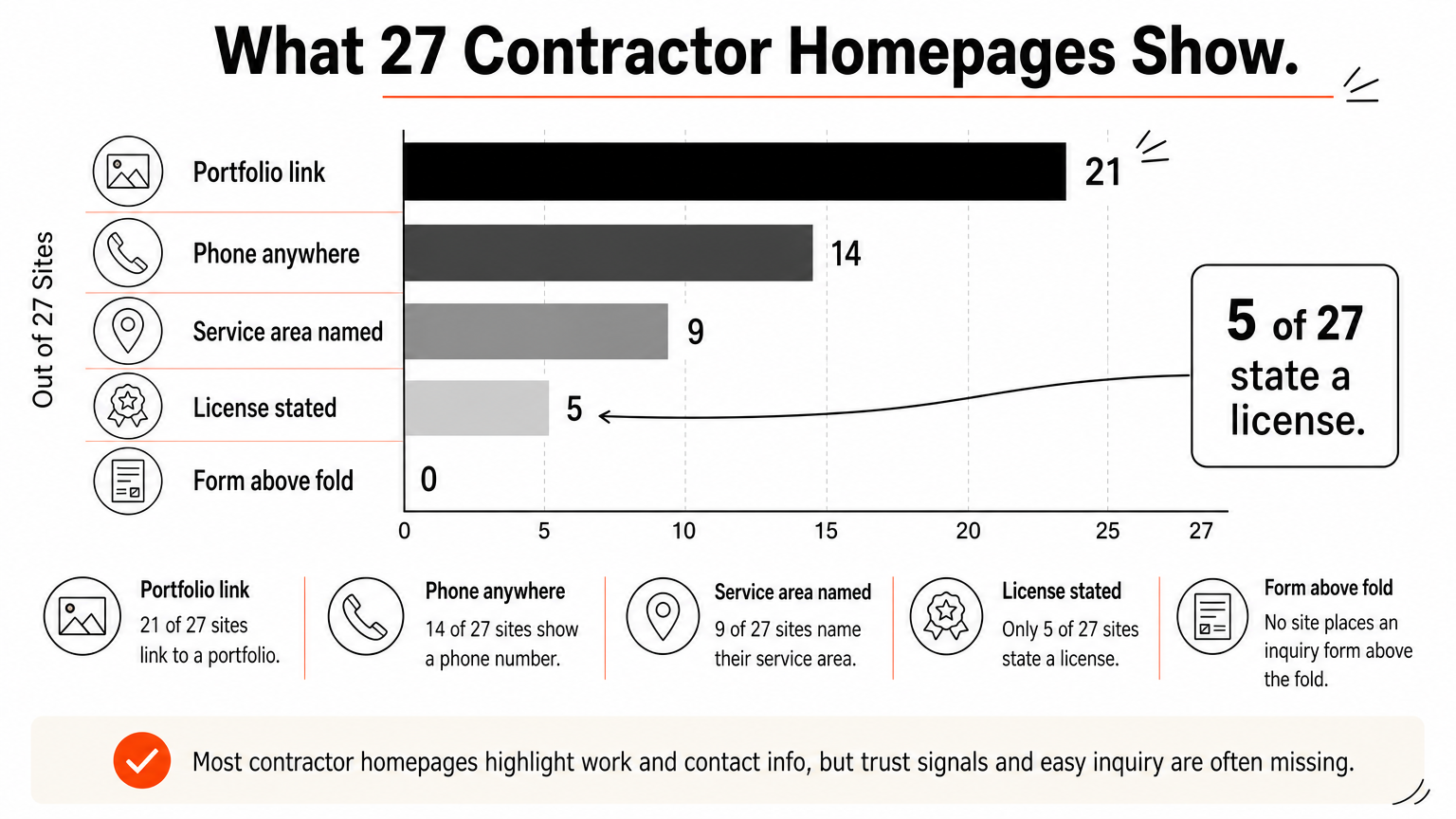
An audit of 27 general contractor homepages shows how rare this is. Most link to a portfolio, but few state a license, name their towns, or put a phone number in the first screen.
| Homepage element | Sites out of 27 |
|---|---|
| Link to a portfolio | 21 |
| Phone number anywhere | 14 |
| Pricing or budget language | 12 |
| Service area named | 9 |
| Phone number above the fold | 8 |
| Inquiry form | 7 |
| License stated | 5 |
| Inquiry form above the fold | 0 |
The two cheapest gaps to close are the license and the phone number. Neither costs anything, and together they answer the first two questions a cautious buyer has.
A license number and a visible phone number answer a buyer's first two questions before they scroll.
How to copy it
Put your license number and issuing state in the header or hero, next to a tap-to-call number. If you work in several states, list each one the way Tri-State does.
- License number and state in the header or hero
- A phone number that is clickable on mobile and visible without scrolling
- Bonding and insurance statements, only if you carry them
2. Allstate: name your towns, not a vague region
What the site does
Allstate General Contractors puts its years in business and three named towns in the headline. Below that, the menu splits by job: kitchen remodels, bathroom remodels, flooring and new construction, each with its own page. A phone number sits above the fold, which only 8 of the 27 audited sites manage.
Other sites handle location differently. MIR Homes gives Areas Served its own menu item and shows the phone number twice above the fold. Southtide Construction states its service area as a route between two cities instead of a vague coastal claim.
Name the towns you actually work in, so buyers and local search can both see where you operate.
How to copy it
Replace "serving the greater region" with a list of real towns, and give each job type its own page. A page on kitchen remodels can then match a search for that job in that town, which a single "Services" page cannot.
- Towns in the homepage headline or the line beneath it
- One page per job type, such as additions, kitchens or new builds
- An Areas Served page that lists every town and county you cover
- The same town list on your Google Business Profile
3. DC Builders: organize by what clients want built
What the site does
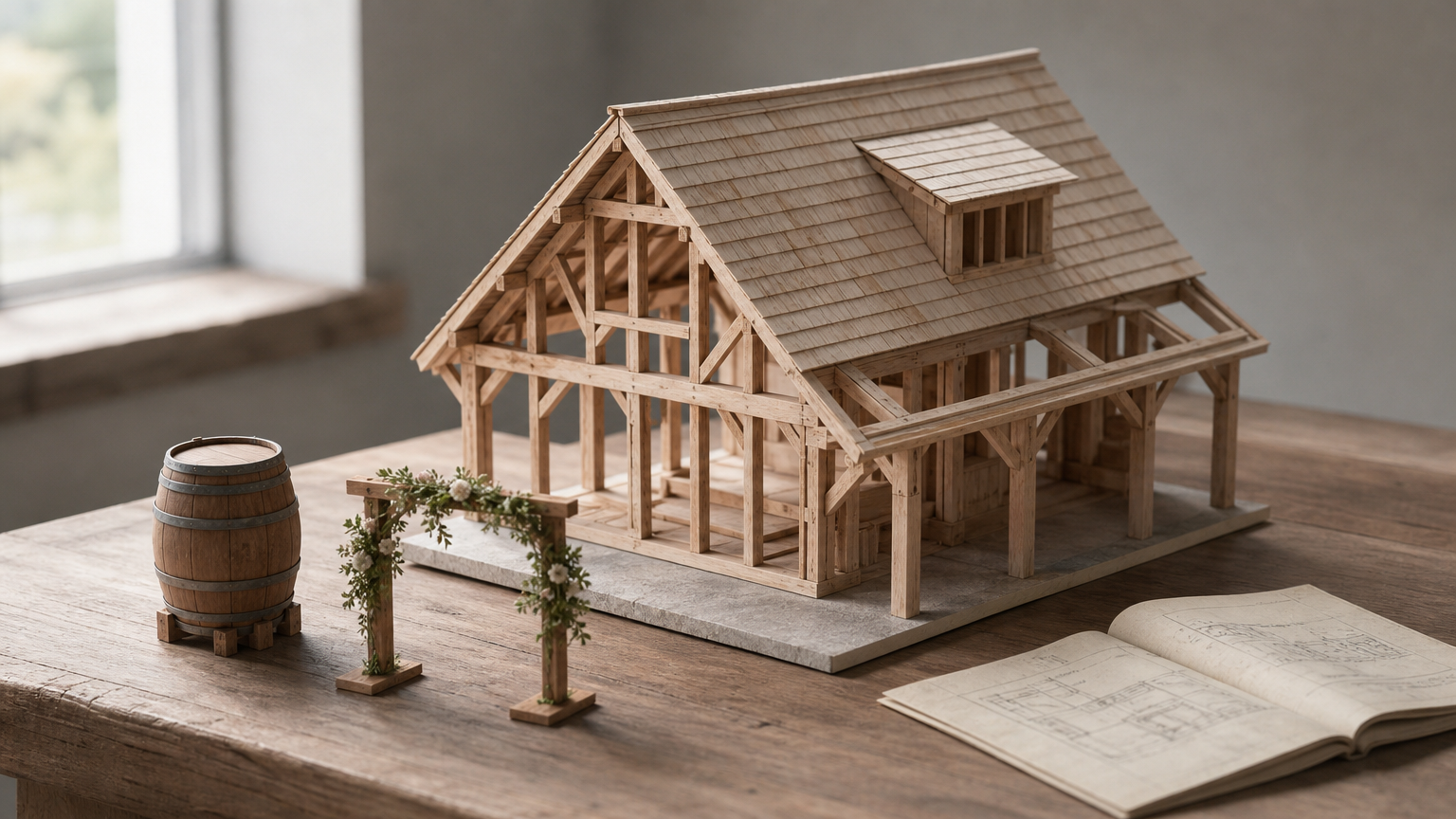
DC Builders organizes its menu by what gets built: luxury custom homes, timber frame homes, wedding and event venues, and wineries and tasting rooms. Those are four different buyers with four different budgets. Giving each a page means each can rank and persuade on its own terms.
Scott Simpson Design + Build splits its portfolio by architectural style: modern, farmhouse, contemporary, urban and green. Someone who already knows they want a farmhouse goes straight to farmhouses. NOVO Construction organizes by client type, such as corporate interiors and professional services, which is how commercial developers build a shortlist.
Sort your portfolio the way buyers shop, not the way you schedule crews.
How to copy it
Most contractor sites link to a portfolio, so the link is not what separates them. The organizing axis is. Pick the one your buyers use: project type, style or client type. Then give each category its own page with photos, scope and location.
- Three to six categories, named in the buyer's words
- A page per category with finished-work photos and a short description of the scope
- A short menu: Blue Divide runs four items with the portfolio second, because the work carries the argument
4. Domus and Castle Homes: talk about price
What the site does
Domus Custom Builders says plainly that on a custom home or an addition there is no such thing as an average price. That honesty does more for trust than an invented range would. Castle Homes goes further and states guaranteed pricing, a real commitment in custom building and the strongest single claim among the sites reviewed.
Keen Building Company sells its estimating process as the product, with named systems and an FAQ. West Village GC blogs about construction price increases and insurance claims in its own city, which reaches owners right when they need a contractor. Only 12 of the 27 audited sites had any pricing or budget language.
Buyers arrive with a price question, and a site that addresses it earns the next click.
How to copy it
You do not need to publish a price list. Explain what drives cost and how you estimate, then let the reader decide whether to call. Promise fixed pricing only if you honor it on every job.
- A "How we price" page covering fixed price, cost-plus or allowances
- An FAQ on the factors that move a quote: size, site conditions, finishes, permits
- A blog post on local cost changes, if you can keep it current
5. Letter Four: say who carries the risk
What the site does

Letter Four states that its founders are a licensed architect and a licensed general contractor. That one line is the pitch for a design-build firm. It settles who is responsible when drawings meet a site. The copy also asks whether previous contractors gave straight answers about what plans would actually cost, which speaks directly to price anxiety.
Honest Renovators takes a similar route with a different tool. The company name and headline are the promise, because in remodeling the fear is being taken advantage of, not poor quality. Both sites are small and single-minded.
Answer "who is responsible?" before the buyer has to ask.
How to copy it
Do general contractors do design? Some do, mainly design-build firms. If you offer it, say what is included. If you do not, name the architect or designer you work with and explain the handoff.
- Which licenses each principal holds
- How design hands off to construction, and who the buyer talks to
- The specific fear you remove, backed by a process instead of adjectives
6. Scott Simpson: short forms and one clear next step
What the site does
Scott Simpson Design + Build asks for three form fields. Letter Four and Honest Renovators ask for two. Keen Building Company asks for five and requires all of them, and Evans Construction requires six, which is heavy for a first inquiry. In the audit, only 7 of 27 sites had an inquiry form at all, and none placed it above the fold.
MIR Homes attaches an incentive to the consultation, a designer-selected finish upgrade for booking. That is rare. Most sites simply say "Contact us" and leave the buyer to guess what happens next.
Every required field is one more reason for a buyer to stop.
How to copy it
Ask for what you need to call back: name, phone and project type. Repeat one call to action, such as "Request a consultation," on every page. Put proof beside the button, because buyers decide on finished-work photos, team photos and Google reviews more than on copy.
- Three fields at most on the first inquiry
- A tap-to-call button in the mobile header
- Photos and review excerpts next to every form
- A one-line promise of what happens after they submit, such as a call within one business day, if you can keep it
How to brief a designer and what it costs
What a contractor site costs
At HSP Automation, a basic 5-page site starts at $1,500, and a fully featured site runs $2,000 to $3,500. Complex custom builds reach $5,000 or more. Most builds take 2 to 4 weeks, and you own the site 100%.
| Build | Price | Build time |
|---|---|---|
| Basic 5-page site | From $1,500 | About 2 weeks for simple 5 to 10 page sites |
| Booking integration, multiple service pages, SEO | $2,000 to $3,500 | 2 to 4 weeks |
| Complex custom build | Up to $5,000+ | 3 to 4 weeks |
| Maintenance plan | From $99/month | Ongoing |
Take a home contractor website with eight pages: home, about, four job-type pages, portfolio and contact. It fits the middle tier. With a $99 monthly plan, the first year comes to $3,188 at $2,000 and $4,688 at $3,500. We give a detailed quote after scoping your needs, so treat these as planning ranges.
What to put in your brief
Whether you hire a contractor website design agency or a freelancer, hand over the six decisions above as a written brief. Then run your current site through our Free Website Grader for Contractors. It takes about 60 seconds, needs no credit card, and scores speed, SEO, mobile usability, security and trust signals.
- License numbers and states
- Towns served and job types, one page each
- Portfolio categories, named in the buyer's words
- Your pricing stance and the fields on your form
- Who owns the domain and site, and who maintains it afterward
Platform matters less than the first screen. The sites in this article run on Wix, Squarespace, Webflow and WordPress, so none of the moves depends on one builder.
Start with the first screen
A strong contractor website makes six decisions. It shows the license and a phone number, names the towns, sorts the portfolio by how buyers shop, addresses price, says who carries the risk, and keeps the first inquiry short. You can make every one of them in an afternoon, before any designer touches a layout.
Pick the two weakest spots on your current site and fix those first. If you want a team to build the whole thing, including booking integration and hosting, see how HSP Automation builds websites for trades businesses.