November 16, 2026
5 Best Cloud Software for Field Service Management in 2026
The best software for field service management is the one your technicians will actually open on a job site, and that handles scheduling, dispatching, invoicing and payments without extra tools. House...
Written by Frankwin Hooglander
The best software for field service management is the one your technicians will actually open on a job site, and that handles scheduling, dispatching, invoicing and payments without extra tools. Housecall Pro or Jobber fits most small home service companies. ServiceTitan suits large, complex operations. Zuper suits structured teams that expect to scale, and Connecteam's free plan gives a tight budget a place to start.
Choosing is harder than it looks. Every vendor claims to do everything, prices hide behind demo calls, and a wrong pick costs you months of re-entered data and retrained crews. Small businesses feel this most, because nobody on staff has time to run a long software trial.
This guide compares five cloud-based platforms on the same points: how each one works, who it suits, what it costs and where it falls short. HSP Automation sets up and automates Housecall Pro, ServiceTitan and Jobber for home service companies, so the notes on those three come from configuring them for real teams. A short buying guide follows the list.
1. Housecall Pro
Housecall Pro is the best all-round choice for small and mid-sized home service companies that want booking, dispatch and payments running quickly.
How it works
Housecall Pro is a cloud-based platform that follows a job from the first call to the final payment. Office staff work from a scheduling and dispatch board, and technicians use a mobile app on their phones. The core tools are:
- Online booking that customers use without calling the office
- Scheduling and dispatch with technician locations
- Estimates, invoices and card payments from the job record
- Customer messaging and automated review requests
Who it suits
It fits trades where most work arrives as inbound calls, such as HVAC, plumbing, electrical, handyman and appliance repair. Owner-operators and growing crews do well because the dispatch board is easy to read and new staff learn it fast.
Housecall Pro setup and automation is a core part of our work at HSP Automation. The gains come after the basic setup, when you automate quote follow-up, tags and invoice sending so the office stops retyping the same data.
Housecall Pro works best when inbound calls fill your calendar and you want a platform that runs the day with little training.
Pricing and limits
Housecall Pro sells tiered monthly plans that scale with users and features. Check the current price on its site before you commit, because plans change. Know these limits:
- Cost climbs as your team grows, and deep customization is limited.
- The standard Zapier app exposes only part of your data. Our custom Housecall Pro Zapier integration adds 13 triggers and 49 actions, costs $147 per month plus a one-time $147 setup fee, and starts with a 14-day free trial.
- It is built for booked work, so it has no canvassing or outside-sales tools.
2. Jobber
Jobber is the best pick for small crews that sell repeat visits and want the simplest possible field service software.

How it works
Jobber keeps the workflow deliberately light. You store customers, schedule visits on a calendar, and send quotes and invoices from the same job. Technicians see their day in the mobile app. The main tools are:
- Customer records and a clear scheduling calendar
- Online booking from your website
- Automatic reminders, quotes and invoices
- Simple performance reports
Who it suits
Lawn care, cleaning, window cleaning and other repeat-visit trades get the most from Jobber, especially crews of five to ten people. The learning curve is short, so new office hires pick it up quickly.
Jobber is also one of the three platforms we configure for clients. We usually set up job types, recurring schedules and follow-ups first. Then we connect QuickBooks so invoices and payments sync on their own.
Jobber keeps a booked schedule tidy, which is exactly what a small repeat-service crew needs and little more.
Pricing and limits
Jobber's Core plan has started at $29 per month for a single user, with more users and features on higher tiers. Confirm current pricing before you buy. Watch for these limits:
- Dispatch is lighter than in tools built for emergency-heavy shops.
- Reporting is basic, so growing teams may outgrow it.
- It assumes the job is already booked, so it does not capture leads in the field.
3. ServiceTitan
ServiceTitan is the best choice for large or fast-scaling service companies that need deep reporting and can afford a longer rollout.

How it works
ServiceTitan is an all-in-one cloud platform built for complexity. It covers dispatch, detailed financial tracking, inventory management and custom dashboards, with deep integrations on top. Where smaller tools stop at the schedule, ServiceTitan tracks what each job, technician and department earns.
Who it suits
It suits multi-truck, multi-department companies in trades such as HVAC, plumbing and electrical. If you run several teams, track inventory across trucks and want KPI dashboards for managers, the depth pays off.
For a five-person crew it is usually too much. Setup takes time and the learning curve is real. We handle ServiceTitan configuration, dispatch optimization and KPI dashboards for clients, and the best results come from deciding which reports you need before the build starts.
ServiceTitan rewards companies that already have enough volume and management staff to use its depth.
Pricing and limits
ServiceTitan uses custom pricing, so you get a quote after a sales conversation. Budget for implementation time as well as the subscription. Limits to weigh:
- Cost runs well above most small-business platforms.
- Rollout takes longer, and your team needs formal training.
- Features you never use still add to the price.
4. Zuper
Zuper is the best option for organized teams that want a configurable platform and expect to grow into it.
How it works
Zuper handles scheduling, dispatching, invoicing and workflow automation, and it connects with accounting software. It feels closer to an enterprise tool than a small-business app, yet smaller teams can grow into it. Its strength is configurable workflows, so the software follows your process instead of forcing a standard one.
Who it suits
Zuper suits service companies with defined processes, such as inspection steps, approvals or multiple job types. It also fits teams that want one platform now and room to scale. Owners who want to be live in a few days may find it heavy.
A flexible platform still needs someone to design the workflows. Without that, you end up with the same manual habits inside new software.
Zuper makes sense when your process is clear enough to configure and you want a platform that will not box you in later.
Pricing and limits
Pricing depends on plan tier and user count, so request a current quote and ask what setup and training cost. Keep these limits in mind:
- Setup and customization take time.
- It structures the service side well but does not cover canvassing or outside sales.
- Very small crews may pay for flexibility they will not use.
5. Connecteam
Connecteam is the best free starting point for small field teams that mainly need crew scheduling, time tracking and communication.
How it works
Connecteam is a mobile-first workforce app with tools for crew scheduling, GPS time tracking, job assignment, checklists and forms, and team chat. Technicians clock in and update jobs from their phones. Managers see who is where and which tasks are done.
It is closer to a team management app than a full field service platform. Check that it covers the quoting and invoicing you need, or plan to pair it with accounting software.
Who it suits
It suits small crews and new companies that need organization more than a full dispatch board. Solo operators may also look at Contractor+, which has a free plan and paid tiers from $29 per user per month, billed annually.
If you plan to run estimates, invoices and customer messaging from one job record, a free workforce app will not replace a full platform.
A free plan is a smart first step for a small crew, as long as you know which features you will outgrow.
Pricing and limits
According to Connecteam, the plan is free for up to 10 users, and paid plans start at $29 per month for the first 30 users, with extra users from about $0.80 each per month. Take a crew of 12: you pay $29 per month, or $348 per year. Confirm current limits on its pricing page. Limits include:
- It is not a full field service platform with a dispatch board.
- Billing and quoting depth may be thin for your trade.
- Free plans carry user and feature caps.
How to choose cloud-based field service software
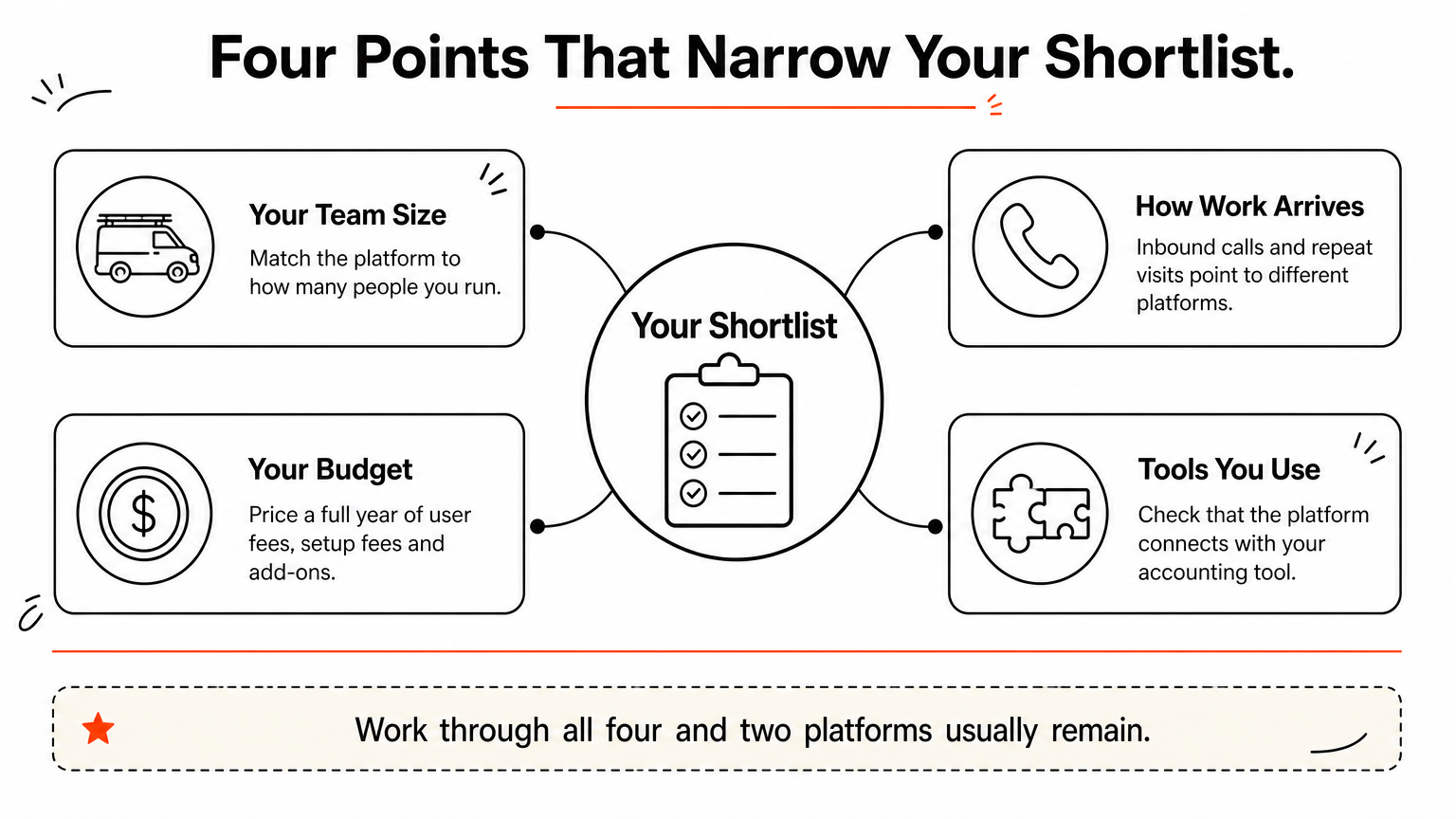
Choose by team size, how work reaches you, budget and the tools you already use. Work through those four points and the shortlist usually shrinks to two platforms.
Side-by-side comparison
| Platform | Best for | Pricing | Biggest limit |
|---|---|---|---|
| Housecall Pro | Small to mid-size trades with inbound calls | Tiered monthly plans | Limited customization as you grow |
| Jobber | Small repeat-visit crews | Core plan from $29/month, one user | Basic reporting and dispatch |
| ServiceTitan | Large, fast-scaling operations | Custom quote | Cost and rollout time |
| Zuper | Structured teams planning to scale | Tiered, by quote | Setup effort |
| Connecteam | Small crews on a budget | Free up to 10 users, then from $29/month | Not a full field service platform |
Large enterprises with an existing CRM may also look at Salesforce Field Service or Microsoft Dynamics 365 Field Service. Both are built for big organizations and complex implementations, so they rarely suit a small trades company.
Five checks before you commit
Run every shortlisted platform through the same test during its free trial or demo:
- Offline mode: Can technicians log notes and photos without signal, and does the data sync later?
- Accounting sync: Does it connect to QuickBooks or your accounting tool without manual exports?
- Data export: Can you pull out customers, jobs and invoices if you switch later?
- Mobile speed: Can a tech complete a job in a few taps in the field application?
- Real cost: Add user fees, setup fees and add-ons for a full year.
Software only saves time when your team uses it correctly. At HSP Automation, most setups take one to two weeks, and complex multi-system builds can take three to four, including training for your staff. Plan that time in before you sign.
Pick the platform your technicians will use, then spend your effort on setup and training.
Pick one platform, then set it up right
For most small home service companies, the choice comes down to Housecall Pro for inbound-call trades or Jobber for repeat-visit work. ServiceTitan and Zuper fit larger teams with more process, and Connecteam's free plan is a low-risk start for a small crew. Test two platforms against the five checks, price a full year, and decide.
Software alone does not remove manual work. The savings come from configuring job types, pricing and permissions correctly, then automating follow-ups, invoices and notifications. If you want help choosing and setting up a platform, book a free strategy call with HSP Automation and we will map your workflow to the right tool.