November 20, 2026
9 Best Field Service Management Software for HVAC in 2026
The best field service management software for HVAC is the one that matches your truck count and the kind of work you sell. Jobber, Housecall Pro, and Service Fusion suit small residential teams. Fiel...
Written by Frankwin Hooglander
The best field service management software for HVAC is the one that matches your truck count and the kind of work you sell. Jobber, Housecall Pro, and Service Fusion suit small residential teams. FieldEdge fits growing shops that live in QuickBooks. ServiceTitan suits larger contractors that sell as hard as they service. ServiceTrade, BuildOps, simPRO, and FIELDBOSS fit commercial contractors with agreements, inspections, and project costs.
Every vendor promises dispatch, scheduling, and a mobile app, so the feature lists look alike. The differences that cost you money show up later. Does each unit have its own service history? Do maintenance agreements create visits on their own? Does job costing work on an install? Which way does data flow into QuickBooks?
This guide ranks nine HVAC field service software options from smallest team to largest. Each gets the same breakdown: what it does, who it suits, and what it costs. At HSP Automation we configure and connect Housecall Pro, ServiceTitan, and Jobber for trades companies, so we also look at what happens after the purchase. Prices are the figures publicly reported, so confirm them with each vendor before you commit.
What to look for in field service management software for HVAC
Good HVAC field service software handles dispatch, recurring maintenance, equipment records, job costing, mobile work, and accounting sync. If a tool is weak in two of those, you will feel it within a season. Judge each product against your own mix of emergency calls, planned maintenance, and installs.
The six capabilities that decide fit
Dispatch and equipment history carry most of the daily value, but you should check all six areas below. Ask each vendor to demo your messiest day, not a clean one.
- Dispatch and scheduling: a board that reshuffles when an emergency call lands, assigns by technician skill and location, and shows live status.
- Maintenance agreements: recurring visits that generate automatically by season, so spring and fall tune-ups never depend on someone's memory.
- Equipment records: make, model, serial number, install date, warranty, and service history on each unit, not only on the customer.
- Job costing: labor and materials tracked against the estimate, which matters most on installs and multi-day projects.
- Mobile app: job details, checklists, photos, signatures, and card payments, ideally working when signal drops in a basement or mechanical room.
- Accounting sync: QuickBooks Online or Desktop support, and whether data flows one way or both.
A tool that cannot tie service history to a specific unit is a scheduler, not HVAC software.
Residential and commercial shops need different tools
Residential service is a volume game. You want fast booking, a flat-rate pricebook, and memberships so a technician can present repair and replacement options on a tablet and sell the maintenance plan before leaving the driveway.
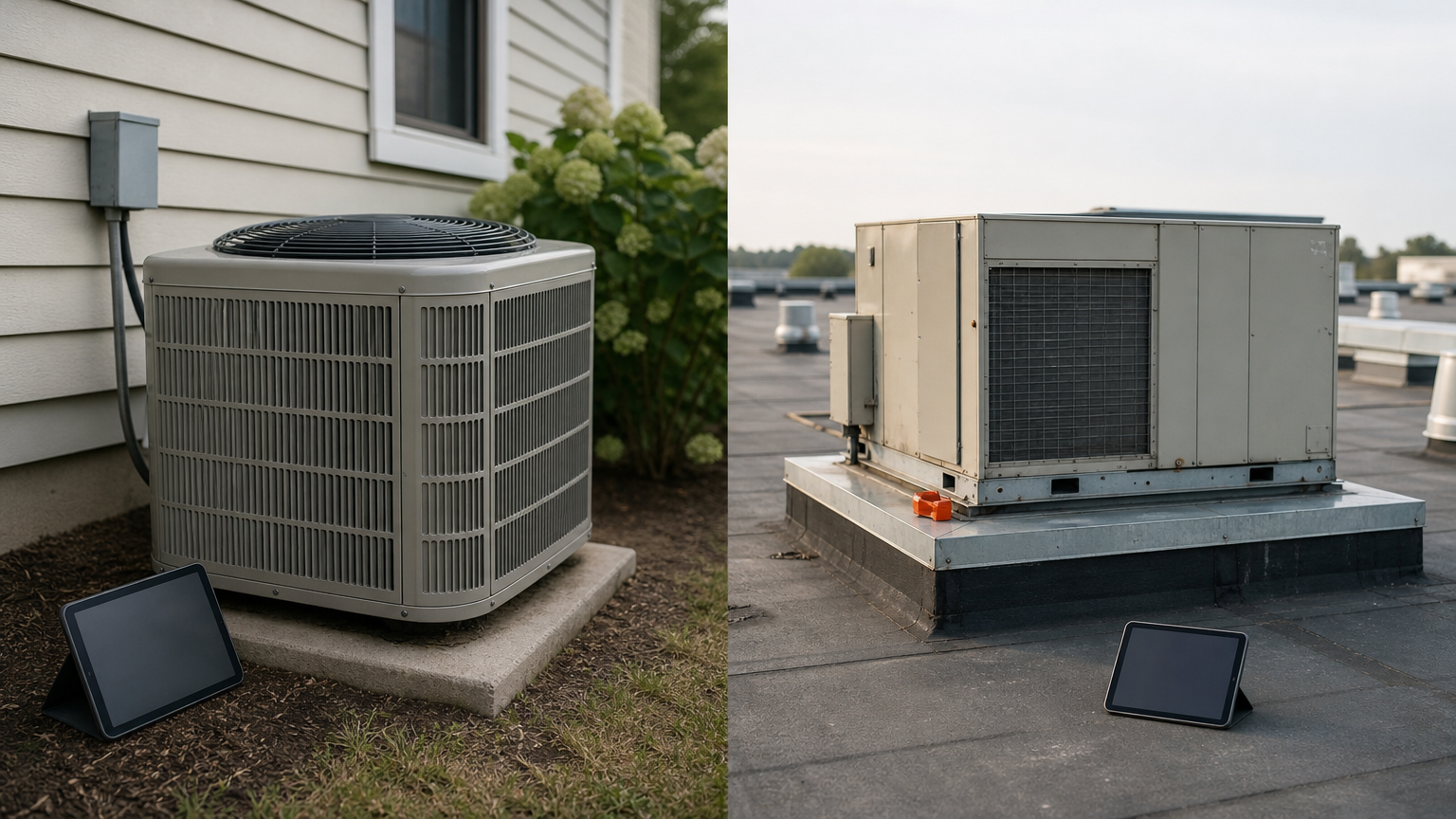
Commercial work is asset-led. You need agreements written against installed equipment, inspection workflows, and project costing for multi-phase jobs. If you handle regulated refrigerants, ask how the tool records refrigerant use and technician certifications, since EPA Section 608 rules put recordkeeping on you. A residential-first tool can stretch into light commercial work. It rarely stretches into project accounting.
1. Jobber
Jobber is the simplest way to get a small HVAC business off paper, but it has no real equipment records. It is a cloud-based platform built in Canada in 2011 for small to midsize service companies.
What it does for HVAC
Jobber covers scheduling, dispatch, a customer database, quoting, invoicing, and payments in one app. Tiered quotes let a customer pick a service level, such as a basic or premium maintenance package, straight from the estimate. Technicians update jobs and add notes from the mobile app.
- Recurring jobs for repeat maintenance visits
- Reporting on revenue by service type and job profitability
- QuickBooks Online sync, one way from Jobber into QuickBooks
The gap is equipment. Jobber has no equipment module, so the common workaround is a custom field that stores the unit's name as plain text. You get no make, model, serial number, or service history per unit.
Jobber is the easiest tool to start with and the first one HVAC shops outgrow.
Who it suits
Jobber suits solo operators and teams of two to ten doing mostly residential repair and tune-ups, who want to be running within days. It is a good first system if your current setup is a calendar and a notebook.
Look elsewhere if you track warranties by unit, run rooftop equipment under service contracts, or need project costing. Those workflows push you toward the commercial tools later in this list.
Pricing
Published plans run from about $49 to $279 per month, and there is a 14-day free trial. Features you may care about sit higher up the ladder, so check the plan before you assume.
- QuickBooks Online sync: Connect plan and up
- Digital checklists: Connect, Grow, and Plus plans
2. Housecall Pro
Housecall Pro is the strongest pick for residential HVAC teams up to about ten technicians. It started in 2013 as a home service tool and keeps the owner's phone at the center.
What it does for HVAC
Scheduling, dispatch, digital estimates, online booking, GPS tracking, and card payments all run from one interface. Service plans can automatically generate recurring jobs, which covers seasonal maintenance. Unlike Jobber, it stores equipment on the service address with make, model, serial number, install date, and notes.
- Maintenance job templates with a built-in checklist
- Online booking that feeds the schedule without a phone call
- QuickBooks Online sync, one way from Housecall Pro
The limit is the item list. Types lean residential, with air conditioner and boiler available but no rooftop unit or chiller type, so commercial units get filed under a close match.
Housecall Pro gives residential HVAC crews real equipment records, but its unit types stop short of commercial equipment.
Who it suits
Housecall Pro suits residential service shops with two to ten technicians that want quick onboarding and a polished customer experience, with automatic arrival texts and online booking.
It is a weaker fit for commercial contractors. Multi-site agreements, project costing, and rooftop unit hierarchies are not what it is built around.
Pricing
Published plans start with Basic and Essentials, with a 14-day free trial. Equipment tracking is listed under Essentials, and QuickBooks Online sync is not available on Basic.
- Basic: $59 per month billed annually, or $79 month to month
- Essentials: $149 per month billed annually, or $189 month to month, for five users
3. Service Fusion
Service Fusion is the best value for growing HVAC shops because its pricing is flat and includes unlimited users. Founded in 2014, it covers customer management, scheduling, dispatch, invoicing, and inventory.
What it does for HVAC
You pay by plan, not by seat, so adding a dispatcher or a new technician does not change the bill. The Pro plan adds a customer web portal with project approval and e-signature. The inventory module tracks parts across multiple locations and vehicles, which helps when trucks carry capacitors, contactors, and filters.
- Mobile apps for technicians
- QuickBooks Online and Desktop, with customers, products, and services syncing both ways
- GPS fleet tracking as an add-on
The vendor mentions equipment history, but the specific unit fields are not documented in public pages, so ask for them in a demo.
With flat pricing and unlimited users, Service Fusion gets cheaper per person the faster your crew grows.
Who it suits
Service Fusion suits HVAC teams of roughly five to fifty with a growing office staff. Unlimited users matter when dispatchers, estimators, and bookkeepers all need logins.
Test the mobile app in your worst-signal buildings before you commit. One App Store reviewer complained that it stops working out of cell range, and that is a risk to check yourself.
Pricing
Published pricing is $208 to $533 per month when billed annually, or $245 to $627 month to month. The annual payment is charged upfront.
- Starter: $208 per month billed annually, $245 month to month
- Pro: $533 per month billed annually, $627 month to month
- Recurring invoicing: on Pro or as an add-on
4. FieldEdge
FieldEdge is the HVAC-native choice for shops in the 10 to 25 truck range that run on QuickBooks. It traces back to dESCO, founded in 1980, and also serves plumbing and electrical.
What it does for HVAC
The dispatch board uses drag-and-drop assignment by technician skill and location. When a customer calls, their full service history appears, which helps repeat-heavy shops. On site, technicians use flat-rate pricing tools to present job costs and can see equipment history, spec sheets, and warranty dates.
- Service agreements: Basic on the Select plan, Advanced on Premier and Elite
- Real-time sync with QuickBooks Online and Desktop on all three plans
- A mobile app that carries job details and history into the field
Service agreements are the heart of an HVAC shop's recurring revenue, so check the plan tier that unlocks the version you need.
FieldEdge earns its place where agreements, a flat-rate pricebook, and QuickBooks all have to work together.
Who it suits
FieldEdge suits residential and light-commercial shops with several trucks that sell maintenance agreements and want the books to match the field without double entry.
Large commercial portfolios and project-driven contractors will want more depth. App Store reviews also describe freezing and payment-page problems in older app versions, so run a trial on the current mobile app.
Pricing
FieldEdge does not publish a price list. Pricing depends on plan and business size.
- One independent roundup lists about $100 per user per month
- Plans are Select, Premier, and Elite
- Ask about onboarding fees and contract length
5. ServiceTitan
ServiceTitan is the pick for established contractors scaling past 15 technicians who want sales tooling and field operations in one system. It launched in 2012 and covers HVAC, plumbing, electrical, and remodeling.
What it does for HVAC
Dispatch holds up at 50-plus trucks. The mobile presentation tools let technicians walk a customer through options with photos, videos, and pre-calculated financing. Equipment is tied to the location with model, serial, warranty, and service history, and memberships attach recurring services to a location and schedule them automatically.
- Dispatch Pro, Marketing Pro, and Finance Pro as add-on modules
- Reporting on technician revenue, close rate, and job profitability
- QuickBooks Online plus Desktop Premier and Enterprise
The cost is complexity. Implementation is significant, and the learning curve is real.
ServiceTitan pays off when you have the volume and management time to use all of it.
Who it suits
ServiceTitan suits mid to large HVAC contractors, especially residential and mixed shops that drive revenue through sales and memberships. If you have a call center, a marketing budget, and a manager who owns the system, it makes sense.
Under about 15 technicians, the per-seat cost is hard to justify against Service Fusion or FieldEdge. Commercial contractors with complex agreements and project billing may find it needs workarounds.
Pricing
ServiceTitan does not publish list pricing, and quotes are sales-led, usually on an annual contract.
- Independent roundups put it at roughly $300 per user per month
- Implementation is billed on top
- Add-on modules cost extra
6. ServiceTrade
ServiceTrade is built for commercial HVAC and mechanical contractors that win work on inspections and transparency. Its core is the inspection and the customer-facing record of what you did.

What it does for HVAC
Technicians run digital inspections that capture equipment condition and deficiencies on site. A deficiency-to-quote workflow turns each finding into a quoted repair, so inspection findings become revenue. Customers see completed work, quotes, and reports in a customer portal, which builds trust on recurring contracts.
- Service history for every asset and visit
- Dispatch and mobile capture of photos and findings
- Dashboards on service revenue and recurring inspection work
ServiceTrade turns the inspection into the sales tool, which is what commercial service agreements run on.
Who it suits
ServiceTrade suits commercial HVAC and mechanical contractors with recurring inspection and PM contracts, especially those serving customers who expect reports and a portal.
Residential shops will find little they need. Accounting and back-office depth is lighter than some rivals and often needs a separate integration, so ask what your bookkeeper would connect it to.
Pricing
ServiceTrade is quote-based. Pricing scales with technicians and modules.
- Ask what the portal and inspection modules add
- Ask which accounting systems integrate
- Ask what onboarding and training cost
7. BuildOps
BuildOps is the fit for commercial HVAC contractors that run service calls and installation projects in the same company. It brings service, agreements, quoting, and project work into one platform.
What it does for HVAC
Service technicians are dispatched with equipment context, while PM contracts generate work automatically. On the project side, job cost tracking gives real-time profitability against the estimate, and scheduling offers Gantt and calendar views. That pairing speaks directly to job costing, a gap in residential-first tools.
- Proposals and quotes in the same system as service
- Asset tracking tied to service history per site
- A mobile app for service and construction crews
BuildOps is a newer platform, so some workflows are still maturing next to longer-established rivals.
BuildOps is worth a demo when half your revenue is service and half is projects.
Who it suits
BuildOps suits commercial HVAC and mechanical contractors with both recurring service and project work, who want one system instead of a service tool plus a project tool.
Small residential shops will pay for depth they do not use. If you run on a specific ERP, confirm the accounting integration works before you sign.
Pricing
BuildOps does not publish prices. Quotes are oriented to commercial operations.
- Request pricing based on technicians and modules
- Ask what the accounting connection costs
- Ask about implementation timeline
8. simPRO
simPRO is the pick for project-driven HVAC contractors who need job costing from quote to invoice. It was founded in Australia in 2002 and serves HVAC, electrical, plumbing, and security trades.
What it does for HVAC
The platform covers quote through invoice with job costing throughout. Multi-stage jobs track cost against estimates, and technicians can create purchase orders from the field. The mobile app works in low-reception areas, so techs can log calls, add notes, and create POs offline.
- Scheduling and dispatch with technician assignment
- Maintenance scheduling for recurring contracts
- A native link that sends invoices to QuickBooks
If your margin lives or dies on install job costing, simPRO deserves a place on your shortlist.
Who it suits
simPRO suits commercial contractors running multi-day installs and service projects, rather than single-visit residential calls. It rewards owners who read cost reports.
Public pages did not clearly confirm equipment records, so ask for a demo of equipment and agreement handling. Residential-only shops will find it heavier than they need.
Pricing
Pricing is user-based. One independent roundup lists plans from about $60 per user per month.
- Confirm current plan and user pricing with simPRO
- Ask about onboarding and data migration costs
- Ask whether the QuickBooks link is one-way
9. FIELDBOSS
FIELDBOSS is the choice for mid-size to enterprise HVAC and elevator contractors that want field operations and ERP in one platform. It is built on Microsoft Dynamics 365 Business Central, and the company says contractors have used it for over a decade.
What it does for HVAC
Field service, finance, payroll, and CRM share one data layer instead of syncing between separate tools. It handles maintenance contracts and compliance tracking, with service schedules that generate work orders automatically. Technicians get serial numbers and warranty details in the field app, and the offline mobile app keeps working with weak signal.
- Real-time dashboards through Power BI
- Inspection automation for compliance-heavy work
- Service history that builds on each asset
FIELDBOSS makes sense only when you want the ERP and the field system to be the same system.
Who it suits
FIELDBOSS suits commercial HVAC contractors with 25-plus technicians, complex contracts, and a finance team that wants everything in Business Central.
It is not for owner-operators or small shops. Because it is built around Business Central, you will not use QuickBooks with it.
Pricing
FIELDBOSS prices on business size. One independent roundup reports about $90 per user per month plus an implementation engagement above $50,000.
- Confirm licensing and implementation costs in writing
- Ask about Dynamics 365 licensing costs
- Ask how long go-live takes
How the nine compare and which to pick
Equipment records and accounting sync separate these tools more than the feature lists do. Use the table to rule options out, then pick by team size and work type.
Side-by-side comparison
The pricing column shows publicly reported starting figures, so treat each as a floor, not a quote.
| Software | Best for | Equipment records | QuickBooks | Reported price |
|---|---|---|---|---|
| Jobber | Small residential teams | None; custom field only | Online, one way, Connect plan and up | $49 to $279/mo |
| Housecall Pro | Residential, up to about 10 techs | Native item record, residential-leaning types | Online, one way, not on Basic | $59 to $149/mo annual |
| Service Fusion | Growing shops, 5 to 50 | History mentioned, fields not documented | Online and Desktop | $208 to $533/mo annual |
| FieldEdge | 10 to 25 trucks, QuickBooks users | History and warranty dates | Online and Desktop, real time | About $100/user/mo |
| ServiceTitan | 15+ techs, sales-led | Unit record with serial and warranty | Online, plus Desktop Premier and Enterprise | About $300/user/mo |
| ServiceTrade | Commercial inspection work | Service history per asset | Confirm with vendor | Quote |
| BuildOps | Commercial service plus projects | Asset tracking | Confirm with vendor | Quote |
| simPRO | Project-driven contractors | Confirm in demo | Invoice link to QuickBooks | About $60/user/mo |
| FIELDBOSS | Mid-size to enterprise | Serials and warranty per asset | None; Business Central | About $90/user/mo plus $50K+ |
Pick by team size and work type
Start with your truck count, then your revenue mix. Most shops land in one of these lanes.
- Under 10 trucks, residential: Jobber for the lowest friction, Housecall Pro if you want equipment records and online booking.
- 5 to 50 people with growing office staff: Service Fusion, because unlimited users keep the bill flat.
- 10 to 25 trucks on QuickBooks: FieldEdge, for agreements and real-time sync.
- 15-plus technicians selling replacements and memberships: ServiceTitan.
- Commercial agreements and inspections: ServiceTrade or BuildOps.
- Install-heavy, cost-driven contractors: simPRO.
- ERP-centered enterprise contractors: FIELDBOSS.
What the software costs, and whether any of it is free
Expect to pay from about $60 per user per month up to $300 or more, and no full HVAC platform is free. What you will find is 14-day trials, which Jobber and Housecall Pro both offer. Use the trial to run your real jobs, not a demo account.
A worked example for an eight-person shop
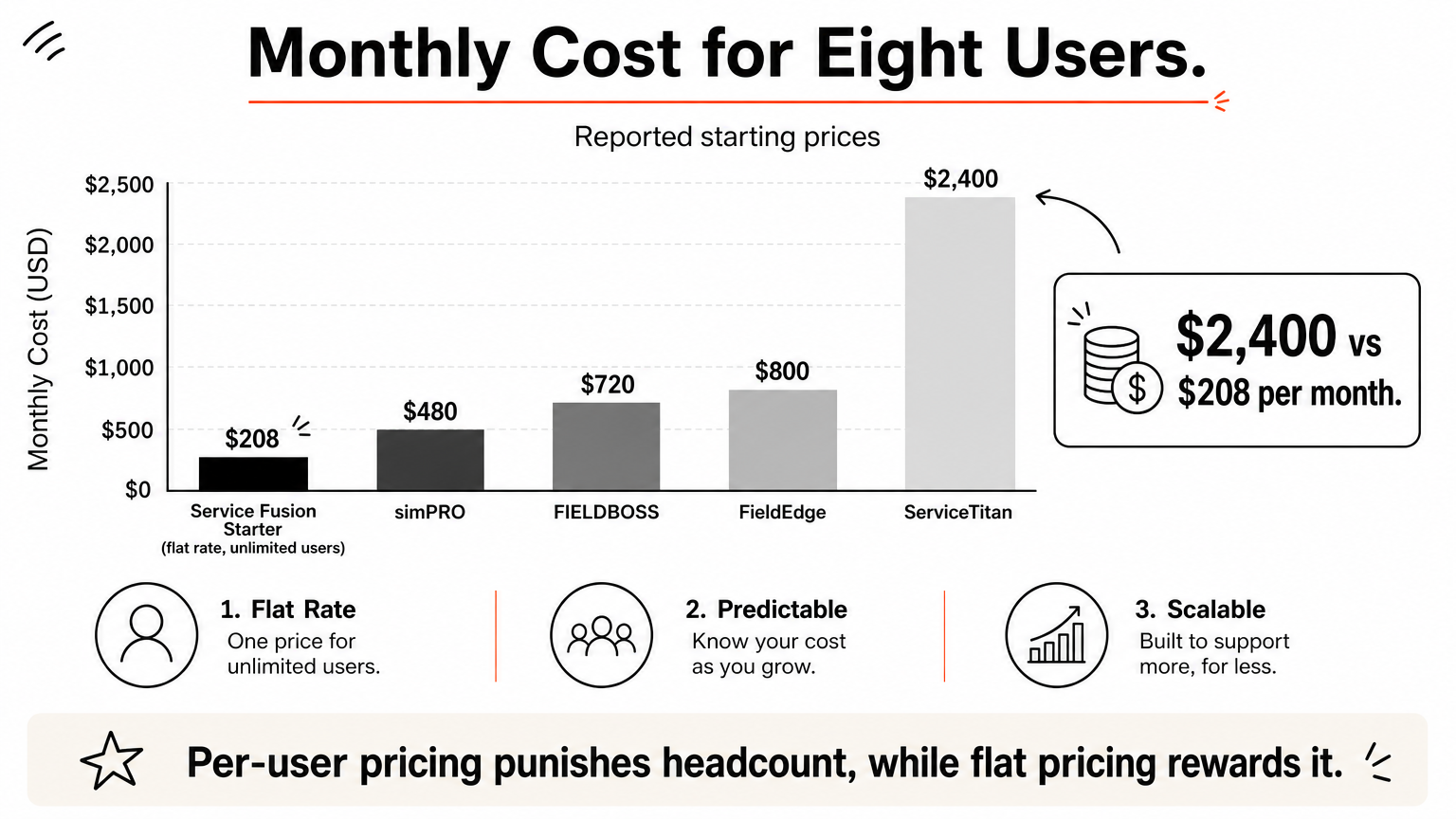
Take a shop with six technicians and two office staff, so eight users, and apply the reported starting figures. Real quotes vary by plan and add-ons.
| Software | Calculation | Per month | Per year |
|---|---|---|---|
| Service Fusion Starter | Flat rate, unlimited users | $208 | $2,496 |
| simPRO | 8 x $60 | $480 | $5,760 |
| FIELDBOSS | 8 x $90 | $720 | $8,640 plus $50,000+ implementation |
| FieldEdge | 8 x $100 | $800 | $9,600 |
| ServiceTitan | 8 x $300 | $2,400 | $28,800 plus implementation |
Housecall Pro Essentials is $149 per month billed annually for five users, so an eight-person team should ask what the extra users cost. The pattern is clear. Per-user pricing punishes headcount, while flat pricing rewards it.
Costs beyond the subscription
Setup, data migration, training, payment processing fees, and add-on modules are where budgets drift. Ask each vendor for a first-year total, not the monthly figure. Include implementation and any plan upgrade needed for QuickBooks sync or agreements.
Compare first-year totals, not monthly prices, because implementation and plan tiers are where quotes diverge.
Making your HVAC software work after you sign up
The software you choose matters less than how well it is configured. Most disappointment with HVAC field service management software comes from default settings, unused features, and disconnected tools, not from the product itself.
Configure before you train
Set up job types, pricing tiers, maintenance agreements, and team permissions before anyone logs in. A dispatcher who sees a clean board on day one adopts the tool. A technician who sees clutter ignores it. HSP Automation handles this as CRM setup and optimization for Housecall Pro, ServiceTitan, and Jobber, and setups typically take one to two weeks.
Train by role. Dispatchers, technicians, and office staff need different workflows, and short role-based sessions beat a single all-hands demo.
Automate the repeat work
Once the basics run, automate the handoffs that eat office hours. With Zapier or custom API work, these are the usual first targets:
- Instant text and email replies to new leads
- Estimate follow-ups that stop after a customer responds
- Invoice reminders for unpaid jobs
- Review requests after a completed visit
- Job and invoice data syncing to QuickBooks
Housecall Pro users can go beyond the standard Zapier app. HSP Automation's custom integration adds 13 triggers and 49 actions that are not in the standard app, with a 14-day free trial, then $147 per month plus a one-time $147 setup fee. It needs your own Zapier account.
Software only saves time once the repetitive handoffs between your tools stop depending on a person.
Choosing your HVAC software
Pick by team size and work type, and your shortlist drops to two or three tools. Residential teams under ten trucks will do well with Jobber, Housecall Pro, or Service Fusion. FieldEdge and ServiceTitan serve growing shops that sell agreements and replacements. ServiceTrade, BuildOps, simPRO, and FIELDBOSS serve commercial contractors with inspections, projects, and ERP needs.
Run a trial on a real week of jobs, confirm the first-year total in writing, and check how equipment records and QuickBooks sync work for your shop. If you want help configuring Housecall Pro, ServiceTitan, or Jobber once you have chosen, book a free strategy call with HSP Automation.