November 12, 2026
6 Best Field Service Software for QuickBooks Compared
The best field service software for QuickBooks is the tool whose sync fits your QuickBooks version and moves data in the direction you need. Housecall Pro and Jobber suit small residential teams on Qu...
Written by Frankwin Hooglander
The best field service software for QuickBooks is the tool whose sync fits your QuickBooks version and moves data in the direction you need. Housecall Pro and Jobber suit small residential teams on QuickBooks Online. ServiceTitan suits larger operations with many technicians. Intuit Field Service Management and Smart Service suit shops that stay on QuickBooks Desktop, and Service Fusion sits in the middle.
The problem is familiar. A technician closes a job, the office retypes it into QuickBooks, and a wrong tax rate or a missed line item shows up at month end. Most vendors say they "integrate with QuickBooks," but that phrase covers everything from a full two-way sync to a one-way invoice push. This article compares six options on QuickBooks version, sync behavior, fit, and price, then shows you how to test any of them before you commit.
At HSP Automation we set up Housecall Pro, ServiceTitan, and Jobber for home service companies and connect them to QuickBooks regularly. The notes below reflect what matters in that work.
1. Housecall Pro
How the QuickBooks sync works

Housecall Pro is an all-in-one platform for scheduling, dispatching, invoicing, payments, and customer management in the home trades. Its QuickBooks Online sync sends invoice data from Housecall Pro to QuickBooks, and users report that changes made in QuickBooks do not sync back.
Treat Housecall Pro as the system of record, then. If your bookkeeper edits a customer's address only in QuickBooks, dispatch can still send a tech to the old one. Edit in the field tool first and let QuickBooks follow.
With a one-way sync, the field tool owns the record and QuickBooks only receives it.
Who it suits
This QuickBooks field service software fits plumbers, HVAC techs, and cleaners who want a simple, mobile-first tool with standard workflows. Teams that need deep customization or a full CRM tend to outgrow it.
- Strengths: drag-and-drop dispatch board, GPS tracking with route optimization, automated appointment reminders, online booking with payments.
- Limits: one-way QuickBooks sync, limited CRM and customization depth, support complaints from some users.
Pricing
Published plans have started at $79 per month for one user, with a $189 tier for up to five users and a $329 tier for up to eight.
Prices change, so confirm current tiers on the vendor's site. Ask which tier includes the QuickBooks sync before you assume it comes with the base plan.
2. Jobber
How the QuickBooks sync works
Jobber combines quoting, scheduling, invoicing, payments, and a client portal for home service businesses. Its QuickBooks connection works with QuickBooks Online only and pushes data one way, so there is no Desktop option.
Expect gaps beyond invoices. Reviewers note that expenses, inventory, and purchase orders may not sync, which limits job costing inside QuickBooks. Changes your bookkeeper makes in QuickBooks also will not reach Jobber.
If you need job costing in QuickBooks, check that expenses and purchase orders sync, not only invoices.
Who it suits
Jobber suits owner-operators and crews of two to five techs doing standard residential work on QuickBooks Online. Owners who want custom modules or workflows will hit its limits.
- Strengths: polished interface, Client Hub for requests and payments, batch invoicing, quote templates, strong mobile app.
- Limits: Online only, one-way sync, no custom modules, per-user cost that grows.
Pricing
Jobber prices by plan and number of users, so the monthly cost rises with each technician. Current tiers are on its pricing page.
A shop that looks cheap at three techs can look expensive at ten. Price the team you will have in two years, not the one you have today.
3. ServiceTitan
How the QuickBooks sync works

ServiceTitan is a cloud platform built for larger, high-volume operations and commercial work. It syncs invoices, field payments, and deposits to QuickBooks Online, and its Transaction Hub adds real-time cash flow views and audit logs. If you run Desktop, ask about support for your edition separately.
Depth is the draw. Because payments and deposits post automatically, a big office spends less time reconciling. The tradeoff is onboarding: reviewers describe a steep learning curve, and implementation can run for months.
ServiceTitan pays off when your volume is high enough that reconciliation time costs more than the software.
Who it suits
This is QuickBooks field service software for companies with many technicians, complex projects, and a dedicated operations team. A ten-person shop will probably find it heavy.
- Strengths: capacity-based scheduling and smart dispatch, job costing and profitability reports, live fleet tracking.
- Limits: price, complexity, and occasional mobile app performance complaints.
Pricing
ServiceTitan does not publish prices, but third-party reports put it at around $398 per technician per month. A ten-tech shop at that rate pays about $3,980 per month, or $47,760 per year, before onboarding.
Treat that figure as a ballpark, not a quote. Request a written price for your headcount, including implementation fees.
4. Intuit Field Service Management
How the QuickBooks sync works
Intuit Field Service Management is a web-based work order, scheduling, and dispatching system for service and installation businesses. It was designed first for QuickBooks Desktop Enterprise, syncing work orders and invoices. It includes iOS and Android apps and a dashboard showing each tech's work orders, location, and status.
Version support deserves a direct question. Intuit also shows a QuickBooks Online demo, while some comparisons say the tool connects only to Desktop Enterprise. Ask which QuickBooks version your account would actually use, and get the answer in writing.
Because Intuit built it, the Enterprise sync is the reason to consider it, not the feature list.
Who it suits
It suits small to mid-sized shops on QuickBooks Desktop with straightforward workflows and little need for customization, in residential or commercial work.
- Strengths: native connection to QuickBooks, scheduling and dispatch, GPS visibility of technicians, mobile apps.
- Limits: reviewers describe the interface and mobile app as dated, and customization is limited.
Pricing
Intuit's product page points you to its sales line rather than a price list, so pricing is quote-based. That also answers how much Intuit Field Service Management costs: you get the number from a quote, not a page.
When you call, ask for the pricing basis (per user or per technician), the setup cost, and whether mobile access is included.
5. Service Fusion
How the QuickBooks sync works
Service Fusion targets small to mid-sized field service businesses and lists QuickBooks Online and Desktop support. Sources disagree on the mechanics. Some describe a native sync, others describe Zapier-based connectors for customers, invoices, and payments.
That difference matters for reliability. A native connection is maintained by the vendor, while a connector layer adds one more piece that can break after an update. Ask for the sync architecture and request a live test during the demo.
Before you buy, find out whether the QuickBooks link is native or a connector layer.
Who it suits
It works for budget-conscious shops and Desktop users who value function over polish. If you want a modern interface and a slick customer portal, look elsewhere.
- Strengths: customizable job templates for work orders, GPS tracking and fleet tools, mobile invoicing with QuickBooks Online sync, role-based access.
- Limits: a dated interface, mixed mobile reviews, and a basic customer portal.
Pricing
Service Fusion offers Starter, Plus, and Pro plans without a public price list. Sources conflict, with some describing flat-rate pricing and others quoting per-user figures starting around $24 per month.
Because the models differ so much, get a written quote for your exact headcount and compare it against the per-user tools above.
6. Smart Service
How the QuickBooks sync works
Smart Service is a QuickBooks Desktop add-on that brings scheduling and dispatch to your existing company file, with real-time syncing of jobs, invoices, and customers. Optional modules cover inventory, service agreements, and lead management.
Its limits are as clear as its strengths. It works with QuickBooks Desktop only and runs on Windows only, so Mac users and cloud-first teams should look elsewhere. Reviewers also call the interface dated.
For a Windows shop committed to Desktop, a native add-on can beat a cloud tool bolted on through a connector.
Who it suits
Smart Service suits small to mid-sized contractors in HVAC, plumbing, and pest control who live in QuickBooks Desktop and want something easy to learn. Companies with complex, growing workflows may find it limiting.
- Strengths: dispatch board, GPS tracking of technician location and job status, inventory and stock management, custom digital forms, time tracking tied to job records.
- Limits: dated interface, Windows only, not built for complex workflows.
Pricing
Smart Service does not list prices, so you contact the team for a quote.
Ask whether the optional modules for inventory, service agreements, and lead management are priced separately, since those are often the reason to choose it.
How to choose and close the sync gaps
Match the tool to your QuickBooks setup
Start with your QuickBooks version, because it removes half the field. Intuit ended new U.S. subscriptions for QuickBooks Desktop Pro Plus and Premier Plus on September 30, 2024, while Enterprise was unaffected, according to Intuit's announcement. Nothing replaces QuickBooks in this picture. New buyers simply land on Online or Enterprise, which is why most field service management software for QuickBooks is Online-first.
This table puts the six side by side:
| Tool | QuickBooks version | Sync notes | Pricing |
|---|---|---|---|
| Housecall Pro | Online | Invoices pushed one way | From $79/month for one user |
| Jobber | Online only | One way; expenses, inventory, POs may not sync | Per plan and user |
| ServiceTitan | Online (ask about Desktop) | Invoices, payments, deposits sync automatically | Quote-based; third-party reports about $398 per tech/month |
| Intuit Field Service Management | Desktop Enterprise (ask about Online) | Native work order and invoice sync | Quote-based |
| Service Fusion | Online and Desktop | Native or connector-based, depending on source | Quote-based; sources conflict |
| Smart Service | Desktop only (Windows) | Real-time job, invoice, and customer sync | Not published |
No tool wins every row, so rank the rows by your QuickBooks version first and price second.
Five questions to ask in every demo
Every vendor says it integrates with QuickBooks, so feature lists tell you little. Put these five questions to each one:
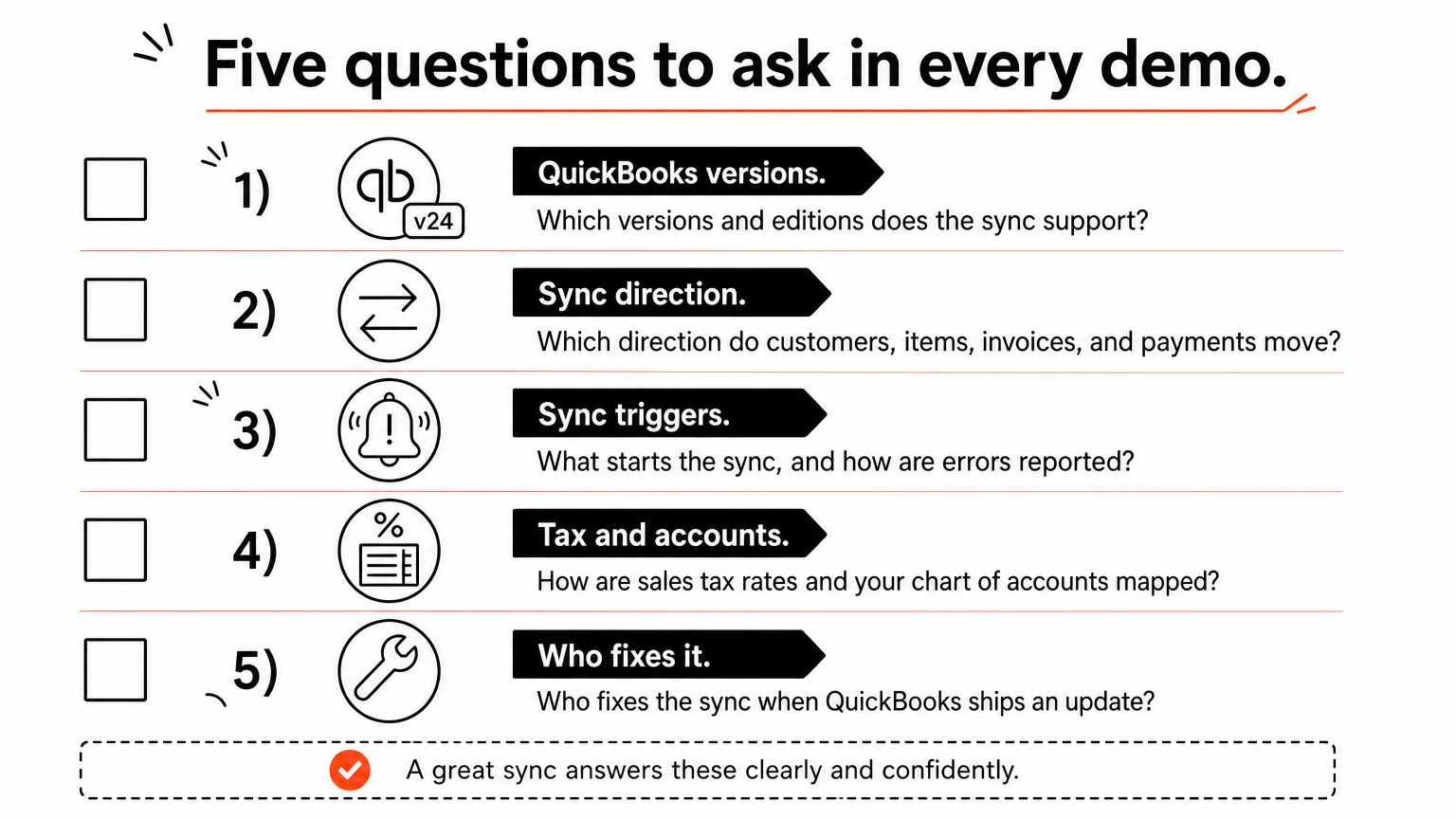
- Which QuickBooks versions and editions does the sync support?
- Which direction does each record type (customers, items, invoices, payments) move?
- What triggers the sync, and how are errors reported?
- How are sales tax rates and your chart of accounts mapped?
- Who fixes the sync when QuickBooks ships an update?
Run one test invoice before go-live. Create it in the field tool, let it sync, check it in QuickBooks, record a test payment, and confirm it applies. Clean up customer names first, since "Jones & Sons" and "Jones and Sons" can create duplicate records.
Where automation fills the gaps
Automation closes specific gaps, but it does not turn a one-way sync into a two-way one. A tool like Zapier can connect QuickBooks to your field service platform and handle steps the native sync skips, such as follow-ups, tag updates, and notifications.
HSP Automation does this for home service companies. We connect QuickBooks to your field service CRM so job data, invoices, and payments sync automatically, and we configure Housecall Pro, ServiceTitan, and Jobber to match how your team works. For Housecall Pro users, our custom Zapier integration adds 13 triggers and 49 actions that the standard Zapier app lacks. It costs $147 per month plus a $147 one-time setup fee, which is roughly $1,911 in the first year, with a 14-day free trial. You need your own Zapier account.
If you would rather not touch Zapier, our done-for-you Zap service starts at $97 per month plus a $97 setup fee for one to five Zaps. That comes to $1,261 in the first year, and maintenance is included.
Pick the sync first, then the features
Choosing field service software for QuickBooks comes down to three checks: your QuickBooks version, the direction of the sync, and the cost at the headcount you will have in two years. Housecall Pro and Jobber fit small Online teams. ServiceTitan fits large operations. Intuit Field Service Management, Smart Service, and Service Fusion cover Desktop shops.
Whichever tools you shortlist, run a test invoice through the full workflow before you sign. Then decide whether the native sync is enough or whether a few automations would remove the manual steps that remain.
If you want a second opinion on your shortlist or help wiring your tool to QuickBooks, book a free consultation with HSP Automation. We handle the setup, training, and monitoring, so you do not need technical experience.