November 18, 2026
6 Best Painting Contractor Website Examples to Copy
The best painting contractor website examples do one job well: they help a homeowner trust you and ask for an estimate within a minute of landing. In this list, Singletrack Painting suits owners who w...
Written by Frankwin Hooglander
The best painting contractor website examples do one job well: they help a homeowner trust you and ask for an estimate within a minute of landing. In this list, Singletrack Painting suits owners who want a clear process and quote form, and Saul's Quality Painting suits crews that lead with licenses and experience. Phinney Ridge Painting suits specialists with a credential to show. Painter Bros shows how review and job counts persuade, Sharper Impressions shows how guarantees remove risk, and Hedlund Painting suits painters with a strong portfolio.
Most paint contractor websites fail in the same ways. They hide the phone number, use stock photos instead of finished work, and give a homeowner no reason to pick them over the next result. You can beat that without a big budget, because the patterns that win are simple and repeatable.
This article walks through six real sites, shows what each does well, and tells you how to copy it. Then it covers how to get a site built, what it costs, and how to check the one you already have. HSP Automation builds websites for home service trades, painting included, so the advice comes from the build side and not from a design gallery.
1. Singletrack Painting: a clear process and quote form
Singletrack Painting, a Denver Front Range contractor built on Squarespace, removes doubt before a homeowner picks up the phone. It explains how a job runs and keeps a quote request within reach.
What the site does
The layout is a modern grid with blue accents on a white background. It offers interior and exterior painting, cabinet painting, commercial roof coatings, and free color consultations. It shows before and after project photos, then a multi-step process section that explains what happens between the first contact and the finished job.
Homeowners worry about the unknown: surprise costs, a messy house, a crew that never shows. A short numbered process answers those fears before they become objections.
A homeowner who understands your process feels safer requesting a quote.
How to copy it
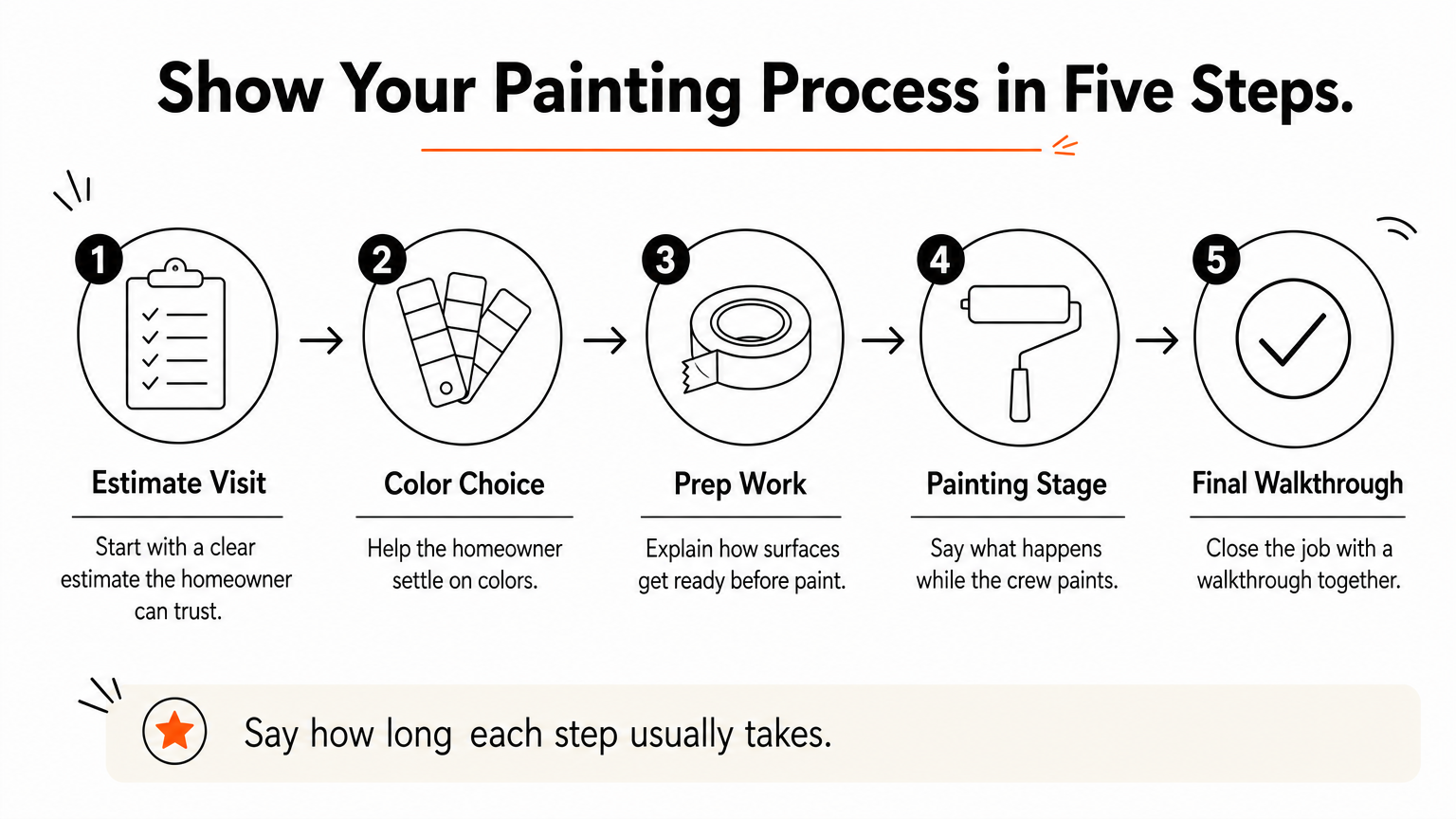
Write your process in four or five steps and place it right below your first screen. Keep the quote form short and visible.
- Name each step in plain words: estimate, color choice, prep, painting, walkthrough.
- Say how long each step usually takes.
- Repeat a "Get a Quote" button after the process section.
2. Saul's Quality Painting: licensed and insured up front
Saul's Quality Painting, a residential contractor on Wix, puts proof of legitimacy where visitors see it first. The site does not make a homeowner hunt for it.
What the site does
The page carries a prominent "Licensed & Insured" badge next to customer testimonials. It also states 25 years of experience and uses video, neutral backgrounds, and bold accent colors for its buttons.
Letting strangers into your home is a trust decision. Insurance and a license are the first things a careful homeowner wants to confirm, and putting them above the fold answers the question before it is asked.
Trust badges belong on the first screen, not buried in an About page.
How to copy it
State what you can prove and make the proof easy to scan.
- Show your license number, liability coverage, and years in business near the top.
- Pair the badge with two or three short reviews that name a specific job.
- Use one button color that appears nowhere else on the page, so the call to action stands out.
3. Phinney Ridge Painting: a credential as the selling point
Phinney Ridge Painting, built on Webflow, shows how a specialist credential separates you from generalists. It leads with EPA certification and lead-safe work.

What the site does
The site presents the company as an EPA-certified painting contractor with 5-star ratings. It lists exterior and interior painting, carpentry and repairs, small projects, and lead safety services. A full-width carousel of finished projects sits beside a clear "Request Estimate" button, and the tagline "Professional Painting With a Personal Touch" ties the pitch together.
Federal lead-safe rules cover work in homes built before 1978. Owners of older homes search for painters who handle that correctly, so the credential is a reason to call, not just a badge.
A credential only sells when you explain why it matters to the homeowner.
How to copy it
Pick the credential or specialty that fits your best customers and give it its own section.
- Explain in two sentences what the certification protects, such as a family living in an older house.
- Link the credential to a dedicated service page, such as lead-safe repainting.
- Keep one estimate button visible beside the project photos.
4. Painter Bros: big numbers and local content
Painter Bros, a national franchise on Webflow, shows how numbers and local relevance build confidence quickly. You do not need its scale to use its tactics.
What the site does
The page uses a dark background with blue and yellow accents and service category cards for interior, exterior, cabinets, epoxy floors, and commercial work. It shows 500+ Google reviews and 100k+ jobs completed as trust indicators. It also adapts content to the visitor's location, so a homeowner sees their own area.
Specific figures are more believable than adjectives like "trusted" or "experienced." Local relevance tells the visitor you work in their neighborhood, which matters more than brand size for most painting jobs.
Use real numbers, because "trusted" claims nothing and "412 reviews" proves something.
How to copy it
Replace franchise scale with your own honest figures and write local pages by hand.
- Show your review count, average rating, and years in business as three short stats.
- Build one page per city or neighborhood you serve, with real project photos from that area.
- Group your services into cards so visitors can find theirs in seconds.
5. Sharper Impressions Painting: guarantees that remove risk
Sharper Impressions Painting, a multi-location franchise running a custom Next.js build, puts its promises on the page. A homeowner sees what happens if something goes wrong.
What the site does
The site displays a 4.8-star rating, a 2-year labor warranty, and an "Always On-time" guarantee. These sit with free quote buttons and before and after photography. It serves offices in Kansas City, Orlando, Atlanta, Indianapolis, and Nashville.
Hiring a painter is a risk: late starts, peeling paint, disputes over the finish. A written guarantee moves that risk from the homeowner to you, which is exactly what a hesitant buyer wants.
A guarantee you state clearly and honor is the cheapest conversion tool you have.
How to copy it
Promise only what your crew delivers every time, then say it plainly.
- Choose one or two promises, such as a labor warranty or a start-date commitment.
- Put them next to your quote button, not on a separate policy page.
- Write the terms in plain words, including what the warranty covers.
6. Hedlund Painting: portfolio, FAQ, and reviews working together
Hedlund Painting, a WordPress site serving Greater Seattle, answers the questions a homeowner has while comparing contractors. It shows the work, explains the details, and displays outside reviews.

What the site does
The site offers a filterable project gallery, so visitors sort by the type of job they want. It adds an expandable FAQ section, Google Reviews integration, and Houzz badges. Services include interior and exterior painting, cabinet refinishing, drywall repair, carpentry, and HOA and multifamily painting.
A homeowner repainting a kitchen wants to see kitchens, not a mixed pile of photos. Reviews pulled from Google are harder to doubt than quotes you typed yourself.
Visitors believe your work when they can filter it to match their own project.
How to copy it
Organize everything you already have instead of creating new material.
- Tag every project by type: interior, exterior, cabinets, commercial.
- Write an FAQ from questions customers actually ask, such as prep work, timing, and deposits.
- Embed your Google reviews so new ones appear automatically.
How to get a painting contractor website of your own
The fastest way to get a strong painting contractor website is to decide on the six elements above first, then choose the build route that gets them live without eating your weeks. The platform matters less than you think. The six sites above run on Squarespace, Wix, Webflow, WordPress, and a custom build, and each works because of its content.
Choose how to build it
You can use a builder, hire a freelancer, or work with a team that builds for trades. A free painting contractor website or a free template gets you online, but free plans usually limit features and domain options, and you still have to write the copy and shoot the photos.
| Route | What you pay | Best for |
|---|---|---|
| Website builder with a template | Monthly subscription plus your own time | Solo painters who can write and photograph their work |
| WordPress with a theme or freelancer | Depends on scope | Owners who want control and have a designer to rely on |
| Custom build for trades | From $1,500 for a basic 5-page site, typically $2,000-$3,500 with booking and SEO, $5,000+ for complex builds | Owners who want booking tied to their field service software |
What it costs and what you get
HSP Automation's website development service follows the custom route. Most sites take 2 to 4 weeks, simple 5-to-10-page sites can be ready in 2, and you own the site 100%. Booking integrations cover Housecall Pro, ServiceTitan, Jobber, and Calendly, and maintenance plans start at $99/month.
Here is a worked example. Take a $2,500 site plus $99/month maintenance, which is $3,688 for the first year. If your average job is $3,000, two extra jobs from the site cover that first year. Your own job value will change the math, but this is the comparison to run.
Check your current site first
If you already have a site, grade it before you spend anything. The free Website Grader for Contractors scans speed, SEO, mobile usability, security, and trust signals in about 60 seconds, with no credit card. It returns a scored report across six categories, so you see what to fix before you redesign.
Build the site homeowners trust
A good painting contractor website shows your process, your proof, your promises, and your work, then makes the estimate request easy. The six examples each lead with one of those, and you can combine all of them on a single site. Start with the elements you can fill in this week: your license, your review count, your best project photos, and a short process.
If you would rather hand the build to a team that works with trades every day, HSP Automation builds websites for home service businesses, tied to your booking system and ready to turn visitors into estimate requests.