November 26, 2026
Automation of Business Processes: What It Means in Practice
Automation of business processes means using software to do recurring work that people used to do by hand, such as entering data, routing approvals, sending reminders, and moving information between s...
Written by Frankwin Hooglander
Automation of business processes means using software to do recurring work that people used to do by hand, such as entering data, routing approvals, sending reminders, and moving information between systems. It is usually called business process automation, or BPA. You set the rules once, and the software follows them every time, without waiting for someone to remember.
This article covers why it matters, how to automate a process step by step, what happens inside an automated workflow, the main types, and examples by department. It also separates BPA from RPA and BPM, three terms that get mixed up constantly.
At HSP Automation we build these systems for home service and trades companies, so many examples lean on quoting, dispatch, invoicing, and lead follow-up. The ideas apply to any business that repeats the same steps every week.
Why automation of business processes matters
Manual work costs more than it looks
Repetitive manual work costs you hours, accuracy, and customer goodwill, and automating business processes removes most of it. The cost hides because each task feels small. A worked example shows the scale. Say a plumbing office books 25 jobs a week and handles three routine steps by hand for each one.

| Manual step | Minutes per job | Hours per week (25 jobs) |
|---|---|---|
| Retyping customer details from booking into invoicing | 6 | 2.5 |
| Sending a quote follow-up | 6 | 2.5 |
| Sending an invoice reminder | 6 | 2.5 |
| Total | 18 | 7.5 |
That is 7.5 hours a week, or about 390 hours a year, spent on work that follows the same rule every time. The figures are illustrative, but the pattern is real. Depending on job volume and setup, businesses we work with can save 10 to 20 hours of administrative work per week.
Automation pays off wherever the same step repeats dozens of times a week.
Gains beyond saved time
Hours are only the most visible gain. Automated business processes also change how the work behaves:
- Speed. A lead who submits a form at 9 pm gets a text reply within seconds, not the next morning.
- Consistency. Every job follows the same steps, no matter who is in the office that day.
- Fewer errors. Data typed once and passed along cannot be mistyped the second time.
- Visibility. Every step leaves a record, so you can see where jobs stall and show what happened during an audit.
- Scale. Volume can grow without adding admin staff in proportion.
When automation does not pay
Low-volume work rarely justifies the effort. If a task happens twice a month, a checklist is cheaper than a workflow. Automation earns its keep through repetition.
The second trap is judgment-heavy work. Pricing an unusual repair or calming an upset customer needs a person. Automate the steps around those moments, such as gathering details beforehand and logging the outcome afterward, and leave the decision to your team.
How to automate a business process, step by step
Choose the right process first
Start with a process that is repetitive and rule-based, because those are the cheapest to automate and the quickest to pay back. Look for these signs:
- It happens often, ideally every day or week.
- The steps are the same each time.
- It involves several people or several software tools.
- Delays hurt, as with new leads or unpaid invoices.
- Mistakes are common, usually from retyping data.
Pick one process that scores high on most of these. Do not start with your most complicated one.
Six steps from idea to working automation
Follow this order. Skipping the early steps is the main reason automation projects disappoint.
- Map the current process. Write down every step, who does it, and how long it takes. Include the workarounds people use.
- Fix the process on paper. Remove steps that exist only out of habit. Automating a bad process just produces bad results faster.
- Set a measurable goal. For example, send every invoice within one hour of job completion, or cut data entry to zero.
- Choose the tool. Check what your current software can already do, then whether a connector or custom integration is needed. Prioritize integration with the systems you use, ease of use for your team, and security.
- Build and test. Start with a copy of real data or a few test jobs. Check edge cases such as a missing email address or a canceled job.
- Launch, measure, adjust. Compare results to your goal after a few weeks and refine the rules.
Timing depends on scope. Simple automations can be live in a day or two, and complex multi-step workflows usually take one to two weeks.
Mistakes that sink projects
The most common mistake is skipping documentation. If nobody wrote down how the process runs, nobody can tell whether the automation matches it. Keeping procedures in one version-controlled place, such as SOP Manager, makes both the build and later changes easier.
Close behind are automating too much at once and leaving no owner. Start with one workflow, name one person responsible for it, and expand once it runs cleanly. Automations also need upkeep, because software updates and new pricing rules can break a workflow that worked last month.
Fix the process on paper before you automate it, or you will only produce the same mess faster.
How business process automation works
Triggers, rules, and actions
Every automated workflow runs on three parts: a trigger that starts it, rules that decide what happens, and actions that do the work. Strung together, they form a workflow. Here is how a typical post-job workflow looks in a field service tool:
- Trigger: a technician marks a job complete.
- Rule: if the customer has an email address and the invoice total is above zero, continue.
- Action 1: send the invoice.
- Action 2: wait two days, then send a review request if the invoice is paid.
- Action 3: if it is unpaid, notify the office instead.
Notice the branch in the last two actions. Good automations handle exceptions by sending them to a person, not by guessing.
Connecting your systems
Most businesses run on several tools: a field service platform, accounting software, a calendar, email. Business system automation connects them so data moves on its own. When a job is completed in your CRM, the invoice and payment can appear in your accounting software without anyone retyping them.

Connections happen through APIs, the interfaces that let software talk to other software. Many tools offer built-in integrations. Where they do not, connector platforms such as Zapier link thousands of apps, and a custom API integration covers the rest. The goal is the same in every case: enter the data once and let it flow.
BPA vs RPA vs BPM
These three terms describe different layers of the same effort. Mixing them up leads to buying the wrong thing.
| Term | Scope | Question it answers | Example |
|---|---|---|---|
| BPM (business process management) | Whole process lifecycle | How should this process work and how do we improve it? | Redesigning how estimates move from request to signed approval |
| BPA (business process automation) | End-to-end workflow across systems | How do we run this process with minimal manual work? | Estimate approval triggers job creation and scheduling |
| RPA (robotic process automation) | One rule-based task | How do we copy this repetitive click-and-type task? | A bot moves data from a form into software with no connector |
BPM decides what good looks like, BPA makes it run, and RPA handles individual tasks inside it. If you only have budget for one habit, make it BPM-style thinking, which is simply mapping and improving a process before you automate it.
Automation executes a process; it does not design one, so design comes first.
Types of business process automation
Five types, from simple to advanced
Automation ranges from one automated task to AI-driven systems that adapt. Each type builds on the one before it, and vendors group them slightly differently.
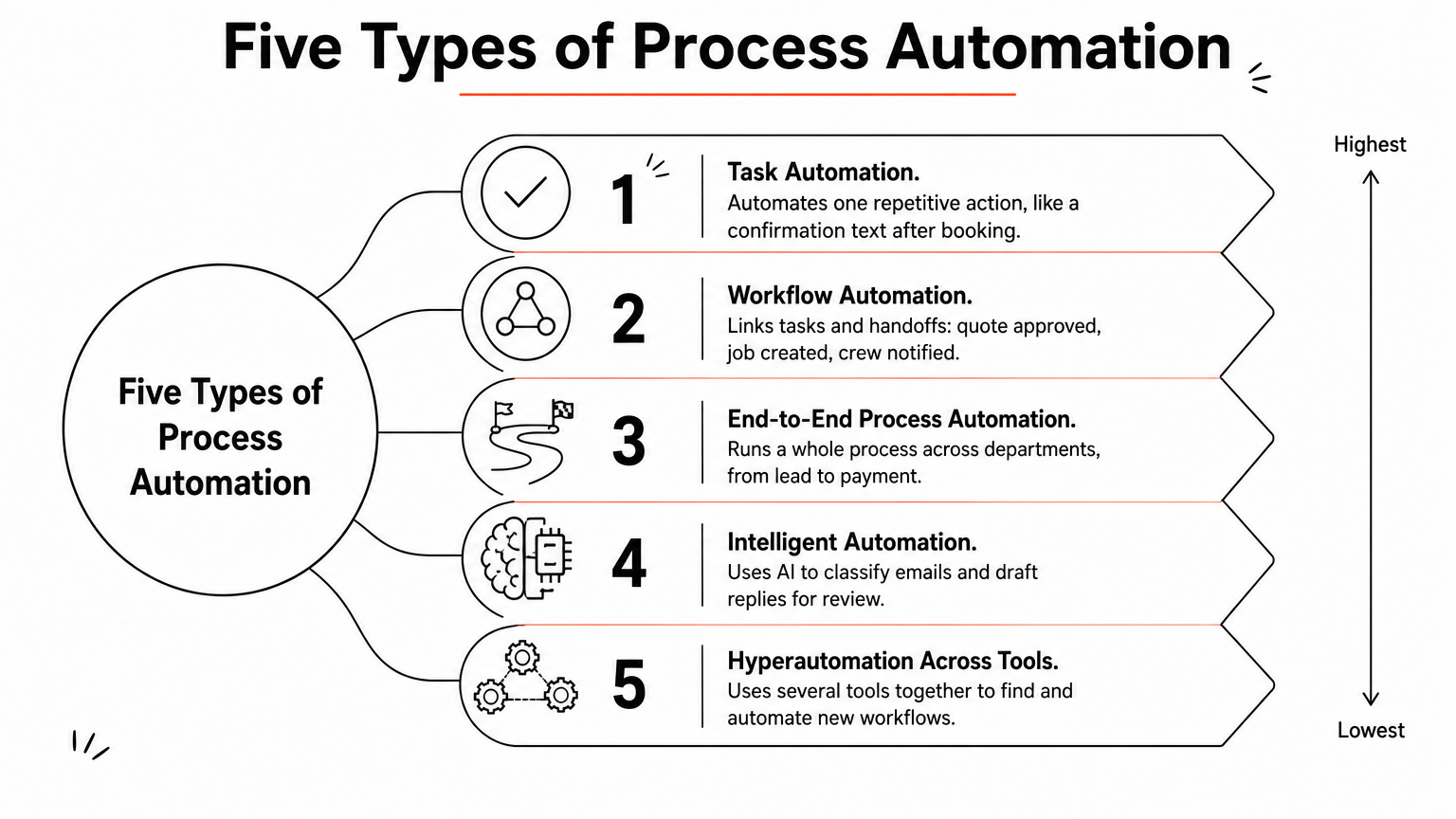
| Type | What it automates | Example |
|---|---|---|
| Task automation | One repetitive action | Sending a confirmation text after booking |
| Workflow automation | A sequence of tasks and handoffs | Quote approved, job created, crew notified |
| End-to-end process automation | An entire process across departments | Lead to quote to job to invoice to payment |
| Intelligent automation | Work that needs reading or judgment, using AI and machine learning | Classifying incoming emails and drafting replies for review |
| Hyperautomation | As many processes as possible, using several tools together | Using process data to find and automate new workflows |
Digital process automation, which you will also see listed, sits between process and intelligent automation. It focuses on customer-facing journeys such as account opening, tied to back-end systems.
Which type to start with
Almost every business should begin with task and workflow automation. They are cheap, quick to test, and teach your team how automation behaves. Once two or three workflows run reliably, link them into an end-to-end process.
Save intelligent automation for work that involves unstructured information, such as free-text requests or scanned documents. Hyperautomation is a direction for mature programs, not a starting point for a ten-person company.
Examples of business process automation
Examples by department
The same idea shows up in every function: replace a manual handoff with a rule.
| Department | Process | What gets automated |
|---|---|---|
| HR | Employee onboarding | Welcome emails, software access, paperwork, orientation scheduling |
| Finance | Accounts payable | Invoice routing for approval, matching purchase orders to invoices, payment processing |
| Sales | Lead follow-up | Logging leads in the CRM, instant replies, reminders for the rep |
| Operations | Inventory | Purchase orders generated when stock falls below a set level |
| IT | Service desk | Ticket creation, routing by severity, status notifications |
| Compliance | Audit records | Time-stamped logs, scheduled checks, document storage |
Examples from a service business
In a trades company, the biggest wins sit between the first call and the final payment:
- Instant lead response. A new web or phone lead gets an automatic text and email within seconds, around the clock, and the lead is logged in your CRM while your team is notified.
- Quote to job to invoice. An approved estimate creates the job, and a completed job creates the invoice.
- Payment sync. Payments and invoices flow into QuickBooks without retyping.
- Review requests. Paid customers get a review request a day or two after the job.
- Technician updates. Crew members get job changes by text or Slack rather than a phone call from the office.
Most field service platforms such as Housecall Pro, ServiceTitan, and Jobber handle some of this natively. Custom Zapier workflows and API connections fill the gaps, which is where most of our work happens.
Look for the handoff where work waits on a person to notice it, and automate that first.
Start with one repetitive process
Automation of business processes comes down to one practice: find work that repeats, write down the rule, and let software follow it. Start with a single process that costs you hours every week, fix it on paper, then automate it with a clear goal and an owner. Add more workflows once the first one runs cleanly.
If you run a home service business and would rather not build it yourself, you can book a free consultation with HSP Automation. We look at your current workflows, point out what is worth automating, and tell you what it would cost before any work starts.