November 24, 2026
8 Best Service Business Management Software for Small Teams
The best service business management software handles scheduling, invoicing and team management in one system, and your crew actually opens it every day. For most small home service companies, that me...
Written by Frankwin Hooglander
The best service business management software handles scheduling, invoicing and team management in one system, and your crew actually opens it every day. For most small home service companies, that means Jobber or Housecall Pro for simplicity, Workiz if the phone drives your business, and Service Fusion or FieldPulse if you want more depth. ServiceTitan fits once you have outgrown the basics, and TidyOps or Christmas Light Calculator fit if you run a cleaning or holiday lighting company.
Most owners start this search with a calendar full of sticky notes, quotes buried in text threads, and invoices that go out days after the job. Every vendor promises to fix that, and the feature lists look nearly identical. The real differences show up in how fast a dispatcher can move a job, how quickly a technician gets paid on site, and how much setup the tool needs before it matches your workflow.
This guide compares eight options for small and mid-sized service companies. Each gets the same breakdown: what you get, who it suits, what it costs and where it falls short. HSP Automation sets up and connects Housecall Pro, ServiceTitan and Jobber for home service businesses, so the setup notes come from that work. TidyOps and Christmas Light Calculator are HSP Automation products, and the guide labels them so you can weigh them accordingly.
What to compare before you pick service software
Judge every platform on three jobs: how it schedules and dispatches work, how fast it turns a finished job into cash, and how well it keeps your team coordinated. Dashboards and marketing add-ons come second. Service software for a small business earns its fee when these three jobs stop eating your office hours, so build your demo checklist around them.
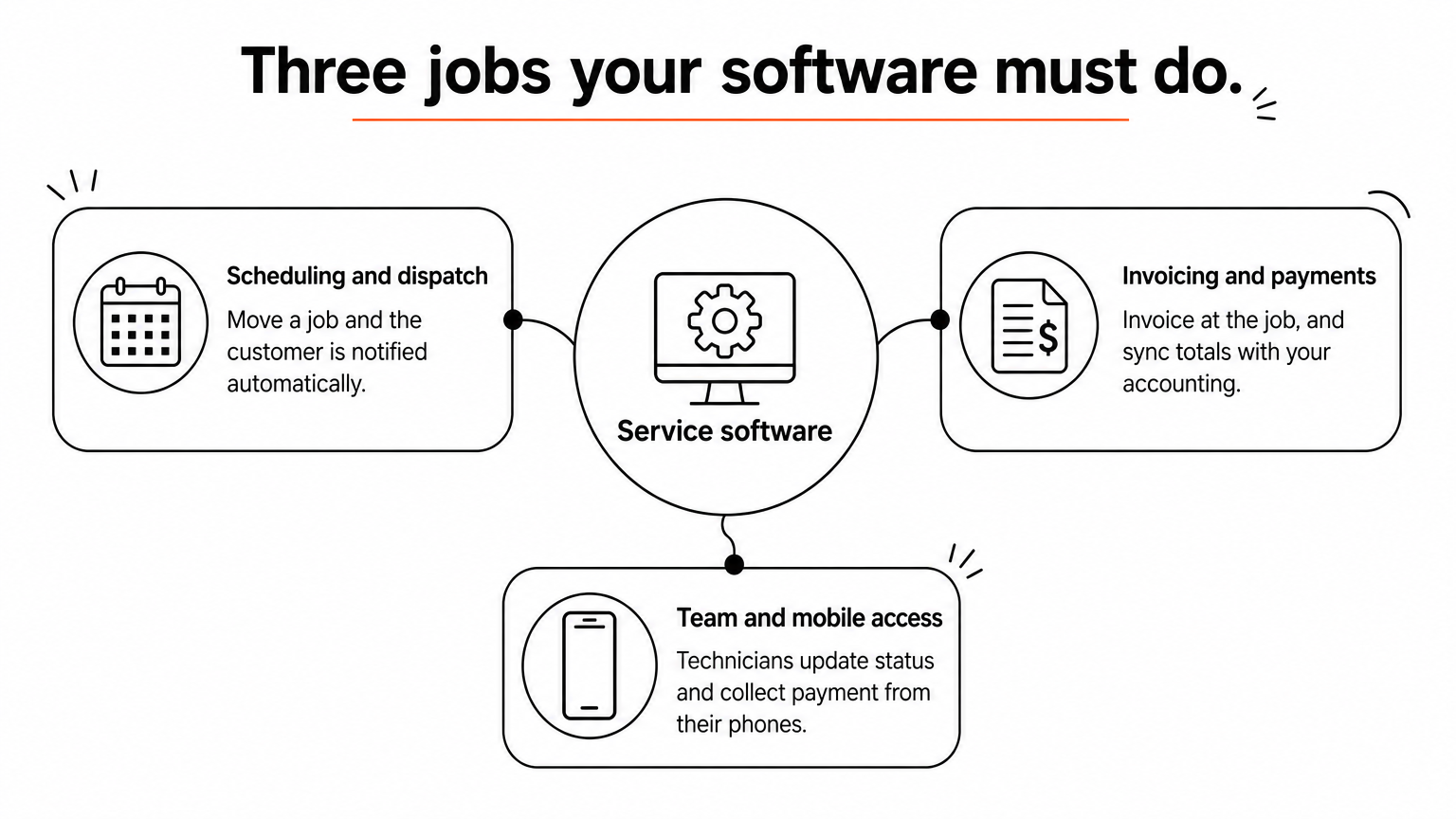
A service business tool pays for itself in three places: the schedule, the invoice and the crew's phone.
Scheduling and dispatch
Scheduling is where a weak tool shows itself first. Test the drag-and-drop calendar with real jobs: move a visit, hand it to another technician and see whether the customer is notified automatically. Larger platforms add route optimization and skill matching, which start to matter once you run more than four or five trucks. Ask these questions in every demo:
- Can a dispatcher see every technician's day and location at a glance?
- Does rescheduling notify the customer without a second step?
- Does the tool handle recurring visits, such as monthly cleanings or seasonal maintenance?
- Can it send an "on the way" text?
Invoicing and payments
Invoicing should happen at the job, not at the end of the week. Look for on-site invoicing, card and ACH payments, and an accounting sync with QuickBooks so nobody retypes totals. Quotes count too, because tools that offer several options per estimate and an e-signature turn quotes into booked work with fewer follow-up calls.
Check payment processing separately from the subscription. The monthly fee and the card processing rate are two different costs, and a cheap plan can carry processing terms that cancel the saving. Ask for both numbers in writing.
Team management and mobile access
The technician's phone is the real product. Look for a mobile app that shows job details, customer history, photos and checklists, and lets technicians update status, collect payment and capture signatures. Offline access matters if your crews work in basements or rural areas.
Back-office controls matter just as much. Role-based permissions keep technicians from seeing margins, and per-user pricing means every new hire raises the bill. Price the tool at the team size you plan to reach in a year, not the one you have today.
1. TidyOps for cleaning companies
TidyOps is built for residential and commercial cleaning companies, so it is the natural first look if your crews clean rather than repair. It brings people, jobs, clients and profitability into one workspace instead of splitting them across a spreadsheet, a calendar and a payroll app.
What you get
Four things sit at the center of the product, and each maps to a daily headache for a cleaning owner. Because it is built for one trade, you are not bending a plumbing-and-HVAC tool to fit a cleaning business. The pitch is one place to see who is working, where, and what each job earns.
- People: your cleaners, crew leads and managers
- Jobs: residential and commercial work
- Clients: the accounts you serve
- Profitability: what each job and client earns you
Trade-specific software wins when your business looks nothing like a van full of HVAC technicians.
Who it suits and what it costs
Owners of maid services, recurring home cleaning routes and commercial janitorial accounts are the target. It is most useful when you want an operating system for the whole company rather than a dispatch tool with a cleaning template added on.
This guide does not quote a price, so check the TidyOps page for current plans. Ask for a walk-through of how quoting, scheduling and invoicing work for one recurring client. Those three flows decide whether it replaces your current tools.
Where it falls short
Focus cuts both ways, and the limits follow from it:
- It is built for cleaning, so it will not suit HVAC, plumbing or electrical dispatch.
- If you want a general tool with a larger user base, Jobber and Housecall Pro both list cleaning among their trades.
- Check the integration list against the accounting and payment tools you already use.
2. Christmas Light Calculator for lighting installers
Christmas Light Calculator is a business management platform for Christmas light installation companies. It covers quotes, customers, scheduling, inventory, payments and team management in one place.

What you get
Quoting is the heart of the product. AI-powered quotes and an embeddable quote widget let customers request pricing from your own website, which matters when a seasonal business has to answer a flood of requests in a few weeks. The rest of the platform supports the install season:
- CRM for customers and leads
- Scheduling and inventory tracking
- Stripe payments and e-signatures on quotes
- Twilio two-way SMS with customers
- Sync with Housecall Pro
- Analytics and role-based team access
Seasonal work lives or dies on quote speed, so a tool built around quoting beats a general one.
Who it suits and what it costs
Holiday lighting installers who quote hundreds of homes before December are the clear fit. Installers who already run year-round work in Housecall Pro can keep that system and still use the calculator for quoting, since the two sync.
Pricing is not listed in this guide, so check the product page for current plans. Because your revenue is concentrated in a few months, ask how plans work in the off-season before you subscribe.
Where it falls short
It is a specialist tool, and you should treat it as one:
- It is built for one seasonal trade, so a multi-trade company needs a general platform for its other work.
- Its strength is quoting and sales flow, not heavy dispatch for large technician fleets.
- You are choosing a niche product, so confirm that the support and integrations you need are included.
3. Jobber for small home service teams
Jobber is a field service tool for small to midsize home and commercial service businesses that want a clean interface and quick onboarding. It runs the whole path from quote to job to invoice to review request.
What you get
Jobber's strength is a polished, easy-to-learn interface that moves a customer from request to payment without much training. Owners and dispatchers work from a visual calendar, and technicians use the mobile app in the field. The feature set covers the basics well:
- Drag-and-drop scheduling with calendar views and route optimization
- Customizable quotes with automated follow-ups
- Instant invoicing, automated payment reminders and online payments
- A client database with service history, notes and approvals
- Online booking and review requests
Jobber wins on ease of use, and for a small crew, ease of use is most of the battle.
Who it suits and what it costs
Jobber fits solo operators and small crews in landscaping, cleaning, HVAC, plumbing and electrical work. If you need something your office manager can pick up quickly, it is the safest starting point on this list. A published roundup reports a 4.6 out of 5 rating on Capterra.
Cost scales by plan. Third-party roundups list the Lite plan from about $19 a month and the Grow plan around $200 a month, depending on team size and features. Plans change often, so confirm current tiers on Jobber's pricing page before you budget.
Where it falls short
Simplicity is the trade-off. Expect these limits as you grow:
- Less customization than enterprise-grade platforms
- Reporting that is not as deep as larger tools
- A possible move to a bigger system if you add many crews and need job costing
4. Housecall Pro for mobile-first crews
Housecall Pro is a mobile-first platform that lets technicians run their whole workflow from a phone or tablet. It suits teams where field staff work with a lot of autonomy.

What you get
Technicians get instant job notifications and can invoice and collect payment before they leave the driveway. The customer side is just as developed, with a self-service portal where clients book jobs and view invoices.
- Drag-and-drop scheduling and real-time dispatch updates
- On-site invoicing with card, ACH or financing options
- Two-way messaging, job confirmations and reminders
- Estimates with e-signature and approval
- Review generation, email campaigns and referral incentives
Housecall Pro is easy to onboard because the whole job lives on the technician's phone.
Who it suits and what it costs
It fits small and growing teams, from a single user to more than 100, across HVAC, plumbing, cleaning, electrical, lawn care, garage door and pest control. G2 reviewers rate it 4.3 out of 5, according to a published roundup, and they single out usability and mobile support.
Published figures put one-user plans at roughly $65 to $79 a month, with higher tiers for larger teams. Those two numbers come from different roundups, which shows how often pricing moves, so check the current price. Housecall Pro is also one of the three platforms HSP Automation specializes in, which helps if you want custom automation later.
Where it falls short
Ease of use comes with a ceiling:
- Reporting and analytics are more basic than enterprise tools
- Customization is limited compared with advanced platforms
- Larger companies with complex dispatch rules may outgrow it
5. Workiz for call-driven service trades
Workiz is the pick for businesses where a ringing phone is the main source of work. It ties call tracking, scheduling, invoicing and payments together so you can see which calls become jobs.
What you get
Workiz records each incoming call and its lead source, which answers a question most owners cannot: which marketing spend produces booked jobs. A built-in phone system and an AI call-answering assistant sit beside the usual scheduling tools.
- Call tracking, lead-source reporting and a built-in phone system
- Drag-and-drop scheduling with smart dispatching
- Estimates, invoices and card payments in the field
- Online booking, recurring jobs and service plans
- Integrations with tools such as CompanyCam, NiceJob and Thumbtack
If most of your jobs start with a phone call, the call record is as valuable as the calendar.
Who it suits and what it costs
It suits small to mid-sized teams in locksmith, garage door, appliance repair, junk removal, HVAC, plumbing and electrical work. G2 reviewers give it 4.6 out of 5, according to a published roundup, and praise its job pipeline visibility.
Workiz uses tiered plans that scale with team size and features. Sources say details are on its plan page or shared on request. Ask which tier includes the phone system and AI answering, since those are the features you are buying it for.
Where it falls short
Its focus on inbound calls shapes the limits:
- Reporting is more basic than in enterprise field service tools
- It is less specialized for asset-heavy or highly regulated work
- If you get few inbound calls, you pay for phone features you will not use
6. Service Fusion for multi-trade contractors
Service Fusion is an all-in-one platform for small to mid-sized service contractors across several trades. It stands out for affordability and for how it handles estimates and customers with more than one property.
What you get
Estimates are a strong point. You can send up to five options per customer and collect an e-signature inside the estimate. Customers can also have multiple service locations, which suits landlords, property managers and commercial accounts.
- Work orders that convert estimates into jobs
- Drag-and-drop calendar with real-time updates
- On-site payment collection and QuickBooks integration
- SMS alerts and "on the way" notifications
- Call tracking and GPS fleet tracking
- Referral-source tracking
Test Service Fusion first if your customers own several properties or like to choose between good, better and best options.
Who it suits and what it costs
It fits HVAC, plumbing, electrical, locksmith, appliance repair and garage door companies with small to midsize teams. It also suits contractors whose customers have several service addresses, since each location carries its own history.
Roundups call it affordable but do not agree on a price, so request a current quote in writing. Ask which of call tracking and GPS fleet tracking are included in your tier, because you may pay for those features whether or not you use them.
Where it falls short
A broad feature set brings its own trade-offs:
- Setup takes time before the tool feels simple, so plan to configure estimates, locations and notifications first
- Public pricing is less clear than for some rivals
- If your work is recurring routes, such as lawn care, check the route features in a trial
7. FieldPulse for teams that want guided setup
FieldPulse is a field service platform for growing companies that want broad coverage and hands-on guidance without jumping to an enterprise tool.
What you get
It covers a lot in one system, from dispatch to inventory and asset tracking. AI-assisted dispatch, called Operator AI, helps optimize technician routes, and custom workflows let you adapt the system to your trade.
- Scheduling, dispatch and recurring service
- Pricebook-driven estimates, invoices and in-field payments
- CRM with a customer portal for booking and service history
- Inventory, asset management and maintenance agreements
- Fleet tracking, KPI tracking and QuickBooks sync
FieldPulse trades a little simplicity for coverage, and its guided onboarding is what makes that trade work.
Who it suits and what it costs
It suits small and midsize general trades such as HVAC, plumbing and electrical that plan to scale. One roundup reports a 4.8 rating across more than 2,500 reviews, praising ease of use and support, though you should read recent reviews yourself before deciding.
Pricing is quote-based, tiered by team size and features, and not fully published on its website. Ask for the full cost in writing, including onboarding, so you can compare it fairly with flat-tier tools like Jobber.
Where it falls short
Breadth means more to configure:
- Pricing is not fully transparent on the website
- Feature depth can require setup time for new teams
- A solo operator with simple needs will pay for features they will not touch
8. ServiceTitan for larger residential operations
ServiceTitan is a full-scale platform for residential trades that want to automate operations and grow revenue. It is the most powerful and most expensive option in this guide.
What you get
ServiceTitan builds revenue tools into the core. Call booking, a pricebook, job costing and memberships sit beside dispatch, and its tooling spans 20+ residential trades.
- Drag-and-drop dispatch with real-time technician tracking and route optimization
- Call booking and recording to lift booking rates
- Pricebook, job costing and inventory tools
- Custom proposals, financing options and card payments
- Dashboards, performance reports and marketing automation
ServiceTitan is built for companies that run on process, which is why small teams often find it too much.
Who it suits and what it costs
It fits midsize to enterprise companies in HVAC, plumbing, electrical, garage door, pest control, landscaping and remodeling. G2 reviewers rate it 4.4 out of 5, according to a published roundup.
Pricing is quote-based, and one roundup puts typical costs around $100 to $200 per user per month. That makes it the premium choice. Ask for a quote that includes implementation and training, not just seats.
Where it falls short
Power has a price in money and in learning time:
- Higher cost makes it a poor fit for small companies
- The interface is complex and has a learning curve for new users
- You need real training time before the team benefits
Side-by-side comparison of all eight picks
The table below sets the picks side by side so you can scan for fit. Pricing figures come from published roundups and vendor descriptions, and they change often, so confirm them on each vendor's site.
Compare total cost per year for your real team size, not the headline monthly price.
The comparison table
| Platform | Best for | Standout feature | Pricing as reported |
|---|---|---|---|
| TidyOps | Cleaning companies | People, jobs, clients and profitability in one workspace | See product page |
| Christmas Light Calculator | Holiday lighting installers | AI-powered quotes and embeddable quote widget | See product page |
| Jobber | Small to midsize home service teams | Quote-to-review workflow, easy to learn | About $19/month (Lite) to about $200/month (Grow) |
| Housecall Pro | Mobile-first small crews | Technician app and customer portal | About $65 to $79/month for one user |
| Workiz | Call-driven trades | Call tracking with lead sources | Tiered, see plan page |
| Service Fusion | Small to midsize multi-trade contractors | Up to five estimate options, multiple service locations | Tiered, confirm with vendor |
| FieldPulse | Growing teams wanting guided setup | Operator AI dispatch and custom workflows | Quote-based |
| ServiceTitan | Midsize to enterprise residential trades | Call booking, pricebook, job costing | Quote-based, roundups cite $100 to $200 per user/month |
Per-user, tiered and quote-based pricing
Three pricing models show up across service software. Per-user pricing is simple for tiny teams, with typical roundup figures of $20 to $100 per user per month, but every new technician adds to the bill. Tiered plans bundle features and seats, which often costs less as you add people. Quote-based pricing means you negotiate, so the number depends on your size and scope.
Whichever model you meet, ask about three extra costs. They are implementation and training fees, card processing rates, and add-ons such as call tracking or fleet tracking. Those line items often decide which tool is cheaper in year one.
What a five-person team might pay
Take a company with one office manager and four technicians. At the typical per-user range of $20 to $100, that is $100 to $500 a month. At the $100 to $200 per-user range cited for ServiceTitan, the same team pays $500 to $1,000 a month.
| Pricing assumption (5 users) | Monthly | Yearly |
|---|---|---|
| Per-user, low ($20 each) | $100 | $1,200 |
| Per-user, high ($100 each) | $500 | $6,000 |
| ServiceTitan-style ($100 to $200 each) | $500 to $1,000 | $6,000 to $12,000 |
Flat-tier tools such as Jobber work differently. You pick the tier that matches your user count and features, then compare the annual total against the per-user options above.
How to choose and roll out your software
Choose by trade first, then team size, then test the finalists with your own jobs. The right service business management software is the one your dispatcher and your technicians both use without being nagged.
The best platform on paper is the one your technicians open without being reminded.
Match the tool to your team size
Under about five technicians, start with the simplest tool that covers your trade: Jobber, Housecall Pro, Workiz, or a niche platform like TidyOps or Christmas Light Calculator. At five to twenty, look at deeper dispatch and workflows with Service Fusion or FieldPulse. Beyond that, or if you run a heavy sales process with pricebooks and memberships, price ServiceTitan.
Free options exist, but they are narrower than they look. Workforce apps such as Connecteam advertise a free plan for teams under 10, but they cover time tracking, messaging and checklists rather than full dispatch and invoicing. Treat a free tier as a stepping stone and use free trials as your real free option.
Run a two-week trial with real jobs
A trial tells you more than any demo. Work through this checklist with live data:
- Add 10 real customers and their service addresses.
- Schedule a full week of actual jobs, then reschedule at least three.
- Send two quotes and convert one into a job.
- Invoice from a technician's phone and take one payment.
- Sync the invoices with your accounting software.
- Ask each technician what slowed them down.
Treat step six as the deciding vote. A tool the office likes and the field avoids will not hold up past the first busy month.
Connect it to your other tools and train your team
No platform does everything, so plan the connections early. For Housecall Pro users, HSP Automation sells Housecall Pro Custom Zapier Integration Access, which adds 13 triggers and 49 actions that the standard Zapier app lacks. It costs $147 a month plus a one-time $147 setup fee, includes a 14-day free trial, and needs an active Zapier account. Over twelve months that is $1,911 ($147 setup plus twelve payments of $147) before your Zapier plan. If it saves just 10 hours of office time a month at $25 an hour, that is $250 of labor against $147.
Adoption fails more often than features do. HSP Automation's CRM Setup & Optimization covers Housecall Pro, ServiceTitan and Jobber, including workflows, job types, pricing tiers and team permissions. Its training service adds role-based workshops, custom SOP documentation and a video library, so dispatchers, technicians and office staff learn the same process.
Choose by trade, then test with real jobs
Every tool here handles scheduling, invoicing and team management. The decision comes down to your trade, your team size and how much setup you want to own. Cleaning and holiday lighting companies should look at the niche platforms first. Small general crews should start with Jobber or Housecall Pro, call-driven trades with Workiz, and larger residential operations with ServiceTitan.
Whatever you choose, run the two-week trial and price the tool at your team size a year from now. If you want help with setup, integrations or training on Housecall Pro, ServiceTitan or Jobber, you can book a free strategy call with HSP Automation and map your workflow before you commit.