November 17, 2026
Best Service Business Software: 10 Tools Compared for 2026
The best service business software matches your crew size and the way you get paid. Jobber, Housecall Pro, and ServiceM8 suit solo operators and small crews. Workiz and Service Fusion suit teams that...
Written by Frankwin Hooglander
The best service business software matches your crew size and the way you get paid. Jobber, Housecall Pro, and ServiceM8 suit solo operators and small crews. Workiz and Service Fusion suit teams that live on the phone and want dispatch and call tracking in one place. FieldPulse and FieldEdge suit growing HVAC, plumbing, and electrical shops. ServiceTitan and Simpro suit larger contractors that need inventory, job costing, and deeper reporting.
Most owners hit the same wall. Jobs live in a calendar, quotes sit in email, invoices come out of QuickBooks, and customer history lives in someone's head. Every handoff costs time and money, and the wrong software just moves the mess into a new login. This guide compares ten options for scheduling, dispatching, invoicing, and customer management, then shows you how to match them to your team size and budget.
At HSP Automation we configure these systems for home service companies, mostly Housecall Pro, ServiceTitan, and Jobber. Pricing is described the way each vendor presents it, because most publish custom quotes.
How to choose service business software
Choose service business software by matching four jobs to your team size: scheduling and dispatch, invoicing and payments, customer records, and mobile access for technicians. If a tool handles those four well at a price you can carry, it fits, whatever the marketing says. Everything else is secondary.
The features that matter
Field service invoicing software pays you back fastest. When a technician can close a job, send the invoice, and take a card payment from the driveway, cash arrives days earlier and the office stops retyping paperwork. Test that flow in every trial before you look at anything else.

Use this checklist when you compare tools:
- Scheduling and dispatch: a drag-and-drop calendar, technician availability, and live job status.
- Quotes and invoicing: a quote that becomes a job, and a job that becomes an invoice without retyping.
- Customer management: service history, multiple locations per customer, notes, and message history.
- Mobile app: photos, notes, status updates, and payment collection in the field.
- Integrations: QuickBooks sync, Zapier, or an open API for the tools you already use.
- Reporting: job completion rates, revenue per technician, and margins.
CRM vs FSM
A CRM stores contacts, deals, and conversations. Field service management (FSM) software adds the operational layer: jobs, dispatch, technician apps, invoicing, and payments. If technicians drive to customers, you need FSM, and the CRM function comes built in.
A free CRM such as HubSpot's works for tracking leads and follow-ups in the early days. It will not schedule a technician or send an invoice from a job. Most owners who start there move to an FSM tool once they pass a few jobs a day.
What it costs
Most tools charge per user, per plan tier, or by custom quote. Figure your monthly cost per user first, then multiply by everyone who needs a login. The table uses an illustrative $50 per user, which is not any vendor's price.
| Team | Users | Monthly at $50 per user | Yearly |
|---|---|---|---|
| Solo operator | 1 | $50 | $600 |
| Small crew with an office manager | 6 | $300 | $3,600 |
| Growing shop | 15 | $750 | $9,000 |
Quote-based vendors cannot be calculated this way. Ask whether field-only seats cost less than full-access seats, because that single answer can cut a growing shop's bill noticeably.
Count every login before you compare prices, because per-user pricing punishes growth.
1. Christmas Light Calculator and TidyOps
What it covers
These are two niche platforms we build at HSP Automation, so weigh this pick accordingly. Christmas Light Calculator runs a holiday lighting business from first quote to final payment. TidyOps does the same job for residential and commercial cleaning companies.
- Christmas Light Calculator: AI-powered quotes, CRM, scheduling, and inventory.
- Stripe payments with e-signatures, plus Twilio two-way text messaging.
- An embeddable quote widget for your website, with Housecall Pro sync.
- TidyOps: people, jobs, clients, and profitability in one workspace.
Who it suits and what it costs
These tools suit holiday lighting installers and cleaning company owners who want software built around their own pricing and seasonal or recurring work, not a generic job template. If you run HVAC, plumbing, or electrical, skip to the next picks. The trade focus is narrow by design.
A trade-specific tool beats a general one only when it was built for your trade.
Pricing varies by product and plan, so check the product page or book a strategy call for current numbers. Test either tool on a real quote before you move your customer list over.
2. Jobber for simple quote-to-payment workflows
What it covers
Jobber covers the core small-crew loop: quote, schedule, job, invoice, payment. Its clean interface is why many owners and office staff adopt it quickly, which matters more than feature count at this size.
- Customizable quotes with automated follow-ups.
- A visual calendar with route optimization and job checklists.
- Invoicing with automated reminders and online payments.
- Online booking and review requests.
Who it suits and what it costs
Jobber suits lawn care, cleaning, and small HVAC, plumbing, or electrical crews that want quoting through payment without a long rollout. The tradeoff is depth. Expect to outgrow its customization, inventory tracking, and reporting once you add parts, several trades, or margin analysis.
Jobber wins on speed to adopt, not on depth.
Jobber uses plan-based pricing, so you choose a tier by features and crew size. Compare the tier that includes the invoicing and automation features you need, not the cheapest headline plan.
3. Housecall Pro for residential service teams
What it covers
Housecall Pro is an all-in-one tool for home service teams that wants an approachable setup for people moving off paper or spreadsheets. It handles scheduling, dispatch, invoicing, payments, and customer communication in one app.
- Drag-and-drop scheduling and team coordination.
- One-click invoicing, digital payments, and customer financing.
- Proposals with e-signature and approval.
- Review generation, email campaigns, and referral incentives.
Who it suits and what it costs
Housecall Pro suits small to mid-sized residential teams, and its own positioning runs from one user to over a hundred. Reporting is basic compared with larger platforms, and job costing is limited. If your margin questions get complicated, you will feel that ceiling.
Housecall Pro is easy to start on and thin on reporting once you scale.
Pricing is plan-based and scales with usage, so costs rise as you add users or features. Price out your headcount a year from now, not only today.
4. ServiceM8 for solo operators and small teams
What it covers
ServiceM8 is a mobile-first job management tool that follows a job from the first call through scheduling, quoting, completion, invoicing, and payment. Its strength is that the technician's phone is the center of the workflow, not an afterthought.
- Job management and scheduling from a mobile device.
- Quotes, invoices, and payment collection.
- Accounting integrations for common small-business setups.
- Plan levels that grow with the team.
Who it suits and what it costs
ServiceM8 suits solo operators and small crews that spend the day on site and want to finish paperwork there. Larger teams need more reporting, inventory, and operational control than it offers. Test the mobile experience on your own devices before you commit.
If your office is a truck, a mobile-first tool is the sensible start.
ServiceM8 uses plan-based pricing, so you compare package levels before deciding. Check which tier adds the accounting integration you need.
5. Workiz for phone-driven home service shops
What it covers

Workiz builds the phone into the software. If most of your jobs begin with a call, that is the difference. It is an automation-first platform for small to mid-sized shops.
- A built-in phone system with call tracking.
- An AI answering assistant, online booking, and service plans.
- Recurring job scheduling and smart dispatching.
- Instant invoicing with automated follow-ups.
Who it suits and what it costs
Workiz suits garage door, locksmith, junk removal, HVAC, plumbing, and electrical businesses where calls drive revenue. It is less ideal for complex multi-trade operations that need deep inventory, asset, and project coverage. Test those areas in a demo if they matter to you.
Workiz makes sense when the phone is your main lead source.
Pricing is quote or plan-based, so confirm package scope and any add-on costs with the vendor. Phone and AI features are where add-ons tend to hide.
6. Service Fusion for affordable all-in-one dispatch
What it covers
Service Fusion is an all-in-one platform for small to mid-sized contractors, known for affordability and mobile access. It covers the daily loop from call tracking to payments.
- A drag-and-drop calendar with real-time updates.
- Estimates with up to five options per customer and built-in e-signature.
- "On-the-way" text notifications and GPS fleet tracking.
- QuickBooks integration and multiple service locations per customer.
Who it suits and what it costs
Service Fusion suits HVAC, plumbing, electrical, locksmith, appliance repair, and garage door companies that want dispatch, estimates, and fleet visibility without an enterprise price tag. Larger multi-trade shops should test reporting and job costing before committing.
Good-better-best estimates are a quiet revenue lever, and Service Fusion builds them in.
The vendor markets on affordability, so compare its current plans on its pricing page against the user count you worked out earlier. Ask what the GPS and call tracking features cost, because add-ons change the total.
7. FieldPulse for configurable office and field workflows
What it covers
FieldPulse unifies office and field with a built-in CRM, pricebook, and real-time KPI tracking. It is configurable without becoming enterprise software, which suits shops that have outgrown a basic scheduling app.
- Scheduling and dispatch with technician availability tracking.
- Pricebook-driven estimates and on-site invoicing.
- QuickBooks sync and a CRM tied to job scheduling.
- Custom workflows, forms, and mobile access.
Who it suits and what it costs
FieldPulse suits small to growing residential and commercial service businesses that want custom workflows and field visibility. Growing teams should test project, inventory, asset, and job-costing needs before shortlisting it.
FieldPulse is a strong middle option, provided your job costing needs stay moderate.
Pricing is seat-based and quote-driven, and buyers separate full-access seats from field-only seats. That split is where you save money, so list your office roles and technicians before the sales call.
8. FieldEdge for HVAC, plumbing, and electrical dispatch
What it covers
FieldEdge focuses on the service business core: dispatch, customer records, work orders, and invoicing, with real-time job visibility for office and field. Its fit is strongest in the core trades.
- Dispatching and work order management.
- Customer management with service history for repeat work.
- Invoicing and reporting.
- Technician workflows with live job status.
Who it suits and what it costs
FieldEdge suits small to mid-sized HVAC, plumbing, and electrical companies that want office visibility. Check key accounting, supplier, and workflow integrations before you choose. If a connection is missing, a Zapier-based automation can often fill the gap, and we build those for FieldEdge as well.
Verify every integration you depend on before signing, since FieldEdge buyers report limits there.
FieldEdge uses custom pricing, and smaller teams should compare package scope against simpler tools. Customization depth is lighter than the biggest platforms, so complex operations should test it.
9. ServiceTitan for high-volume home service companies
What it covers
ServiceTitan is the deepest tool on this list for residential and commercial trades. It covers dispatch, call booking, sales, marketing, and reporting in one system built for high job volume.
- Centralized calendar with real-time technician tracking.
- Job costing, pricebook management, and inventory tools.
- Custom proposals, integrated sales tools, and two-way SMS.
- Dashboards and performance reports across departments.
Who it suits and what it costs
ServiceTitan suits mid-size to enterprise HVAC, plumbing, and electrical companies with several departments and complex office-to-field workflows. It is more than a simple service team needs. Implementation takes training, process design, and rollout work, so budget time as well as money.
Buy ServiceTitan for the operation you are growing into, not the one you run today.
Pricing is custom, and smaller businesses face a larger investment than with lighter tools. Ask for a full quote that includes onboarding and any add-on modules.
10. Simpro for growing trade contractors
What it covers
Simpro connects job management, quoting, scheduling, inventory, invoicing, payments, and reporting in one system. It supports service, maintenance, asset, and project workflows.
- Scheduling, dispatch, and quoting.
- Inventory and supplier-linked purchasing.
- Invoicing and payments with accounting integrations.
- Reporting for job progress and margins.
Who it suits and what it costs
Simpro suits electrical, HVAC, plumbing, fire protection, security, and multi-trade contractors that have moved past simple scheduling. The learning curve is higher than lighter apps, and teams moving from spreadsheets need implementation time. Solo operators and lean teams start faster elsewhere.
Simpro rewards contractors who need office, field, finance, and reporting connected in one place.
Pricing is quote-based and depends on users, workflows, add-ons, and implementation scope. Ask for a quote that lists the base plan and every add-on separately.
Which service business software fits your size and budget
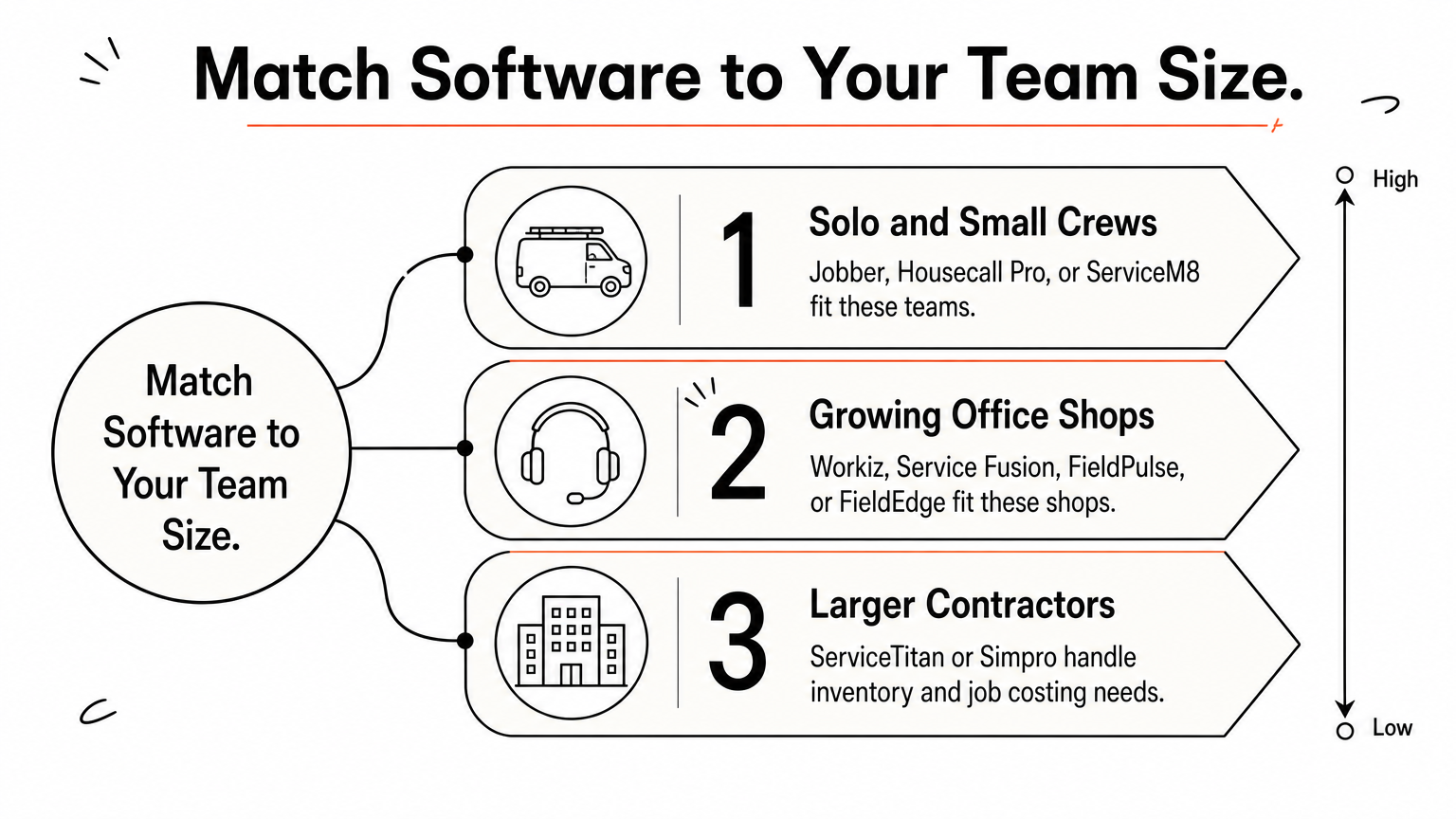
Solo operators and small crews do best on Jobber, Housecall Pro, or ServiceM8. Shops with a growing office and several technicians do best on Workiz, Service Fusion, FieldPulse, or FieldEdge. Larger contractors with inventory and job costing needs do best on ServiceTitan or Simpro.
Side-by-side comparison
This table sets the ten picks next to each other. Pricing models reflect how each vendor sells, not specific dollar amounts.
| Software | Best for | Pricing model | Standout strength | Main limit |
|---|---|---|---|---|
| Christmas Light Calculator and TidyOps | Holiday lighting installers, cleaning companies | Confirm with HSP Automation | Trade-specific quoting and operations | Narrow trade focus |
| Jobber | Small home service crews | Plan-based | Clean interface, fast adoption | Reporting and inventory depth |
| Housecall Pro | Small to mid-sized residential teams | Plan-based | Easy onboarding, payments, financing | Basic reporting, limited job costing |
| ServiceM8 | Solo operators and small teams | Plan-based | Mobile-first job flow | Advanced reporting and inventory |
| Workiz | Phone-driven home service shops | Quote or plan-based | Built-in phone and call tracking | Complex multi-trade depth |
| Service Fusion | Small to mid-sized contractors | Check vendor plans | Estimates with options, GPS tracking | Larger shops should test reporting |
| FieldPulse | Growing residential and commercial shops | Seat-based custom quote | Pricebook, CRM, field-only seats | Needs a sales conversation |
| FieldEdge | Small to mid-sized core trades | Custom | Real-time job visibility | Integrations, cost for small teams |
| ServiceTitan | Larger HVAC, plumbing, electrical | Custom | Sales, job costing, reporting depth | Implementation effort and cost |
| Simpro | Growing trade contractors | Custom | Inventory, projects, assets | Learning curve |
Match the tool to your next two years of headcount and job complexity, not today's.
Invoicing and payments compared
If invoicing is your main pain, compare how each tool handles the job-to-cash step. This list reflects what the vendors describe.
- Jobber: instant invoicing, automated reminders, and online payments.
- Housecall Pro: one-click invoicing, digital payments, and customer financing.
- Workiz: instant invoice generation with automated follow-ups.
- Service Fusion: on-site payment collection and QuickBooks integration.
- FieldPulse: on-site invoicing with QuickBooks sync.
- ServiceM8: invoices and payments within the job flow.
- Simpro: invoicing and payments tied to quotes, jobs, and reporting.
Setting up the tool you choose
Buying the software is half the work. The other half is configuring workflows, job types, pricing tiers, and team permissions so the tool matches how your crew operates. That is the step owners skip, and it is why a good tool still feels clunky three months in. Plan one to two weeks for setup and training on a simple stack, and longer for multi-system builds.
Then automate the repeat work. Housecall Pro users can add our custom Zapier integration, which gives 13 triggers and 49 actions that the standard Zapier app lacks. It costs $147 per month after a 14-day free trial, plus a one-time $147 setup fee, and it requires an active Zapier account. Whichever platform you pick, connecting QuickBooks and automating lead replies are the first automations worth building.
Pick one tool and set it up properly
The right choice comes down to team size, how you bill, and how much complexity you carry. Jobber, Housecall Pro, and ServiceM8 fit small crews, Workiz and Service Fusion fit phone-driven shops, FieldPulse and FieldEdge fit growing core-trade companies, and ServiceTitan and Simpro fit larger contractors. Run two trials against your real jobs, count every user, and choose the one your technicians will actually open.
If you want help choosing, configuring, or automating the platform you pick, book a free strategy call with HSP Automation. We will look at your current workflow and tell you what it will cost before any work starts.