October 30, 2026
6 Best Small Business Service Software Tools Compared
The best small business service software covers scheduling, quoting, invoicing, customer records, and mobile job updates in one place, and it fits the size of your crew. For most home service teams, J...
Written by Frankwin Hooglander
The best small business service software covers scheduling, quoting, invoicing, customer records, and mobile job updates in one place, and it fits the size of your crew. For most home service teams, Jobber or Housecall Pro is the right starting point. ServiceM8 suits solo operators who work from their phones. Workiz suits teams moving past basic scheduling. ServiceTitan suits larger companies with heavy dispatch needs. TidyOps suits cleaning companies.
Most owners reach this decision after the same pain. Jobs sit in a calendar, quotes live in a text thread, invoices sit in another app, and nobody is sure who followed up with whom. The wrong tool just moves that mess to a new screen. This article skips generic business suites and compares six tools built for crews that go to the customer.
HSP Automation sets up and automates field service platforms such as Housecall Pro, ServiceTitan, and Jobber for home service businesses, so we see where each tool fits and where it strains. Every pick below gets the same three checks: what it does, who it suits, and its limits and pricing. A comparison table and a buying checklist follow the list.
1. TidyOps for cleaning companies
TidyOps is built for one trade: residential and commercial cleaning. It is our own product, and we recommend it only if you run cleaners.

What it does
TidyOps is an operating system that brings people, jobs, clients, and profitability into one workspace. You skip the spreadsheet for crews, the calendar for visits, and the separate invoice app, and work from one place built around how cleaning companies operate.
That structure matters for profit per client. Cleaning margins depend on labor hours against what you charge. A tool that keeps jobs, staff, and clients together makes that comparison easier to see.
Who it suits
It suits owners of residential and commercial cleaning companies who manage a team of cleaners and a book of recurring clients. If your week is staffing visits and watching margins, a trade-specific system saves the translation work a general tool demands.
Anyone outside cleaning gains little here. A plumber or an HVAC shop should pick a general field service tool from the rest of this list.
Limits and pricing
The main limit is scope. TidyOps is made for cleaning, not for HVAC, plumbing, or electrical work. This article does not cover plan prices, so check the TidyOps product page for current pricing.
Ask for a walkthrough built around your own client list and a typical week. That shows quickly whether it handles your recurring visits and crew assignments.
A trade-specific tool beats a general app you have to bend into shape, but only inside its trade.
2. Housecall Pro for easy all-round setup
Housecall Pro is the easiest all-round pick for small and mid-sized residential service teams that want to stop running jobs on paper and spreadsheets.
What it does
It covers scheduling, dispatching, invoicing, customer records, and payments in one app. Technicians see job details on their phones, and the office sees status as it changes.
Taking payment in the same system where you build the invoice keeps the quote-to-cash path short. That is where small teams often lose days.
Who it suits
It suits small and mid-sized home service companies that want an approachable tool without a long rollout. Teams coming off paper, spreadsheets, or disconnected apps adapt quickly.
Residential work is its home ground. If your jobs are mostly homeowner calls, estimates, and same-week visits, the workflow will feel natural.
Limits and pricing
Reporting is basic compared with bigger platforms, and job costing is limited. Pricing scales with users, features, and plan scope, so price your real headcount rather than the starter tier.
Standard Zapier connections also cover only part of what Housecall Pro can do. Our custom Zapier integration adds 13 triggers and 49 actions that the standard app lacks. It runs on a 14-day free trial, then $147 per month plus a one-time $147 setup fee, and it needs an active Zapier account.
Housecall Pro gets small residential teams running fast, and automation covers the reporting and follow-up gaps.
3. Jobber for simple quoting and invoicing
Jobber is the best fit when your priority is a clean quote-to-invoice workflow that your whole team will actually use.
What it does
Jobber handles scheduling, quoting, invoicing, payments, and customer communication with a simple office workflow. Estimates convert into active jobs without heavy process overhead.
Reminders and client-facing messages cut the admin work of confirming visits. That is usually the first time-saver an owner notices.
Who it suits
It suits small home service businesses that need core job and customer management and want fast adoption. A clean interface means office staff and crews learn it in days, not weeks.
If you are replacing a whiteboard, a shared calendar, and a stack of invoice templates, this is the gentlest step up. It also answers the beginner CRM question: the customer records built into Jobber are enough, and you do not need a separate CRM first.
Limits and pricing
Advanced customization is limited, so complex trade workflows can outgrow the structure. Inventory depth and reporting are lighter than in larger platforms, which matters once you track parts or margins closely.
Jobber uses plan-based pricing. Compare package levels against the features you need before you choose a tier.
Jobber wins on simplicity, and you trade away depth in inventory and reporting for it.
4. ServiceTitan for larger, high-volume teams
ServiceTitan is the deepest platform on this list, and it fits larger home service companies, not most small ones.
What it does
It covers dispatch, call booking, sales workflows, marketing, customer management, and reporting in one system. Teams use it to analyze job performance, sales, and technician activity across departments.
Its center of gravity is high-volume HVAC, plumbing, and electrical work. If several dispatchers and salespeople share one pipeline, that depth pays off.
Who it suits
It suits companies with high job volume, dispatch complexity, and real reporting needs. A small business planning to grow into multiple dispatchers and a sales team can also justify it early.
A crew of three to five trucks rarely uses most of it. Lighter tools get you running sooner and cost less.
Limits and pricing
Rollout is the catch. Expect training, process design, and implementation work before it pays back. Pricing is custom, and the investment is larger than for lighter tools.
Feature volume can also exceed what a simple team needs. We configure ServiceTitan for clients, including dispatch optimization and KPI dashboards, because the value comes from setup, not from the license alone.
ServiceTitan rewards companies that already have the volume and the process discipline to use it.
5. ServiceM8 for solo operators and mobile work
ServiceM8 is the best fit for solo operators and small crews who run the business from a phone.

What it does
It focuses on job management from first call through scheduling, quoting, completion, invoicing, and payment. Field staff capture job information and finish work on mobile devices.
Common accounting integrations keep invoices flowing into your books. That helps a small business with no bookkeeper on staff.
Who it suits
It suits solo operators and small service teams that want simple field workflows over a heavy office system. If you quote on site and invoice before you leave the driveway, the mobile-first design matches your day.
A one-person handyman, locksmith, or repair business gets most of the value. An owner who spends the day in the office will like it less.
Limits and pricing
Larger teams need deeper reporting, inventory, and operational controls than it offers. It is strongest for small crews, not complex multi-trade operations.
Pricing is plan-based, so compare levels first. Test the mobile experience on your own devices during a trial, because the app is the product here.
ServiceM8 works best when the phone in your pocket is your office.
6. Workiz for growing home service teams
Workiz is the pick for home service teams that have outgrown a basic calendar and want more structured workflows.
What it does
It supports scheduling, dispatching, invoicing, customer management, and operational visibility from one system. You manage jobs, customers, and field work centrally instead of across separate tools.
Its trade coverage is broad, including HVAC, plumbing, electrical, garage door, locksmith, and home repair services.
Who it suits
It suits small and growing service teams moving from basic scheduling into a more structured process. If you have two or three technicians and a part-time dispatcher, it fits that stage.
Locksmith and garage door companies, whose calls are urgent and dispatch-driven, are a natural match.
Limits and pricing
Test whether reporting, inventory, and job controls match your operating model before you commit. Larger multi-trade teams may need deeper asset and project coverage.
Pricing is quote-based or plan-based depending on your needs. Confirm package scope and add-on costs with the vendor in writing.
Workiz fits the middle stage, past a basic calendar but short of enterprise needs.
How to choose the right service software
Choose by your crew size and trade first, then by how much reporting and inventory depth you need. Price comes after fit.
Comparison at a glance
| Tool | Best for | Pricing model | Main limit |
|---|---|---|---|
| TidyOps | Cleaning companies | See product page | Built for cleaning only |
| Housecall Pro | Small to mid-sized residential teams | Scales with users and features | Basic reporting, limited job costing |
| Jobber | Small home service teams | Plan-based | Lighter inventory and reporting |
| ServiceTitan | Larger HVAC, plumbing, electrical | Custom, larger investment | Heavy rollout |
| ServiceM8 | Solo operators, small mobile crews | Plan-based | Shallow reporting and inventory |
| Workiz | Teams moving past basics | Quote or plan-based | Verify reporting and inventory depth |
Five questions to answer before you buy
- How many people schedule, dispatch, and work in the field?
- Do you need quotes, jobs, invoices, and payments in one flow?
- Do you track parts, assets, or recurring maintenance?
- Which accounting tool must it connect to?
- Will technicians use it on a phone all day?
Ask each vendor for a demo or trial with your own jobs loaded. Free plans are rare in this category, so a trial is the safest way to test.
Connect the tool to the rest of your business
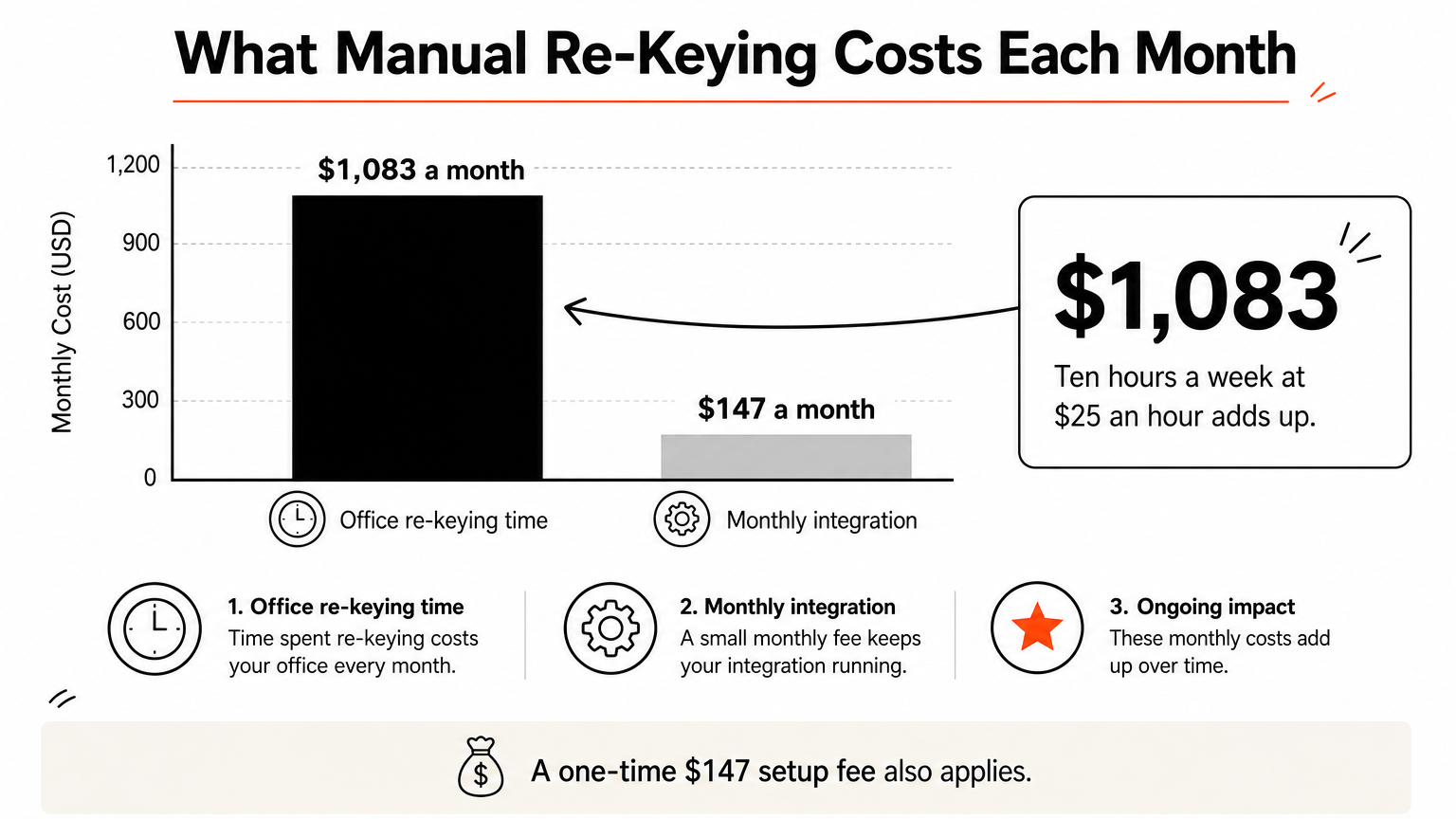
The software you pick rarely covers everything. Here is a worked example. Say your office manager spends 10 hours a week re-keying jobs into invoices and sending follow-ups. At $25 an hour, that is $250 a week, or about $1,083 a month. A $147 monthly integration plus the one-time $147 setup fee costs far less than that wasted time.
We handle this for clients through our CRM Setup and Optimization service for Housecall Pro, ServiceTitan, and Jobber, covering workflows, job types, pricing tiers, and team permissions. We also connect QuickBooks so job data, invoices, and payments sync automatically.
If you mean help desk software
Some searches for service management mean support desk software, not field work. If you answer tickets instead of sending crews to job sites, look at tools such as Zendesk or Freshservice. They handle tickets, not dispatching.
Choose for your trade and crew size first, then fix the gaps with integrations.
Match the tool to your crew, then automate it
The right small business service software depends on who you are. Cleaning companies should look at TidyOps. Small residential teams do well with Housecall Pro or Jobber. Solo operators on the road lean toward ServiceM8. Growing teams look at Workiz, and large, high-volume companies at ServiceTitan.
Whichever you pick, the first month decides whether it sticks. Set up workflows to match how your team already works, and connect your accounting and follow-up tools early.
If you want help choosing or configuring one, book a free consultation with HSP Automation. We learn your workflow first, recommend a setup, and tell you the cost before any work starts.