November 25, 2026
Automation in Business: What It Is, Types, and Examples
Automation in business means using software to carry out repetitive, rule-based work that people used to do by hand, such as sending a quote, copying a customer record, or following up with a lead. Yo...
Written by Frankwin Hooglander
Automation in business means using software to carry out repetitive, rule-based work that people used to do by hand, such as sending a quote, copying a customer record, or following up with a lead. You define the rule once, a trigger starts it, and the software repeats the same steps every time without reminders. Business automation systems range from a simple link between two apps to AI that reads documents and makes judgment calls.
This guide covers why automation matters, how it works, the four main types, concrete examples by department, how to start, and which tools fit which problem. You will also see a worked example of what a first automation costs and what it can return.
HSP Automation builds these workflows for home service and trades companies, so many examples lean that way. The principles hold for any small or mid-sized business that loses hours to admin work.
Why automation in business matters
Automation matters because manual admin work is slow, error-prone, and impossible to scale without hiring. Software repeats a task the same way every time, which frees the owner and the office team for work that needs a person.
The cost of doing it by hand
Picture a typical service company. A lead arrives through a web form. Someone copies it into the CRM, texts the customer, books a visit, re-enters the job in accounting, sends an invoice, and a week later remembers to ask for a review. Every handoff is a chance for a typo or a forgotten step.

Those manual handoffs are where time leaks out. HSP Automation puts the typical saving at 10 to 20 hours of administrative work per week, depending on job volume and how the workflows are configured.
Automation does not make your team work faster. It removes the work that never needed a person.
What you gain
Five benefits show up again and again:
- Speed. New leads get a reply in seconds, and quotes and invoices go out the same day.
- Accuracy. Data is entered once and passed along by software, so there is less retyping.
- Consistency. Every customer gets the same follow-up, no matter who is busy.
- Capacity. You take on more jobs without adding admin headcount.
- Visibility. Every step is logged, so you can see where work stalls.
Does automation replace jobs?
Automation replaces tasks, not whole roles. In a small business, the realistic result is that data entry, chasing approvals, and manual reminders disappear. Your people spend that time on estimates, customer calls, and field work.
Roles built entirely on repetitive keying do shrink. Even so, most small teams end up using the freed hours to grow rather than to cut. The business that automates keeps its people and handles more work.
How business automation works and the main types
Business automation works on a simple chain: a trigger starts the process, conditions check the rules, and actions do the work. The four main types are workflow automation, business process automation, robotic process automation, and intelligent automation.
Trigger, condition, action
Every automated workflow follows the same logic, whether it runs in a $20 connector or an enterprise platform. Here is a service-business example:
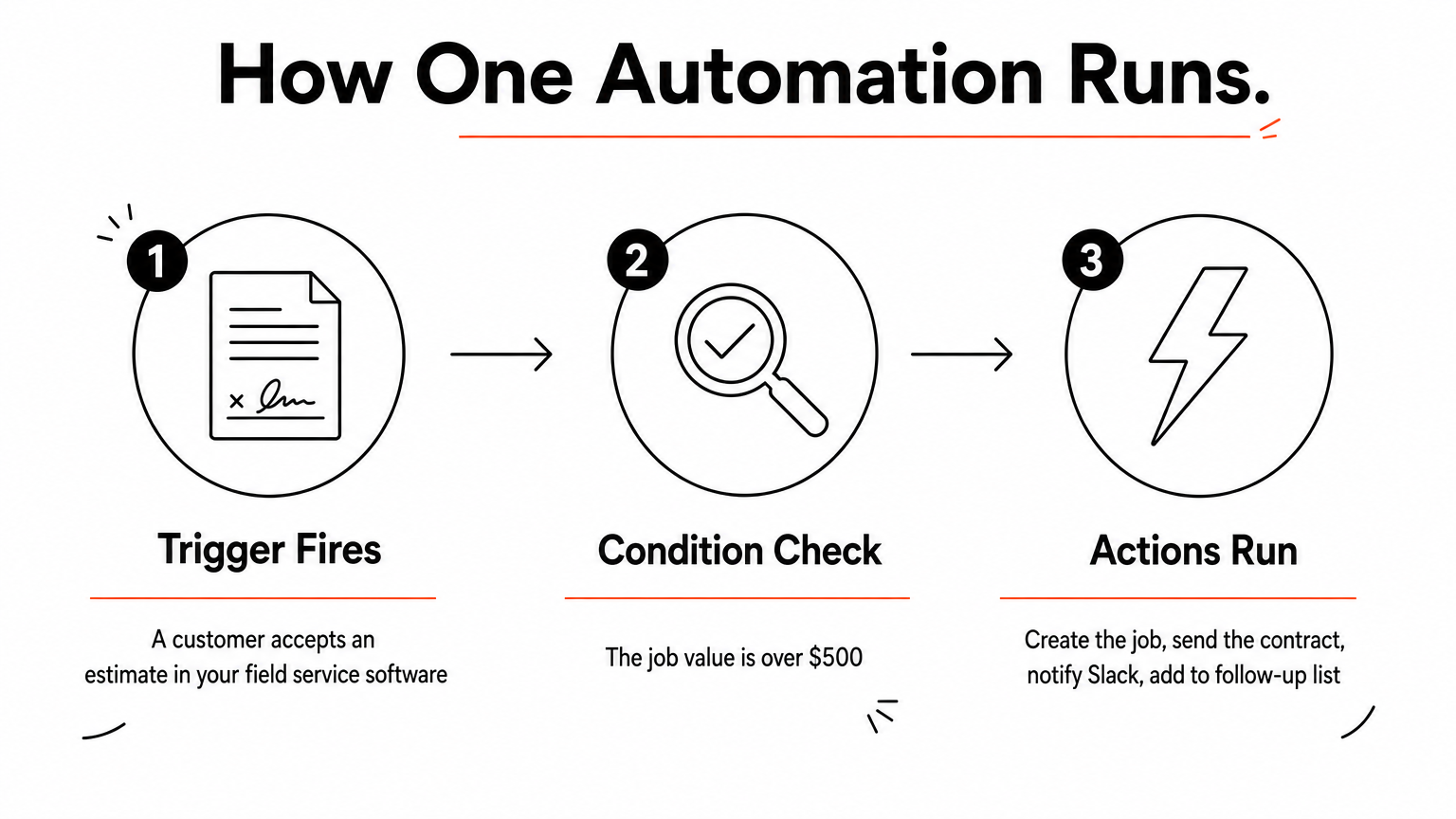
- Trigger: a customer accepts an estimate in your field service software.
- Condition: the job value is over $500.
- Actions: create the job, send the contract for signature, notify the scheduler in Slack, and add the customer to your follow-up list.
Rules like these are what make automation reliable. Unclear rules are the usual reason an automation fails, so write the steps down before you build anything.
The four types compared
The categories overlap, but each solves a different kind of problem.
| Type | What it does | Example | Best when |
|---|---|---|---|
| Workflow automation | Connects apps so work moves between steps on its own | New lead creates a CRM record and sends a text | You use several tools that do not share data |
| Business process automation | Runs a multi-step process across teams, with approvals | Estimate to contract to job to invoice | The process crosses departments |
| Robotic process automation (RPA) | Software bots click and type in apps like a person | Moving invoice data into an old desktop system | The system has no modern integration |
| Intelligent automation | Adds AI to read documents and make decisions | Sorting support tickets by intent | Inputs are messy or unstructured |
In manufacturing, you may also see "four types of automation" meaning fixed, programmable, flexible, and integrated automation. That list describes machinery. For office and software work, the table above is the useful split. Newer AI agents extend the last row by pursuing a goal instead of following a fixed script, but most small businesses get their first gains from the first two rows.
Start with the simplest type that solves your problem, and move up only when it stops being enough.
Examples of automation in business by department
The best candidates are tasks that repeat daily, follow clear rules, and move data between tools. Lead response, quoting, invoicing, scheduling, follow-up, onboarding, and reporting all qualify.
Sales and lead response
Speed decides who wins a service job. A homeowner with a leaking pipe calls the next company if you do not answer. An automated lead response sends a text and email within seconds, logs the lead in your CRM, and alerts your team, at any hour.

The same logic covers quoting. When an estimate is approved, the system can send the contract, create the job, and schedule the follow-up, with nobody retyping anything. Automated quote-to-job handoffs remove the gap where deals usually go cold.
Operations, finance, and HR
Back-office work is where most hours hide. The table shows how common tasks change once they are automated.
| Area | Done by hand | Automated |
|---|---|---|
| Scheduling | Office calls techs and customers to confirm | Booking triggers confirmations and reminders |
| Invoicing | Someone builds each invoice after the job | Job completion creates and sends the invoice |
| Accounting | Job data re-entered in QuickBooks | Jobs, invoices, and payments sync automatically |
| Customer follow-up | Owner remembers to ask for reviews | Review request goes out after payment |
| HR onboarding | Paperwork, accounts, and checklists by email | One trigger creates accounts and assigns tasks |
| Reporting | Weekly spreadsheet assembled by hand | Dashboard updates itself from live data |
Notice that none of these tasks needs judgment. They need a rule and a reliable executor. Anything you can explain in a checklist can usually be automated.
If you can write the task as an if-this-then-that checklist, software can do it.
How to start automating your business step by step
Start by listing your repetitive tasks, pick the one that costs the most time, automate it, and measure the result. Expand only after the first workflow runs cleanly.
Five steps for your first automation
- List the repeats. For one week, note every task you or your staff do more than three times. Include how long each takes.
- Rank by pain. Choose the task with the most hours, the most errors, or the biggest customer impact, such as slow lead response.
- Write the rules. Spell out the trigger, the conditions, and the actions on a single page. A tool for standard operating procedures, such as SOP Manager, keeps those written processes version-controlled as they change.
- Build and test small. Run the workflow on a handful of real cases before you switch it on for everyone.
- Measure and expand. Compare hours, errors, and response times before and after, then pick the next task.
A worked example of the payback
Say your office manager spends 10 hours a week on retyping and manual follow-ups, and that time is worth $25 an hour. That is $250 a week, or $13,000 a year.
A done-for-you package of one to five Zapier workflows for a Housecall Pro account costs $97 a month plus a $97 setup fee, which is $1,261 in year one. You also need your own Zapier subscription, so add that cost. Even if the automation saves only half the time, you recover about $6,500 in labor value against roughly $1,261 in fees. These numbers are illustrative, so use your own wage and hours.
Mistakes to avoid
Do not automate a broken process. If your quoting steps are inconsistent, automation makes the inconsistency run faster. Fix the process first, then build.
Do not automate everything at once, either. Each workflow needs an owner who checks its errors, because apps change and connections break. A workflow with no monitoring will fail quietly, and you will find out from an unhappy customer.
Fix the process, automate one workflow, prove it, then repeat.
Business automation tools and solutions to consider
Choose tools by the problem. Connector platforms link apps, your core software may already automate part of the job, RPA handles legacy systems, and AI tools handle documents and decisions.
Common business automation tools
| Category | Examples | Fits when |
|---|---|---|
| App connectors | Zapier, Make, n8n, Microsoft Power Automate | You need two or more tools to share data |
| Field service platforms | Housecall Pro, ServiceTitan, Jobber | Your core software has built-in automations to switch on first |
| RPA | UiPath, Automation Anywhere, SS&C Blue Prism | Work happens in older apps without integrations |
| Document and AI tools | Amazon Textract, Microsoft Copilot Studio | You process unstructured inputs such as scans and emails |
Zapier, Make, and Power Automate are the usual first stop for small companies. They use the trigger, condition, action model described earlier, and most workflows need no code.
Choosing a solution for a service business
Check four things before you commit: whether the tool connects to your CRM and accounting software, who builds and maintains the workflows, what the total monthly cost is, and how fast you can go live. Maintenance is the hidden cost, so ask who fixes a broken workflow.
If you run on Housecall Pro, ServiceTitan, Jobber, or FieldEdge, HSP Automation's Workflow Automation service builds and maintains the connections for you, with simple automations typically live in 1 to 2 days and complex ones in 1 to 2 weeks. Its lead response systems run from $97 to $297 a month, depending on volume and complexity. For Housecall Pro users who build their own Zaps, a custom Zapier integration adds 13 triggers and 49 actions that the standard app lacks, at $147 a month plus a $147 setup fee, with a 14-day free trial.
The best automation tool is the one that connects to your existing software and has someone accountable for keeping it running.
Where to go from here
Automation in business is software doing the repetitive, rule-based work so your people can do the rest. It works through triggers, conditions, and actions. It comes in four main types, and the easiest wins are lead response, quoting, invoicing, scheduling, and follow-up.
Pick one task that costs you the most hours, write its rules, and automate it before you touch anything else. If you would rather have someone else handle the setup, book a free strategy call with HSP Automation and walk through your current workflows with a specialist.