October 31, 2026
Business Automation AI: What It Is and How to Use It
Business automation AI is the use of artificial intelligence, such as machine learning and language models, to run business tasks that used to need a person to read, judge or write. Plain automation f...
Written by Frankwin Hooglander
Business automation AI is the use of artificial intelligence, such as machine learning and language models, to run business tasks that used to need a person to read, judge or write. Plain automation follows fixed rules: when a job closes, send an invoice. AI automation handles the messy parts around those rules, like reading an email, working out what the customer wants and drafting the reply. For a small business, that means fewer hours of admin and fewer leads that go cold.
This article explains why AI business automation matters, how to start with one process, which technologies sit behind it and where businesses use it today. It also covers the risks, the costs and a simple way to measure whether it pays off. Each section ends with something you can act on, so you can begin without reading a second guide.
HSP Automation builds workflow automations for home service companies, connecting tools like Housecall Pro, ServiceTitan, Jobber and Zapier. That hands-on work shapes many of the examples below. The logic applies to any company with repeat tasks, a busy inbox and a CRM.
Why AI business automation matters
AI business automation matters because it reaches work that ordinary automation cannot: tasks that start with unstructured input such as emails, voicemails, photos and PDFs. Most small businesses have already automated the easy steps, like sending a receipt. The hours that remain sit in the gray areas, where someone has to read, judge or write. That is where AI earns its keep.
What AI adds to rule-based automation
Rule-based automation follows instructions you write in advance. AI automation adds a step that can interpret text, images or speech and decide what happens next. The table shows the practical difference.
| Rule-based automation | AI automation | |
|---|---|---|
| Input | Structured fields, such as a form or a CRM status | Free text, voice, images, scanned documents |
| Logic | Fixed if-then rules you write | Patterns learned from data, or a language model |
| Typical task | Send an invoice when a job is marked complete | Read an inbound email and decide if it is a quote request, a complaint or spam |
| Failure mode | Stops when the format changes | Gives an answer that sounds right but is wrong |
| Best use | Predictable, high-volume steps | Judgment-heavy steps with a review point |
In practice the two work together. A workflow tool moves data between your apps, and an AI step sits inside the workflow to read or write something. You are not replacing your software. You are teaching it to handle messages the way a trained office employee would.
Rule-based automation moves data; AI reads, decides and writes, and the best setups use both.
What you gain
Four gains show up in almost every small business that automates well.
- Faster responses. A reply goes out in seconds, not whenever someone next checks the inbox.
- Fewer admin hours. HSP Automation's workflow automation work typically frees 10 to 20 hours of administrative work per week, depending on volume and setup.
- Consistency. Every lead gets the same follow-up, including at 9 p.m. on a Sunday.
- Growth without hiring. The same office can handle more jobs before it needs another person.
These gains compound. A faster reply books more jobs, and more jobs create more admin, which automation absorbs. That is why AI automation for small business works best when you point it at the bottleneck that limits growth, not at a random task.
When it does not pay off
Skip AI for any task that happens a few times a month. Doing it by hand is cheaper than building and checking an automation. The same goes for a process nobody has written down. Automating a messy process gives you a faster mess, so fix the steps first.
Be careful with high-stakes outputs too, such as legal wording, safety advice or final prices, when no one will review them. In those cases use AI to prepare a draft and keep a person as the one who approves it.
How to start with AI for business automation
The safest way to start is to pick one repetitive process, build a small pilot with a human checkpoint and measure it for a month before adding anything else. You do not need a technology strategy. You need one process, one tool and one number to track.
Choose the first process
A good first process meets most of these tests:
- It happens at least weekly.
- The steps are the same each time.
- The input arrives digitally, as a form, email, text or file.
- A mistake is cheap to fix.
- Someone on your team dislikes doing it.
Common winners are replying to new leads, sending appointment reminders, following up on unaccepted quotes and entering invoice data. Write the process on paper first: each step, who does it and what triggers it. If you cannot describe it in ten lines, it is not ready to automate.
Build the pilot
Build in this order, because the AI step is the part most likely to need adjusting.
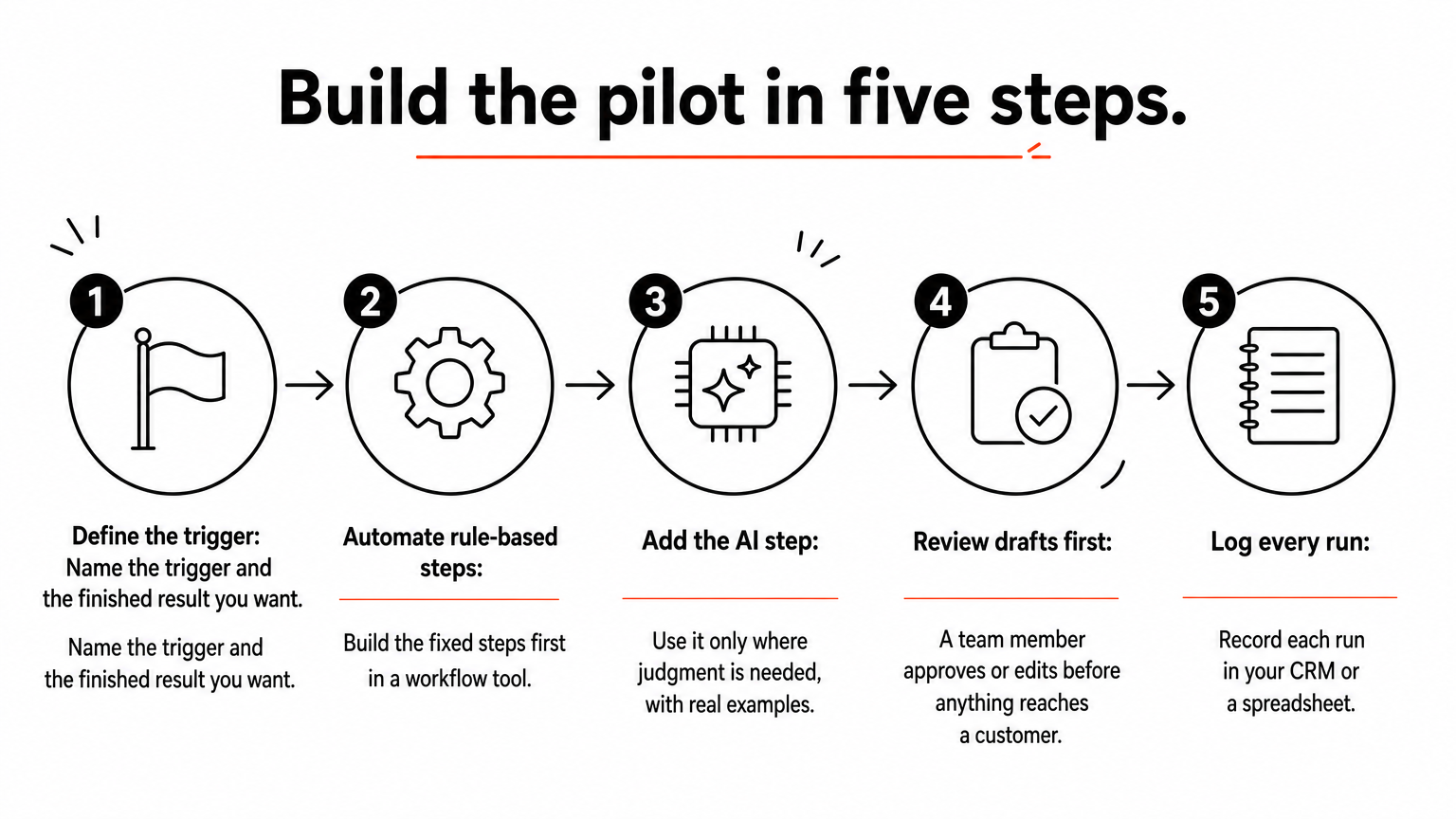
- Define the trigger and the finished result. For example: a web form arrives, and the customer gets a reply and a CRM record.
- Automate the rule-based steps first in a workflow tool such as Zapier or Make.
- Add the AI step only where judgment is needed, with a narrow instruction and three or four real examples of good output.
- Send AI drafts to a person first. A team member approves or edits before anything reaches a customer.
- Log every run in your CRM or a spreadsheet so you can see what happened.
Timing depends on complexity. Simple automations often take a day or two to set up, and complex multi-system workflows take one to two weeks. If you do not want to build it yourself, a done-for-you provider handles the technical setup and trains your team.
Review, train and expand
Run the pilot for two to four weeks. Each week, read a sample of 20 outputs and note every error. Write a short procedure so that your team knows what the automation does and when to step in. Once a category of output is correct nearly every time, remove the human checkpoint for that category only. Then pick the next process.
Start with one process, keep a person in the loop, and loosen oversight only where the results earn it.
The technologies behind AI automation
AI automation is a stack of a few technologies, and most small businesses only need the first two or three. Knowing what each does helps you judge a vendor's claims and avoid paying for capabilities you will not use.
The main building blocks
| Technology | What it does | Example |
|---|---|---|
| Workflow automation | Connects apps through triggers and actions | A completed job in your CRM creates an invoice and a review request |
| Robotic process automation (RPA) | Software bots copy human clicks and data entry | A bot moves data into a system that has no integration |
| Language models and NLP | Understand and write human language | Classify an email, draft a reply, summarize a call |
| Document processing | Reads scans, invoices and receipts | Pull vendor, date and total from a photographed receipt |
| Machine learning prediction | Finds patterns in past data | Flag likely fraud or forecast demand |
| AI agents | Plan and complete multi-step tasks using tools | Research a lead, update the CRM and book a call |
Workflow automation is the foundation. The other layers make it smarter, but none of them helps if your apps are not connected.
How the pieces combine in one workflow
Here is what AI for business automation looks like when it runs end to end for a service company:
- A customer submits a request form on your website.
- The workflow tool catches it instantly.
- A language model reads the message and tags the service type and urgency.
- The workflow creates the customer and lead in your CRM.
- A text and email reply goes out within seconds.
- If the request is urgent, a Slack or Teams message alerts the office.
Only step 3 uses AI. Every other step is plain automation. That ratio is typical, and it is a good sign. A reliable workflow keeps AI to the smallest job it can do well.
Where AI agents fit
AI agents go further than a fixed workflow. You give them a goal and a set of tools, and they decide the steps. That freedom is useful for research-style tasks, but it also makes mistakes harder to predict. For most small businesses, the right order is a fixed workflow with one AI step first. Consider agents later, once your data is clean and you can state exactly what the agent may and may not do.
Practical use cases for small and growing businesses
The best-proven uses of AI business automation are lead response, customer questions, scheduling, quoting, paperwork and follow-up marketing. The table sets out what the AI does and what plain rules do in each area.
| Area | Task | What AI does | What rules do |
|---|---|---|---|
| Lead response | New web form, text or email | Reads the message, tags service and urgency | Replies at once, logs the lead, alerts the team |
| Customer service | Common questions | Answers from your FAQ, flags what it cannot answer | Routes the ticket to the right person |
| Scheduling | Booking requests | Understands requests like "Thursday afternoon" | Checks the calendar, books the slot, sends reminders |
| Quoting | Estimates | Drafts a scope from notes or photos | Pulls prices, sends the quote, follows up |
| Finance | Invoices and receipts | Extracts vendor, date and total from scans | Matches to the job, syncs to accounting |
| Marketing | Reviews and email | Personalizes follow-up messages | Triggers them at the right time after a job |
| HR | Applications | Summarizes resumes against the job requirements | Schedules interviews |
Customer-facing work
Lead response is the strongest first use case. Customers who need a plumber or an electrician often contact several companies and tend to hire the first one that answers. An automated system that replies by text and email within seconds, around the clock, closes that gap. HSP Automation's lead response systems do this and log each lead in your existing CRM or field service software.
Customer service follows the same pattern. An AI assistant can answer routine questions such as hours, service areas and how to reschedule, then hand anything unusual to a person with the conversation attached.
Back-office work
Back-office tasks produce the most hours saved, because they are repetitive and nobody sees them. Typical examples are entering invoice data, matching payments to jobs and syncing job records to QuickBooks. If you use Housecall Pro, the standard Zapier app covers only part of what the platform can do. HSP Automation's custom integration adds 13 triggers and 49 actions that the standard app lacks. These support auto-sent quotes and invoices, tag automation, technician routing and notifications.

Sales and marketing work
After a job closes, automation can request a review, send a maintenance reminder and re-engage customers who have not booked in a year. AI improves these messages by personalizing them with the service performed, the season or the customer's last question. Seasonal businesses benefit most, because the same workflow can run at scale during a short peak without extra staff.
Pick the use case where a slow or missed response costs you money today, and automate that first.
Risks and mistakes to avoid
The main risks of AI automation are wrong outputs, privacy exposure and poor handling of people. All three are manageable if you plan for them before launch rather than after the first complaint.
Wrong answers delivered with confidence
Language models can write a fluent reply that is factually wrong, such as inventing a price or promising a service you do not offer. Limit this in three ways. Give the AI only the information it needs, such as your real FAQ and service list. Keep prices, guarantees and legal promises in fixed templates controlled by rules. And review a weekly sample of outputs. When something fails, fix the instruction or the data, then retest.
Privacy, security and consent
Do not paste customer payment details or sensitive records into a public AI tool. Check each vendor's terms on whether your data is stored or used to train models, and give each integration the minimum access it needs. Also check the rules on automated outreach. In the United States, automated marketing texts and calls fall under rules such as the Telephone Consumer Protection Act, so collect consent and ask a qualified lawyer about your situation.

Team resistance and over-automation
Staff often assume automation is a step toward replacing them. Say plainly what is changing: the tedious work goes away, and the judgment work stays with them. Involve the people who do the task today in testing. They know the exceptions.
Customers have limits as well. Do not hide behind a bot when someone is upset or the job is complicated. Always give a visible way to reach a human, and route complaints and sensitive requests to a person automatically.
Automate the routine, protect the exceptions, and never leave a customer stuck with a bot.
What it costs and how to measure the return
Expect to pay for three things: software subscriptions, setup and a few hours of your own time for testing. The software side is usually a monthly fee, which makes the cost easy to compare with the hours you save.
What the pieces cost
These are HSP Automation's own prices, shown as a reference point for what done-for-you automation costs a small business.
| Item | Cost | Notes |
|---|---|---|
| Automation packages | Mostly $97 to $500 per month, plus a one-time setup fee | Depends on scope; you are told the price before work starts |
| Lead response system | $97 to $297 per month | Depends on volume and complexity; includes setup, monitoring and adjustments |
| Housecall Pro custom Zapier integration | $147 per month, plus a one-time $147 setup fee | 14-day free trial; needs an active Zapier account |
Your workflow tool and any AI service are billed separately by those vendors, so check their current pricing before you commit.
A worked example
Take a plumbing company whose office manager spends 10 hours a week on data entry, lead replies and reminders. At a loaded cost of $30 an hour, that is $300 a week, or about $1,300 a month (300 × 52 ÷ 12). Assume the automation costs $300 a month in total, plus a $500 one-time setup. The net gain is $1,000 a month, and the setup pays for itself in about two weeks. At the top of the 10 to 20 hour range, 20 hours saved is worth $2,600 a month.
Revenue can matter more than savings. Assume 40 leads a month and a 25% booking rate, which is 10 jobs. If faster replies lift that to 30%, you book 12 jobs. At $400 a job, the two extra jobs add $800 a month. Those rates are assumptions, so measure your own.
How to measure it
Record a baseline before the pilot, then compare monthly:
- Hours per week spent on the automated task
- First response time to new leads
- Lead-to-booked rate
- Errors or rework found in the weekly sample
- Customer complaints that mention the automation
If hours fall and complaints do not rise, expand. If errors climb, tighten the instruction before you add volume.
Measure hours saved and booked jobs against a baseline, and let those two numbers decide your next automation.
Start with one process
Business automation AI is plain automation plus an AI step that reads, decides or writes where rules fall short. It pays off most in lead response, scheduling, quoting, paperwork and follow-up. The safe path is simple: choose one repetitive process, build a pilot with a human checkpoint, keep prices and promises in fixed templates and measure hours and booked jobs against a baseline.
You do not need to build it alone. If you run a home service company and want a second opinion on where to begin, book a free strategy call with HSP Automation. We will look at your current workflow, point out the automation opportunities and tell you what it will cost before any work starts.