November 5, 2026
Marketing Automation for Small Business: 8 Tools Compared
The best marketing automation for small business is the tool that handles the work you repeat every week: answering new leads, sending follow-up emails, and nudging past customers. If you run a home s...
Written by Frankwin Hooglander
The best marketing automation for small business is the tool that handles the work you repeat every week: answering new leads, sending follow-up emails, and nudging past customers. If you run a home service or trades company, a done-for-you partner like HSP Automation fits best. HubSpot suits owners who want one CRM for everything. ActiveCampaign gives you the deepest email logic for the money. Brevo is the cheapest multichannel start, and Mailchimp is the easiest first tool. Klaviyo and Omnisend serve online stores, and Zapier connects the tools you already own.
Most owners do not fail because they picked a bad product. They pick one that is too big, too thin, or needs a weekend of setup that never happens. The same label covers a free plan and a plan at $890 a month, and key features often sit behind the higher tiers.
This guide compares eight tools on what each automates, who it suits, and what it costs. After the list, you will see how to choose, what a realistic monthly bill looks like, and which tasks to automate first. We build automations for home service companies at HSP Automation, so we list our own service first where it fits and say plainly where it does not.
1. HSP Automation: done-for-you for trades businesses
HSP Automation is a service, not a self-serve app. We build and maintain the automations that sit on top of your field service software and your email, so you never have to learn the tools yourself. It is the only pick here designed around trades businesses.

What it does
We connect Housecall Pro, ServiceTitan, Jobber, or FieldEdge to the rest of your tools through Zapier and custom API work. The marketing side covers the moments where trades companies lose jobs: slow replies, no follow-up, and silent past customers.
- Lead response: instant text and email replies within seconds, around the clock. The lead is logged in your CRM or field service software and your team is notified.
- Email marketing and reminders: automated campaigns that nurture leads, plus job reminders sent 24 hours before a scheduled visit.
- Social media management: content creation and scheduling for Facebook, Instagram, LinkedIn, and Nextdoor, plus paid Facebook and Instagram ads aimed at homeowners in your service area.
Who it suits
HSP Automation fits owners of HVAC, plumbing, electrical, roofing, landscaping, pest control, cleaning, and similar companies. These owners are busy in the field, are not technical, and already run a field service platform. You hand us the workflow and we handle setup, training, and monitoring. Most setups take 1 to 2 weeks, and complex multi-system builds can take 3 to 4.
It is the wrong pick if you run an online store or a software company, or if you want a drag-and-drop newsletter designer to use yourself. Pick Mailchimp or Klaviyo for those jobs.
If you run a trades business and dislike software setup, pay a specialist to build and maintain the automation.
Pricing and limits
Lead response systems cost $97 to $297 a month, depending on volume and complexity. The price includes setup, ongoing monitoring, and adjustments. Our done-for-you Zapier service for Housecall Pro is priced by the number of Zaps or paths, and you need your own Zapier account:
| Zaps or paths | Monthly price | One-time setup fee |
|---|---|---|
| 1 to 5 | $97 | $97 |
| 6 to 10 | $147 | $147 |
| 11 to 20 | $297 | $297 |
| 21 to 50 | $497 | $497 |
| 51 or more | $997 | $997 |
Annual billing saves 17%, and you can cancel anytime. Housecall Pro users who want to build their own Zaps can instead use our custom Zapier integration, which adds 13 triggers and 49 actions missing from the standard app. It costs $147 a month plus a $147 setup fee, with a 14-day free trial. There is no free plan, but the first 30-minute strategy call is free.
2. HubSpot: all-in-one CRM and marketing
HubSpot is the best pick when you want contacts, email, landing pages, and sales follow-up in one system. It is also the most expensive way to get real automation, so know which tier you are buying.
What it does
HubSpot combines a CRM with email, forms, landing pages, ads, social scheduling, and reporting. Its visual workflow builder lets you set triggers and actions, such as adding a new lead to a sales sequence or updating a contact property when someone clicks a link.
- A free CRM with contact management, deal tracking, and basic email
- Workflows that act on behavior and lifecycle stage
- AI tools that draft emails, blog posts, and ad copy
Who it suits
HubSpot suits small businesses with a sales team, a longer buying process, and a plan to grow into the platform. A marketing agency or a B2B services company will use most of it. A two-person shop that only needs a welcome email will pay for a lot it never opens.
Expect some work to get the AI output on brand. Reviewers describe the generated copy as generic, so plan to edit it.
HubSpot is a strong system, but its automation only gets serious when your budget does.
Pricing and limits
The CRM is free, and Marketing Hub Starter runs around $20 a month. The free and Starter tiers allow only limited automation, such as ten email automation actions a month. Marketing Hub Professional, where omnichannel workflows live, starts at $890 a month billed annually. One review put onboarding fees near $3,000 for that tier, so ask before you sign.
Costs also rise as your contact list grows. If your list is small and your automation needs are simple, start free and move up only when a specific feature blocks you.
3. ActiveCampaign: deeper email automation for less
ActiveCampaign is the best value for small business marketing automation that goes beyond a basic welcome email. It pairs a powerful workflow builder with a built-in CRM, at a price well below HubSpot Professional.
What it does
The visual builder supports branching, conditional content, lead scoring, and site tracking, so you can trigger an email when someone visits a pricing page. A large library of pre-built automations covers lead nurture, re-engagement, and deal updates. Its AI can draft a workflow from a plain description.
- Lead scoring that ranks contacts by behavior
- Email, SMS, and site messaging in one place
- A CRM with pipeline management and sales follow-ups
Who it suits
ActiveCampaign fits service businesses, consultants, and B2B companies with a sales cycle that needs several touches. If your customers take weeks to decide, its nurture logic pays off.
The trade-off is a steeper learning curve than Mailchimp. Reviewers also note it can be more than a very basic user needs, and its predictive sending is limited to the two highest tiers.
Choose ActiveCampaign when email sequences, not newsletters, drive your sales.
Pricing and limits
Starter begins at $15 a month, billed annually. One comparison lists Plus at $49 and Pro at $79 a month. There is no free plan, only a 14-day trial. Prices scale with your contact count, so a growing list adds cost every month.
The landing page and form tools are basic compared with dedicated page builders. If most of your leads come from a polished landing page, plan to pair it with a separate builder.
4. Brevo: the lowest-cost multichannel start
Brevo is the best choice for a tight budget. It automates email, SMS, and WhatsApp even on its free plan, which is more channels than some paid tools offer.
What it does
Brevo's workflow builder includes delays, A/B splits, webhooks, and CRM updates. Around it sits a simple CRM and a meeting scheduler, so one account covers outreach, contact records, and booking. An AI assistant can build campaigns and enrich profiles.
- Email, SMS, and WhatsApp automation
- Transactional emails such as order confirmations and password resets
- A basic CRM, live chat, and a meeting scheduler
Who it suits
Brevo suits owners with a large contact list who send moderate volumes. You pay for what you send, not for how many people you store. That makes it friendly to a restaurant, a retailer, or a service company with an old customer list.
Its CRM is simpler than dedicated CRMs, and some key features sit in higher tiers. Expect to outgrow it if your workflows become complex.
Brevo gives you the most channels per dollar, as long as your needs stay simple.
Pricing and limits
The free plan allows 300 emails a day with unlimited contacts and carries Brevo branding. Paid plans start at $9 a month on Starter. Features such as custom objects, Facebook Ads, and pop-ups live in higher tiers that cost hundreds of dollars a month, so check which tier holds the feature you want.
Template designs feel dated next to Mailchimp, and reporting is limited on the lower tiers. For a first automation setup, those are small prices to pay.
5. Mailchimp: the easiest first tool
Mailchimp is the best starting point if you have never run an email campaign. Its drag-and-drop builder and polished templates remove nearly every barrier to sending your first newsletter.
What it does
Mailchimp covers email campaigns, signup forms, landing pages, and basic automation flows. You click touchpoints to add actions such as sending an email or text, scheduling a message, or changing a tag. It connects to stores such as Shopify and WooCommerce.
- A drag-and-drop email builder with templates
- Welcome series and basic behavior triggers
- Forms, landing pages, and audience insights
Who it suits
Mailchimp suits solo founders and very small teams that want a newsletter plus a simple welcome sequence. It is simple to pick up, which is its main selling point.
It leans heavily toward email. The CRM features are minimal, and reviewers say its AI automation is light compared with ActiveCampaign. If your needs grow past simple sequences, you will likely move.
Start with Mailchimp to learn automation, and expect to graduate once your flows need real branching.
Pricing and limits
There is a free plan for a small list, but the contact cap has changed over time and sources disagree, so confirm the current limit on Mailchimp's pricing page. Essentials starts at $13 a month and Standard at around $20. On Essentials, automations are limited to four steps, and multiple starting points and branching arrive with Standard.
Pricing scales with your contact count, and costs rise quickly once you leave the free tier. Compare the bill at your list size against Brevo before you commit.
6. Klaviyo: built for online stores
Klaviyo is the best pick for an online store that wants automation tied to revenue. Its flows react to what shoppers do, and its reports show what each email earns.
What it does
Klaviyo connects deeply to Shopify, WooCommerce, and BigCommerce. It ships more than 60 pre-built flows for abandoned carts, welcome series, post-purchase messages, and win-back campaigns. Nearly everything is drag-and-drop, from workflows to forms.
- Abandoned cart and browse abandonment flows
- Revenue attribution for each email or text
- Predictive metrics such as customer lifetime value and churn risk
Who it suits
Klaviyo suits shops with a steady stream of orders and a list worth segmenting. If your revenue comes from a store, its flows pay for themselves faster than any general tool. You can use it for service or software businesses, but you will pay for store features you do not need.
If you sell products online, Klaviyo is the tool to beat.
Pricing and limits
A free plan exists. Email plans start at $20 a month, and email plus SMS starts around $35. Costs climb steeply as your list grows. SMS is billed through credits and is available only in select countries.
Reviewers also call the template builder functional but less polished than Mailchimp's. Advanced flows take some learning. Budget an afternoon to set up the first abandoned cart flow.
7. Omnisend: ecommerce automation on a budget
Omnisend is the best ecommerce option when price matters more than depth. Its free plan includes features that other tools lock away.
What it does
Omnisend automates email, SMS, and push notifications in coordinated flows. You can start from pre-built workflows covering the customer journey, or drag and drop your own. Segmentation, forms, and customer profiles are available at the free level, along with A/B testing and an AI assistant for building segments.
- Pre-built workflows for abandoned carts and welcome series
- Email, SMS, and push in one flow
- 280+ native integrations
Who it suits
Omnisend suits small shops that want Klaviyo-style flows without the Klaviyo bill. Support is a quiet strength: the free plan includes 24/7 email and live chat help, and Omnisend Academy offers courses on the tool.
Omnisend needs a connected store to work properly, so it does not make sense for a service company or a consultant.
Omnisend gives small stores the most automation for the least money.
Pricing and limits
There is a free plan, and paid plans start at $16 a month on Standard. Your cost will rise with list size, just as with the others. The main limit is focus. It is narrowly built for ecommerce, so a business without a store will find features it cannot use.
If you outgrow it, the pain point is advanced analytics and deeper predictive features, where Klaviyo is stronger.
8. Zapier: the glue between your tools
Zapier is the best pick when you already own the tools and need them to talk to each other. It is not an email, SMS, or social platform. It moves data and triggers actions between the ones you already use.
What it does
Zapier works on triggers and actions. When something happens in one app, such as a new form submission, it kicks off steps in others, such as adding the lead to your CRM, sending a Slack alert, and enrolling the contact in an email sequence. You can also add AI steps to draft copy or classify leads.
- Connections to thousands of apps, from CRMs to spreadsheets
- Multi-step workflows with filters and branches
- AI steps for drafting, summarizing, and sorting data
Who it suits
Zapier suits owners whose tools do not share data: the form builder, the CRM, the email tool, and the spreadsheet. It removes copy-and-paste work between apps. It is also the engine behind much of what we build for trades companies.
It will not send your newsletters or post to social media on its own. You still need a tool for those channels, and you need time to build and monitor the workflows.
Zapier will not send your campaigns, but it keeps every other tool feeding them.
Pricing and limits
Zapier has a free plan, and paid plans start at $19.99 a month. The real cost is setup time and upkeep, since a broken Zap quietly stops leads from flowing. If you would rather not manage that, a done-for-you service handles it.
How to choose the right tool for your business
Pick by how you sell, then check the monthly cost and the CRM connection. Those three questions eliminate most of the eight tools quickly.
Match the tool to how you sell
The table sets the eight side by side. Prices change often, so confirm them on each vendor's page before you buy.
| Tool | Best for | Free plan | Starting price |
|---|---|---|---|
| HSP Automation | Home service and trades companies | No (free consultation) | From $97/month plus setup |
| HubSpot | All-in-one CRM and marketing | Free CRM | Professional from $890/month |
| ActiveCampaign | Deeper email automation | No (14-day trial) | From $15/month, billed annually |
| Brevo | Tight budgets, multichannel | Yes | From $9/month |
| Mailchimp | First-time email senders | Yes | From $13/month |
| Klaviyo | Online stores | Yes | From $20/month |
| Omnisend | Budget ecommerce | Yes | From $16/month |
| Zapier | Connecting your existing tools | Yes | From $19.99/month |
A trades company should look at HSP Automation first, a store at Klaviyo or Omnisend, and a B2B firm at ActiveCampaign or HubSpot. A solo owner who wants one newsletter and a welcome email can start with Mailchimp or Brevo.
Work out the real monthly cost
Sticker prices hide the extra tools and your own time. Take a five-person plumbing company that wants instant lead replies and a follow-up sequence.
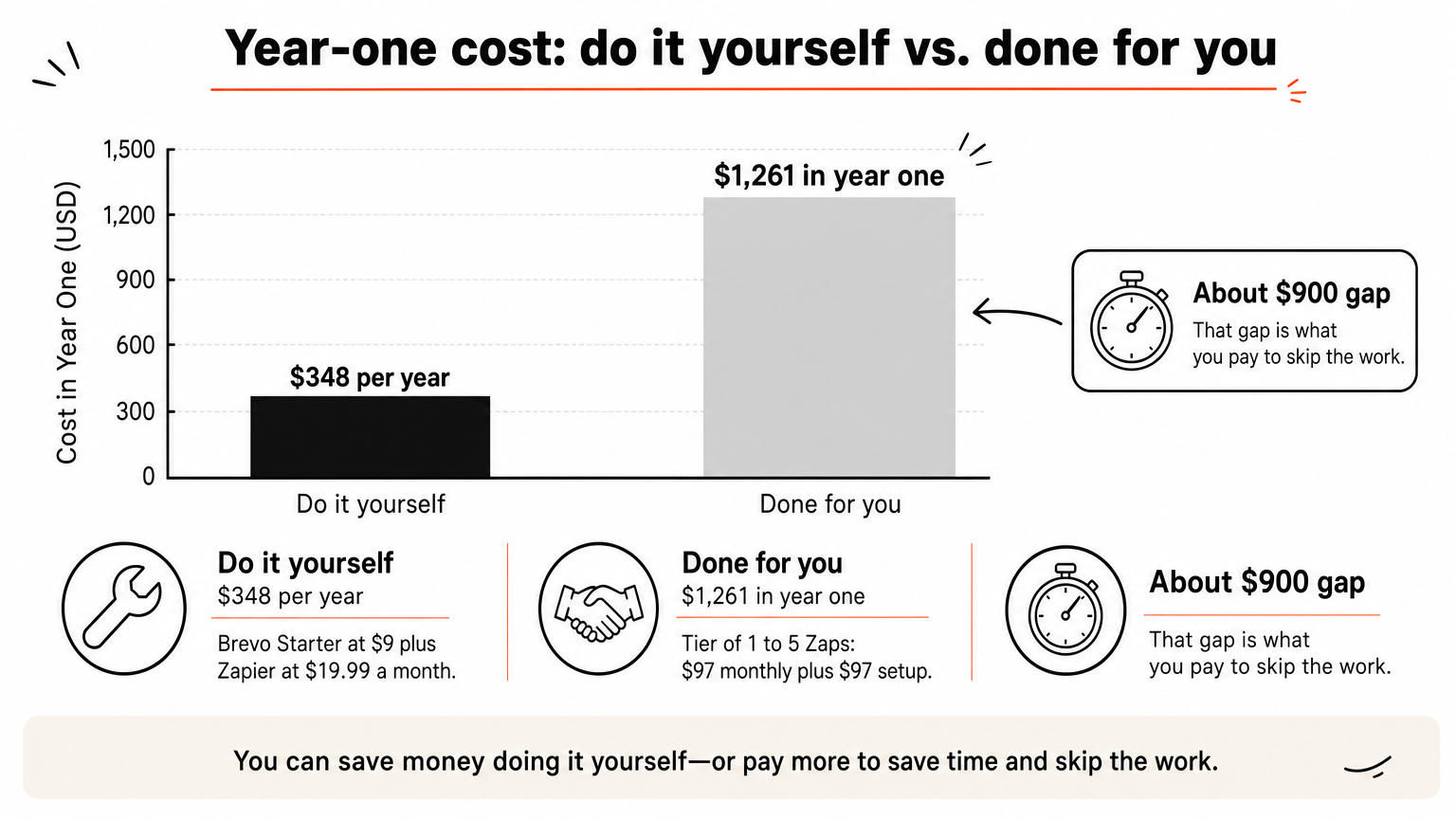
- Do it yourself: Brevo Starter at $9 plus Zapier at $19.99 comes to $28.99 a month, about $348 a year. You also build and fix everything.
- Done for you: the 1 to 5 Zap tier at $97 a month plus a $97 setup fee comes to $1,261 in year one, plus your own Zapier account. We build, test, and maintain it.
The gap of about $900 is what you pay to skip the work. If setup would cost you 20 hours and your time is worth $50 an hour, that is $1,000 of your week. Neither answer is universally right, and the better one depends on whether you have the hours.
Check how it connects to your CRM
A marketing tool that cannot see your customer records creates a new silo. Before you buy, confirm it connects to your CRM or field service software, natively or through Zapier. For trades companies, that means Housecall Pro, ServiceTitan, Jobber, or FieldEdge. Ask a vendor to show a lead moving from form to CRM to first reply without manual steps.
Pick the tool that connects to your CRM before the one with the nicest email builder.
What to automate first
Start with the task where a slow response costs you money, then add the rest one at a time. Small business marketing automation works best as a few reliable flows, not twenty fragile ones.
Reply to new leads in seconds
Lead response comes first because a quick answer is the cheapest way to win a job. Set up an instant text and email that confirms you received the request, states when you will call, and logs the lead in your CRM. A tool like Brevo or Zapier can do this, and we build it for trades companies as a managed system.
Send a short nurture sequence
A three to five email sequence beats a long drip nobody finishes. Send a welcome, a useful tip, proof that you do good work, and a clear next step. Use branching only after you see who opens and clicks, so the logic matches real behavior.
Follow up after the job
Reminders, review requests, and seasonal check-ins bring repeat work. Send a reminder 24 hours before a visit, a thank-you and review request after, and a seasonal nudge later. Automate social posting last. A posting schedule helps visibility, but it will not rescue a slow lead response.
Pick one tool and start small
The right marketing automation for a small business is the one you will actually keep running. Match it to how you sell: a managed service for trades, HubSpot or ActiveCampaign for longer sales cycles, Brevo or Mailchimp for budget and simplicity, Klaviyo or Omnisend for stores, and Zapier for connecting what you own. Then automate lead response before anything else.
If you run a home service company and want someone else to build and maintain the setup, book a free 30-minute strategy call with HSP Automation. We will look at your current workflow and tell you what it costs before any work starts.